Effective queries on Rails with PostgreSQL
Extracting data from databases is a major task of most Web applications. News websites, social networks, discussion forums, and your banking app have one thing in common: the need to retrieve information from a database. To make the process fast and efficient, we need to know how to structure not only the data but also information about where each record or a set of records is located. In this article, we will dive into indexes, which hold all the necessary metadata to effectively query records from a database. This topic covers Rails’ basic approaches for effective queries using PostgreSQL as a database. In Rails with Postgres, these optimizations are typically applied through migrations and carefully designed Active Record models.
Indexes in real life
Imagine that it’s the 1980s, and you need to locate a name in a phone book. The name that you are looking for is Sarah Connor? Now, imagine that this phone book has millions of names and locations, and all these records are mixed and have no particular order. How much time would you spend locating all the Connors and then finding the right Connor. Fortunately, in real life, you don't have to deal with unorganized phone books.
Before the IT revolution, phone books were quite common. In phone books, all entries are listed in alphabetical order, so you can easily jump to a specific page and find your contact. In the "Terminator" movie, T-800, while trying to find Sarah Connor, navigates to the desired page and quickly finds all contacts named Sarah Connor to terminate them. This is a real-life index example. If it was all mixed up, even the Terminator itself would not be able to locate Sarah Connor. However, that would be a boring alternative.

There are many types of indexes (e.g., btree, hash, and gin), each designed to be used in specific situations. Computers are fast, so even with thousands of non-indexed records, you would not encounter performance issues. However, databases grow over time and can accumulate hundreds of thousands or even millions and billions of entries, so indexes are required in such situations. In this article, we will focus on common indexes, learn how to analyze their effectiveness, and choose suitable indexes for a specific situation in Rails.
Some Rails with Postgres here
Let’s build a simple example to demonstrate indexing techniques in a Rails Postgres application. We need to create a model User and run all the necessary migrations. This model represents one of the Active Record models that will interact with our Postgres database.
Run the following code to create a model and its corresponding migration file. Don't forget to perform the migration!
rails new phonebook_app --database=postgresql

rails db:create

rails g model User last_name:string first_name:string

rails db:migrate
class CreateUsers < ActiveRecord::Migration[6.1]
  def change
    create_table :users do |t|
      t.string :last_name
      t.string :first_name

      t.timestamps
    end
  end
end
We need some data to work with and conduct performance testing. Queries like this are commonly executed through Active Record models, making database indexing better for Rails performance. Download this seeds.rb file to populate our database. Put it in db/seeds.rb and run the rails db:seed command. It will create approximately 100,000 users with random names. If you want more records, just tune the file and increase the number of iterations.
It's time to conduct performance testing. Let's find all the Sarah Connors in our phone book.
User.where(last_name: "Connor", first_name: "Sarah")
# User Load (18.2ms)  SELECT "users".* FROM "users" WHERE ...
This is called a "sequential scan"; each record in the Postgres database is checked to find and retrieve all entries with last_name Connor and first_name Sarah. My computer produces the results in about 16-25 ms. It's not very slow, but the amount of time required will increase linearly as the number of records increases. Moreover, the typical Web app makes several requests to a Postgres database during page rendering. All these milliseconds will add up and turn into seconds. However, indexes will help keep the amount of time required to a minimum.
Btree index
B-tree is the most used index type in relational databases. We will cover the practical aspect of this type of index. When you create an index in a Rails app without specifying its type, btree will be assigned by default. First, create a migration and add two indexes for each column.
rails g migration add_indexes_to_users_last_and_first_name
class AddindexesToUsers < ActiveRecord::Migration[6.1]
  def change
    add_index :users, :last_name
    add_index :users, :first_name
  end
end
It's time for new types of tests!
User.where(last_name: "Connor", first_name: "Sarah")
# User Load (0.6ms)  SELECT "users".* FROM "users" WHERE ...
With 100,000 entries, queries are 30 times faster! My computer takes 0.5-0.8 ms to perform such a query because a B-tree index requires O(log n) time, while a sequential table scan takes O(n) time. If you are unfamiliar with Big O notation, take a look at the Rubyist Guide to Big O Notation. After increasing the number of records in the Postgres database to 1,000,000, PostgreSQL takes 80 ms without indexes and 0.8 ms with indexes, which is 100 times faster! As you can see, B-tree index scans are much faster than a sequential scan, and the difference grows with the number of entries.
Your first impression may be that it's better to add indexes to every field in a database. However, first of all, only one of the defined indexes is working here (see the compound index section). Furthermore, indexes can slow down queries if there are not many records in the database, and each index takes up space in a computer's memory. Often, the size of the indexes may be larger than the amount of data stored in a Postgres database. You can install the "rails-pg-extras" gem to get more information. I recommend that you carefully study the documentation of this gem, as it contains many useful functions that will make your work with the Postgres database as efficient as possible.
# Gemfile
gem "rails-pg-extras"
Now, go to the console with rails c and use these commands to get information about the index and table sizes:
RailsPgExtras.table_size
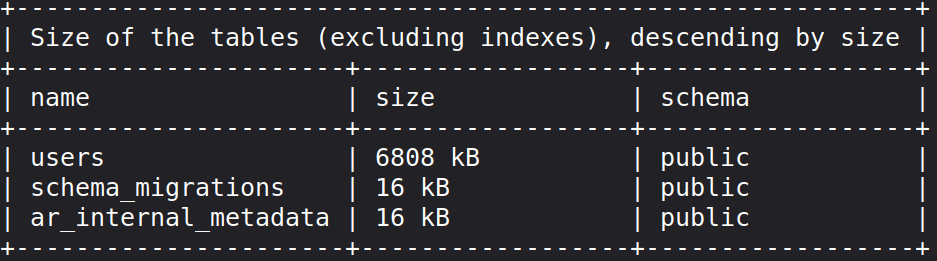
RailsPgExtras.index_size
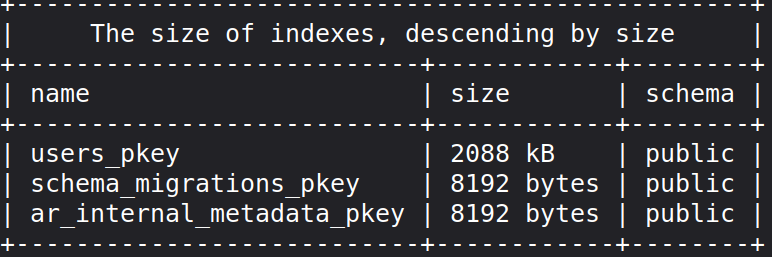
In our case, the size of the indexes is not too big, but is B-tree indexing a good choice for our columns? Yes, if we are searching records for the full match. Many names are difficult to spell, and people expect to find them by partial match. Connor or Conor? Nah, please, give me all records with last name starting with "Con".
User.where("last_name ILIKE ?", "Con%")
# User Load (110.2ms)  SELECT "users".* FROM "users" WHERE (last_name ILIKE 'Con%')
Although you can see lots of such code in applications, and columns are indexed using B-tree, many developers don't know when their indexes aren't working. Btree is unsuitable for partial matching, so our database will perform a full table scan. We need something different, a special index for such cases.
pg_trgm, GiST and GIN indexes
We should add the pg_trgm module to our PostgreSQL. This module helps in finding similarities in alphanumeric text based on trigram matching, as well as index operator classes that support fast searching for similar strings. What is a trigram, you might ask? A group of three consecutive characters taken from a string is defined as a trigram. By counting the number of shared trigrams, we can measure two strings' similarity. This simple idea appears to be very effective for measuring the similarity between words in many natural languages.
Let's break "Connor" into trigrams to better understand what it is: " c"," co",con,nno,nor,onn,"or ". An index should keep these trigrams and link them with our records. There is a trigram "Con", which is used in our query, and now, PostgreSQL can easily find all records with "Con" in their last_name. Before diving into indexes for such cases, let's add the extension for PostgreSQL using Rails app migration.
rails g migration add_pg_trgm_extension
class AddPgTrgmExtension < ActiveRecord::Migration[6.1]
  def change
    enable_extension "pg_trgm"
  end
end
Don't forget to run the migration so that the extension will be enabled. To check whether it's enabled, go to the Postgres console and run the pg_available_extensions function to get a list of all the available extensions; pg_trgm should be in the list.
psql -d your_database_name_development

SELECT * FROM pg_available_extensions;
Try taking any word and decomposing it into trigrams. When pg_trgm is enabled, you are able to use special functions from it. Check that your trigram word decomposition is correct.
SELECT show_trgm('Sarah');
This extension is designed to work with trigrams, but storing them is a job for GiST and GIN indexes. GIN and GIST have several differences. If you don’t know which one to choose, just remember a few rules: GIN searches faster than GIST but is slower to update, and if you have a write-intensive table, use GIST. GIN is better for static data. Please be aware, however, that they don’t support exact matching with the equals operator! You can perform an exact match using like/ilike with no wildcards. If you want to use the equals operator where(last_name: "Connor"), you must create a standard BTREE index on the appropriate column.
Let's add GIN for first_name and GiST for the last_name column.
rails g migration add_gin_and_gist_indexes_to_users
class AddGinAndGistIndexesToUsers < ActiveRecord::Migration[6.1]
  def change
    add_index :users,
              :first_name,
              using: :gin,
              opclass: 'gin_trgm_ops',
              name: 'gin_index_users_on_first_name'

    add_index :users,
              :last_name,
              using: :gist,
              opclass: 'gist_trgm_ops',
              name: 'gist_index_users_on_last_name'
  end
end
We manually set the indexes’ names because there are already B-tree indexes on these columns(index_users_on_first_name and index_users_on_last_name). Run rails db:migrate and try performing our partial match query in the console.
User.where("last_name ILIKE ?", "Con%")
# User Load (3.5ms)  SELECT "users".* FROM "users" WHERE (last_name ILIKE 'Con%')
This is much faster, and the indexes are working! Next, try first_name querying, where we have gin index, but the numbers will be almost the same. For our table size, it doesn't matter; GiST and GIN have similar performance. However, for larger amounts of data, you should be more careful in choosing the appropriate index. It’s time to check the tables’ and indexes' sizes, and this my result for 1 million records in the users table:
RailsPgExtras.table_size
# +------------------------------------------------------------+
# | Size of the tables (excluding indexes), descending by size |
# +------------------------------+-----------------------------+
# | name                         | size                        |
# +------------------------------+-----------------------------+
# | users                        | 66 MB                       |
# | schema_migrations            | 16 kB                       |
# | ar_internal_metadata         | 16 kB                       |
# +------------------------------+-----------------------------+

RailsPgExtras.index_size
# +--------------------------------------------+
# |  The size of indexes, descending by size   |
# +-------------------------------+------------+
# | name                          | size       |
# +-------------------------------+------------+
# | gist_index_users_on_last_name | 69 MB      |
# | users_pkey                    | 21 MB      |
# | gin_index_users_on_first_name | 19 MB      |
# | index_users_on_first_name     | 7168 kB    |
# | index_users_on_last_name      | 6880 kB    |
# | ar_internal_metadata_pkey     | 8192 bytes |
# | schema_migrations_pkey        | 8192 bytes |
# +-------------------------------+------------+
As you can see, my data is 66 MB and GIN, and the GiST indexes are 69 MB and 19 MB. The indexes are starting to become larger than the data. The situation will become worse when your strings are longer and there are more trigrams. Be careful with these indexes and use them only if partial matching is often applied to some columns in the database.
Partial indexes
Tables and indexes are becoming increasingly larger. How can we decrease the memory footprint and continue to perform high-speed queries? It's time to add partial indexes. Partial indexes are incomplete and can return a subset of the data. In many cases, we perform similar queries. Imagine that we have a global phone book containing all of our users, but our customers are located in U.S., and 99% of them only search for U.S. contacts.
rails g migration add_country_to_users country:string
class AddCountryToUsers < ActiveRecord::Migration[6.1]
  def change
    add_column :users, :country, :string, default: 'US', limit: 2
    add_index :users, :country, where: "country = 'US'"
  end
end
As you can see, we added the where option and defined a rule for when the index should be applied. It will create a B-tree index for records with country equal to US. The index will be small (since it doesn’t include the global records) and fast, as well as have a lower memory footprint. However, this is a trade-off. When our customers search for records outside of the U.S., querying will be slower. In most cases, memory and computer clocks are cheaper than such nuisances, and you can avoid partial indexes. However, if you have a very large database and known query patterns, you can effectively use partial indexes.
I’ll share a suggestion that will help speed up your queries. In the migration example above, we're limiting our country column length to 2 characters because it's an ISO 3166-1 alpha-2 standard, and we don't need all 255 characters here, which is set by default. Combining the appropriate indexes and string lengths will help speed up your queries.
Unique indexes
Unique indexes ensure that only one record can exist with such a value in a column. For example, in our phone book, we could have a Social Security Number (ssn) column, which is 9 digits in length and, more importantly, unique for every user.
add_index :users, :ssn, unique: true
When you query the ssn column, the database is confident that it has only one record with this value and doesn't perform additional useless manipulations after the first match. Furthermore, you get powerful protection against duplicates that the Rails project cannot provide on its own. If we refer to common uniqueness validation in a model, it's not enough. Many instances of your app are running in parallel and not synchronized with each other, which causes duplicates in the database.
validates :ssn, uniqueness: true # may not work
Index-only scan
When querying data with an index, PostgreSQL uses it to find data and then goes to the table and retrieves all the data. You can perform an index-only scan, which means that PostgreSQL uses an index to retrieve data without diving into the table itself. This is another dramatic performance step, decreasing I/O operations! Although there are some constraints, you can retrieve data stored in an index. Here is an example:
User.where(last_name: "Connor").pluck(:last_name)
It will create a query that only retrieves last_name.
SELECT "users"."last_name" FROM "users" WHERE "users"."last_name" = 'Connor';
We have an index for this column, and if you add EXPLAIN ANALYZE to it, you'll see that PostgreSQL is performing an index-only scan! This approach works for compound indexes, too.
Index Only Scan using index_users_on_last_name on public.users (cost=0.42..8.44 rows=1 width=7) (actual time=3.794..3.810 rows=20 loops=1)
Tips to help keep your queries effective
-
Small, fixed-size tables are not a good choice for index use. Small tables will not show a significant performance effect. However, consider that small tables may grow over time, such as in the number of users. For instance, tables like 'continents' will remain small, because there are only six of them, and indexes are useless here unless, of course, the tectonic plates go crazy.
-
Use a unique index along with
validates uniqueness: truebecause it will ensure 100% protection from duplications, while Rails with Postgres cannot ensure it alone. -
Don't use a B-tree index for a partial match. Use the pg_trgm extension with GIN GiST indexes for such queries.
-
Choose high-write over low-read tables when using indexes. The downside of indexes is that they degrade write performance; however, they improve read performance.
-
Composite indexes would be a good choice if certain fields appear together in queries. For instance, in our users example above, it's preferable to create a composite index of (last_name, first_name).
-
Do not overcomplicate index implementation if you are planning to create an index on field1 and a composite index on (field1, field2). A composite index on (fieild1, fieild2) will work just fine because we can use it for querying field1 only.
Get new features, monitoring tips, and behind-the-scenes stories from our dev team once a month. Subscribe to the Honeybadger newsletter.

Written by
Pavel TkachenkoPavel is a web developer involved in all software development processes. He is passionate about UX/UI design and loves both frontend and backend development. He is zealous about teaching and sharing his knowledge with fellow developers.