Error handling in Elixir
In a world where we glorify fast output and moving on to the next thing, we often find ourselves thinking in happy paths only. Let's be honest, though — errors happen. And when you start thinking about properly modelling and handling them when the project is already in full swing, you are too late. Good errors can help reveal what works and what doesn't work.
The Elixir error-handling system offers multiple ways to signal and deal with unhappy paths. But what are those errors and when should you use them? If you have been writing Elixir for a couple of years, you probably have some intuition about them already. Let's turn this intuition into structured knowledge. In this article, we'll go over different types of errors and catalogue them in a developer-friendly way, so there are fewer doubts about the usage patterns.
Error tuples
The most common way to signal an error in the Elixir world is a function returning an error tuple (sometimes also called a "tagged tuple"). It usually takes the shape of {:error, reason}, for example {:error, :permission_denied}. It becomes part of the function's public API, which means that the author has already made an effort to identify the ways in which the operation might fail and hand them to the caller as a kind of catalogue of failures.
As an example, let's talk about a hypothetical function read_file_contents(filename). If everything goes well, the function will return {:ok, "Lorem ipsum dolor sit amet..."}. But there are a number of ways reading a file can go wrong. For example, the file might not exist, or it might have the wrong permissions, or maybe it's unreadable in some other way. Each one of these cases would have a corresponding tagged tuple: {:error, :not_found}, {:error, :permission_denied}, {:error, :unreadable}.
Those who use typespecs would encode that catalogue as:
@spec read_file_contents(String.t()) :: {:ok, String.t()} | {:error, :not_found | :permission_denied | :unreadable}
This way, someone who is going to use the read_file_contents function gets a full picture of the cases they need to take care of. With that, they are expected to use pattern matching to handle both the errors and the happy path.
Best practices
If you are writing a function returning an error tuple, there are a few things worth remembering.
- Use atoms instead of strings for the error reason. While it might seem tempting to put a string in there, such as
{:error, "User is locked"}, and surface it directly in the UI, this is generally a trap. You don't want your function API tied to website copy or design, requiring an update whenever someone wants to rephrase the error message. Also, you often lack the context required to build a meaningful error message, such as the user's language — and you don't want to pass it down to the function just to build an error message. Instead, return an atom ({:error, :user_locked}) and have the caller at the appropriate layer translate it into a proper error message. - Don't be afraid to return structs too, if that makes sense. A common pattern is to return
{:error, %Ecto.Changeset{}}, because it is a struct rich in data, helping the caller decide what to do next when this happens. - While the overwhelmingly common case is to return a two-element tuple,
{:error, reason}, nothing really stops you from using larger tuples.
But the tagged tuple is not the only way to signal an error. Sometimes a programmer (or a system) wants to communicate that something that should not have happened occurred. In other words, that exceptional circumstances arose.
Exceptions
While error tuples signal problems that can be anticipated, exceptions usually model problems that cannot reasonably be predicted. They generally fall into two categories: programmer errors and infrastructure errors. There is also a small third category, which we'll cover later.
Programmer errors
Let's take the following snippet:
iex(1)> Atom.to_string(11)
** (ArgumentError) errors were found at the given arguments:

  * 1st argument: not an atom

    :erlang.atom_to_binary(11)
    iex:1: (file)
It doesn't make sense to pass an integer to the Atom.to_string/1 function. That's what ArgumentError says. When this happens, it's likely a programmer error. Either a wrong variable was passed as an argument or not enough validation was done before calling the function. Either way, it is a signal to the developer: there's a problem here, and the program won't be able to recover from it — you should fix the code.
Also in this category are the "bang versions" of popular functions. For example, Ecto.Repo has a one/2 function that returns a single row, or nil if there isn't one. There is also one!/2, which raises Ecto.NoResultsError instead of returning nil. (Both raise if the query returns more than one row.) Why? A programmer using one!/2 is basically saying, "I'm certain there's always exactly one result." If this is not true, it means that the developer's conviction was wrong, hence the loud bang.
Infrastructure errors
This category is reserved for dire issues that could not have been predicted, and usually the "solution" is to just wait them out. One of the most common cases in this category is network issues (for example, the database is unreachable over the network).
Beware, though, that this is highly contextual. If you are building a resilient distributed database, a network issue is probably something you should expect and handle (via an error tuple). But in an average web application, an unreachable database is an outlier that is not only unlikely but also something you can't do much about. Hopefully, the ops team can sort it out, or it goes back to normal on its own.
Conventional exceptions
There is also a small set of situations in which exceptions are raised because it would be inconvenient to model them in any other way. A good example is division by zero. It raises an exception because you can imagine how inconvenient it would be to return tuples ({:ok, result}) instead of just a value for every arithmetic expression.
How to handle an exception
If an exception happens, it bubbles up the call stack, and if nothing rescues it, it crashes the process. Let's see a simple Elixir code snippet:
defmodule Test do
  def this_raises do
    :ok = Keyword.get([value: 1], :value)
  end

  def call do
    this_raises()
  end
end

Test.call()
Running the above code will crash the whole execution with an exception:
** (MatchError) no match of right hand side value: 1
    foo.exs:3: Test.this_raises/0
    foo.exs:11: (file)
However, we can handle the exception using the rescue keyword:
  def call do
    this_raises()
  rescue
    _ -> nil
  end
This will rescue any exception and return nil instead. In real life, though, we should probably not rescue every possible exception. It's much better to be more specific. In this case, we want to handle the MatchError specifically:
  def call do
    this_raises()
  rescue
    e in MatchError -> dbg(e)
  end
As you can see, we can actually take the exception itself and do something with it. Most of the time, this means logging it or surfacing it in some other way. In the case above, we are just inspecting and printing the exception itself.
[foo.exs:9: Test.call/0]
e #=> %MatchError{term: 1}
Custom exceptions
If you want to signal an exception, you can raise it manually:
raise ArgumentError, message: "No arguments given"
As we saw above, this will crash the execution.
** (ArgumentError) No arguments given
    bar.exs:1: (file)
    (elixir 1.18.4) lib/code.ex:1525: Code.require_file/2
However, you are not limited to the exceptions defined by the Elixir standard library here. Even though there are plenty of them, sometimes it's useful to have your own custom errors. You can define them using the defexception macro. Let's see this in action:
defmodule Test do
  defmodule NegativeNumberGiven do
    defexception [:message]
  end

  def process_number(num) do
    if num < 0 do
      raise NegativeNumberGiven, message: "Negative number passed: #{num}"
    else
      num
    end
  end
end
We defined a NegativeNumberGiven exception and then raised it when a certain condition was met. This could also be improved by providing a default message, like this:
defmodule NegativeNumberGiven do
  defexception message: "Negative number given"
end
Exits and throws
A separate type of error signal in Elixir is an exit. Most languages have exceptions, but exits are specific to Erlang's process model: they signal that a process is stopping. Elixir inherits them from Erlang, and it's good for an Elixir developer to know about them.
Perhaps the simplest way to get an exit is to call exit/1 with something other than the :normal atom. For example: exit(:test). When put in a simple Elixir script file, this will make the process crash, which would look like this:
** (exit) :test
    exit.exs:1: (file)
    (elixir 1.18.4) lib/code.ex:1525: Code.require_file/2
It looks similar to an exception, but there is one significant difference: you cannot rescue an exit. If you try something like this, the process will still exit.
  def foo do
    exit(:test)
  rescue
    _ -> nil
  end
You can handle exits, though, with the catch keyword:
defmodule Test do
  def foo do
    exit(:test)
  catch
    type, reason -> dbg([type, reason])
  end
end
This time, the catch clause runs, and dbg prints the kind of signal and its reason:
[exit.exs:5: Test.foo/0]
[type, reason] #=> [:exit, :test]
When we come across an exit, we use catch and the two-element pattern. The first element is always :exit, and the second usually contains debugging information. This might feel like a weird choice. Why do we always have an :exit atom first? Because catch handles more than exits. The first element tells you which kind of signal you caught, and an exit is only one of them. Another is a throw.
Throws are a tool to break the current execution flow and "throw" a message up. If it's "caught" by something, we can handle the message one way or another. But if we don't, the process will die, and it's up to its supervisor to decide what to do with it. You can use throw yourself, although it's generally discouraged.
defmodule Test do
  def foo do
    throw({:value, 42})
  catch
    {:value, num} ->
      IO.puts("The number is #{num}")
  end
end
This looks different from how we used catch with exits, but that's only because it uses shorthand notation. The long form, like the one we used for exits, would be:
defmodule Test do
  def foo do
    throw({:value, 42})
  catch
    :throw, {:value, num} ->
      IO.puts("The number is #{num}")
  end
end
We're starting to see a pattern here: the first element is the kind of signal we catch, and the second is its value. There are three kinds, and each one has a different job:
:throwcomes fromthrow/1. It means your code is passing a value up the stack on purpose, and that value can be any term. You catch it withcatch, usually close to where it was thrown.:errorcomes fromraiseor from runtime failures like1 / 0. It means something went wrong, and in Elixir, this is an exception. You handle it withrescue, or not at all.:exitcomes fromexit/1, including calls inside library functions likeGenServer.call/3. It means a process is stopping, and its reason can be any term. It's rarely caught; usually a supervisor deals with it.
In short: a throw is a message to your own code, an error says something is broken, and an exit means a process is going away.
This also explains how catch relates to rescue. If you catch :error, reason around 1 / 0, you get Erlang's raw :badarith atom. rescue catches the same failure but hands it to you as an ArithmeticError struct, which is easier to work with. That's why you'll almost always use rescue for errors and save catch for throws and exits.
One exit you will run into in real code: when a GenServer.call/3 times out, the calling process exits. If the server being slow is something you expect, wrap the call in catch :exit, _ so the caller doesn't crash too.
What shall we do with an error?
When an error happens, you likely want to know about it. For simple local applications, printing it is often enough. But in real production setups, it's useful to have an error tracking service, such as Honeybadger. Set it up according to our Elixir docs and use Honeybadger.notify in your error-handling code.
For exceptions:
try do
  raise ArgumentError, "You're wrong"
rescue
  exception ->
    Honeybadger.notify(exception, stacktrace: __STACKTRACE__)
    reraise exception, __STACKTRACE__
end
Note that we use reraise here. This is common practice for preserving the original exception's stacktrace when you want to do something with the exception in between. In this case, we notify Honeybadger, but you could also just log it, for example.
For tagged tuples:
case File.open("my_important_file.txt") do
  {:ok, file} ->
    process_file(file)

  {:error, error} ->
    Honeybadger.notify("Error when opening the important file: #{inspect(error)}")
end
And similarly for exits and throws:
try do
  do_something_risky()
catch
  :exit, reason ->
    Honeybadger.notify("Application exited: #{inspect(reason)}")
    exit(reason)

  :throw, value ->
    Honeybadger.notify("Uncaught throw: #{inspect(value)}")
    throw(value)
end
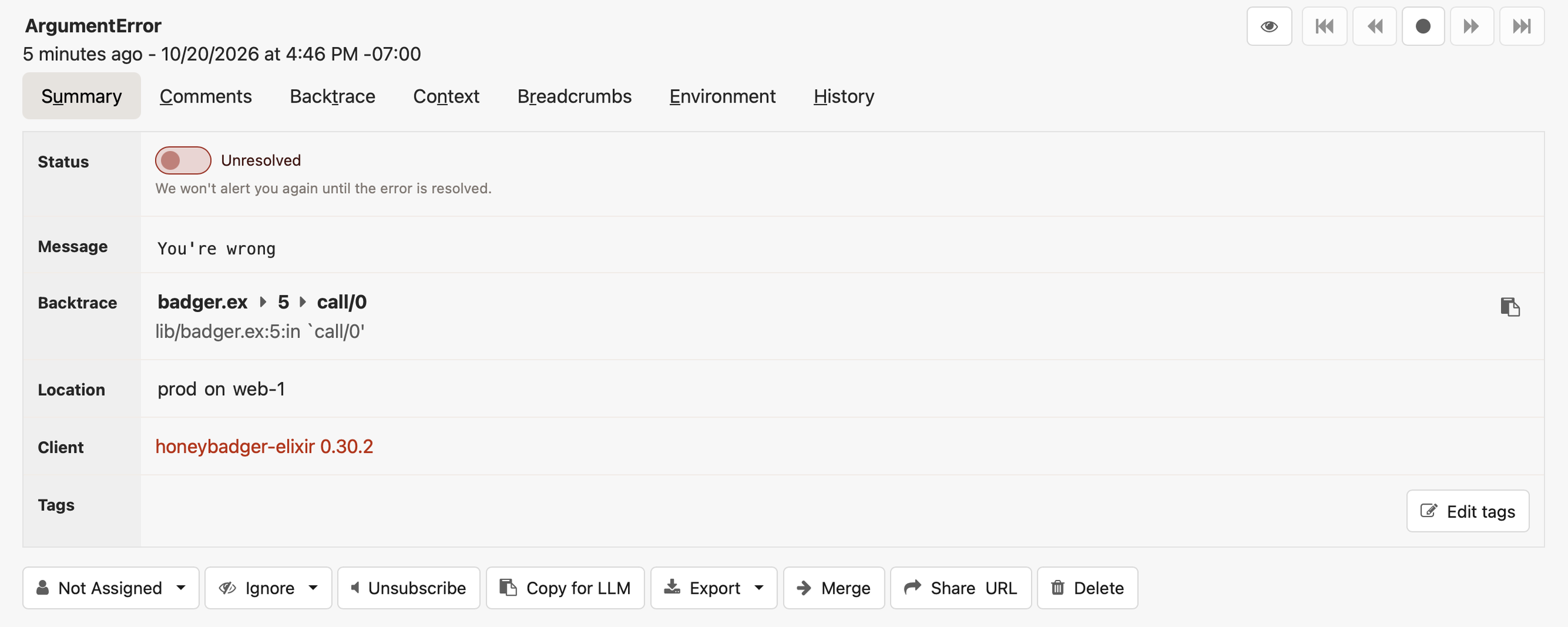
Either way, your error is reported to the Honeybadger app. With that, you can not only track errors but also assign them, resolve them, set alerts, comment on them, and much more.
Choosing the right approach
We've learned about different structures for representing error signals: tuples, exceptions, exits, and throws. It might feel a bit daunting to have so many options. And while there are no written-in-stone rules for choosing the right one, I can share my approach to them:
- Use tagged tuples for expected failures and to signal that "this can go wrong in this and that way."
- Use built-in exceptions to signal that the developer used the library the wrong way.
- Use custom exceptions when none of the built-in ones describe the failure, whether it's misuse of your code (like
NegativeNumberGiven) or a failure outside its control (like "unreachable host" in an API wrapper). - Don't use throws unless there's absolutely no other sane way to solve the problem.
- Catch throws and exits when you are interacting with Erlang libraries that use them.
No matter which type you choose, your errors should surface and become actionable. Using a service like Honeybadger can greatly help you wrangle them. If you're unsure whether it's the right service for you, remember that you can sign up for a free trial for evaluation.
Happy error handling!

Written by
Paweł ŚwiątkowskiPaweł is an Elixir developer (by day) and a Ruby developer (by night), always trying to learn new things. When not in front of a computer, he might be playing curling.