FastAPI error handling: types, methods, and best practices
Errors and exceptions are inevitable in any software, and FastAPI applications are no exception. Errors can disrupt the normal flow of execution, expose sensitive information, and lead to a poor user experience. Hence, it is important to implement robust error-handling mechanisms in FastAPI applications. In this article, we will discuss the different types of FastAPI errors to help you understand their causes and effects. We will also discuss various FastAPI error handling methods, including built-in methods and custom exception classes.
Finally, we will discuss some FastAPI error handling best practices to help you build robust APIs and reliable web applications.
What are errors and exceptions in FastAPI?
Errors and exceptions in FastAPI applications occur when the normal execution flow is interrupted due to an unexpected event, such as invalid input, missing data, or a failed database connection. For example, attempting to divide a number by zero results in an error, as it is not a valid mathematical operation.
FastAPI provides different exception handling mechanisms to handle errors. After encountering an error, the FastAPI app raises an exception that disrupts the normal execution flow of the app. We can catch the exception, log the error messages, and send a meaningful response.
To understand the different types of errors in FastAPI, let's create a calculator app. Using the app, we will discuss the various types of errors, their occurrence, and how to handle them.
from fastapi import FastAPI, HTTPException
from pydantic import BaseModel
from fastapi.responses import JSONResponse


app = FastAPI()

# Define the root API endpoint
@app.get("/")
async def root():
    return JSONResponse(status_code=200, content={"type":"METADATA", "output": "Welcome to Calculator by HoneyBadger."})


# Define the input data model
class InputData(BaseModel):
    num1: float
    num2: float
    operation: str

# Define the calculator API endpoint
@app.post("/calculate/")
async def calculation(input_data: InputData):
    num1=input_data.num1
    num2=input_data.num2
    operation=input_data.operation
    if operation=="add":
        result=num1+num2
    elif operation=="subtract":
        result=num1-num2
    elif operation=="multiply":
        result=num1*num2
    elif operation=="divide":
        result=num1/num2
    else:
        result=None
    if result is None:
        raise HTTPException(status_code=404, detail={"type":"FAILURE", "reason":"Not a valid operation"})
    else:
        return JSONResponse(status_code=200, content={"type":"SUCCESS", "output":result})
In this code, we have defined the /calculate/ endpoint in the FastAPI application, which takes the operation name and operands as input. The endpoint validates the input using the InputData model and returns the calculated value upon successful execution. Save the above code in calculator_app.py. Next, run the FastAPI app server with the calculator application using the following command:
uvicorn calculator_app:app --reload --port 8080 --host 0.0.0.0
After starting the FastAPI server, you can perform different operations by sending HTTP requests to the server. For example, you can send a POST request to the /calculate endpoint to add two numbers, as shown below:
curl http://127.0.0.1:8080/calculate/ -X POST -H "Content-Type: application/json" -d '{"operation": "add", "num1":10, "num2": 10}'
Executing the above command will give you the following output:
{"type":"SUCCESS","output":20.0}
FastAPI logs the API call as a successful execution using the HTTP status code 200 OK.
INFO: 127.0.0.1:43880 - "POST /calculate/ HTTP/1.1" 200 OK
With the basic calculator app done, let's discuss the different FastAPI errors and how they occur.
Different types of errors in FastAPI
Errors in FastAPI are categorized into various types, including internal server error, validation error, method not allowed error, and HTTP exception. These errors are handled using different mechanisms, as shown in the following image:
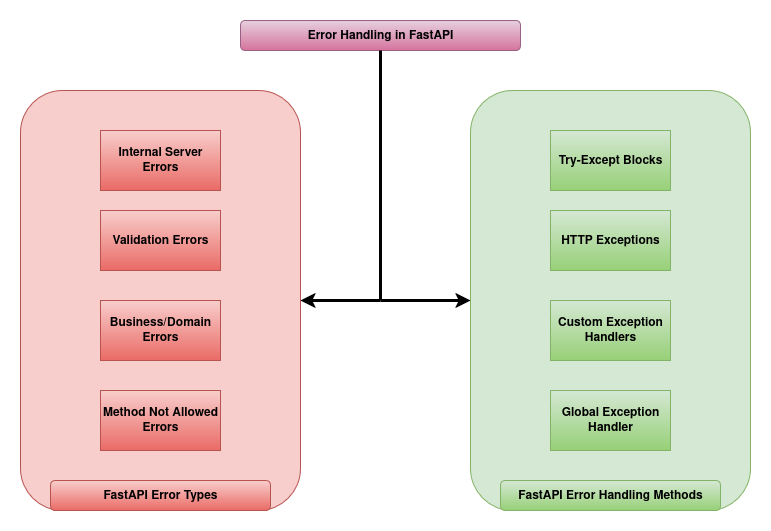
Let's discuss the different types of errors in FastAPI so that we can implement mechanisms to handle each of them.
Internal server error
Internal server errors in FastAPI applications are caused by unexpected runtime issues, such as logical errors, mathematical errors, or database issues that aren't explicitly handled by the program. For example, if the calculator app running on the FastAPI server tries to divide a number by zero, it will return an internal server error due to ZeroDivisionError.
Let's send an API request to the calculator app to trigger this error:
curl http://127.0.0.1:8080/calculate/ -X POST -H "Content-Type: application/json" -d '{"operation": "divide", "num1":10, "num2": 0}'
In this API call, we have passed zero as the second operand. Dividing by zero causes the program to run into ZeroDivisionError, which is an unhandled exception. Hence, the server returns Internal Server Error as its output.
If you look at the execution logs of the FastAPI application, you can see the ZeroDivisionError exception with the message ZeroDivisionError: float division by zero.
INFO:     127.0.0.1:46266 - "POST /calculate/ HTTP/1.1" 500 Internal Server Error
ERROR:    Exception in ASGI application
Traceback (most recent call last):
  File "/home/aditya1117/.local/lib/python3.10/site-packages/uvicorn/protocols/http/httptools_impl.py", line 409, in run_asgi
    result = await app(  # type: ignore[func-returns-value]
.....
  File "/home/aditya1117/codes/HoneyBadger/fastapi_app/calculator_app.py", line 33, in calculation
    result=num1/num2
ZeroDivisionError: float division by zero
After an unhandled exception, FastAPI returns a 500 Internal Server Error for that request, but the server keeps running. If it isn't a global handler, the user gets a generic 500 page.
Method not allowed error
The Method Not Allowed error occurs due to a wrong HTTP method in the API call. If a FastAPI endpoint is defined using the POST request method and the API users call the API endpoint using the GET request method, the FastAPI server runs into StarletteHTTPException with HTTP status code 405. For instance, we have defined the /calculate endpoint using the POST request method. When we send a GET request to the endpoint, the FastAPI app runs into the StarletteHTTPException error.
curl http://127.0.0.1:8080/calculate/ -X GET -H "Content-Type: application/json" -d '{"operation": "add", "num1":10, "num2": 10}'
FastAPI internally handles the StarletteHTTPException and returns the "Method Not Allowed" message.
{"detail":"Method Not Allowed"}
If you check the execution logs, you can see the 405 Method Not Allowed message as follows:
INFO: 127.0.0.1:34004 - "GET /calculate/ HTTP/1.1" 405 Method Not Allowed
Similarly, any API call with an existing API endpoint but an incorrect HTTP method results in a Method Not Allowed error.
Request validation error
FastAPI validates inputs using Pydantic models. If an incoming request for a FastAPI endpoint doesn't conform to the declared structure and parameter types, it returns a request validation error in response.
For example, we have defined the /calculate endpoint with three inputs where the operation must be a string and num1 and num2 must be floating-point numbers or values that can be converted to floats. When we pass an operand that cannot be converted to a floating-point number, the app runs into a request validation error.
curl http://127.0.0.1:8080/calculate/ -X POST -H "Content-Type: application/json" -d '{"operation": "divide", "num1":10, "num2": "HoneyBadger"}'
For the above API call, the app runs into a request validation error. As FastAPI provides built-in exception handling mechanisms for handling validation errors, the app returns a JSON object with a "JSON decode error" message as follows:
{"detail":[{"type":"json_invalid","loc":["body",43],"msg":"JSON decode error","input":{},"ctx":{"error":"Expecting value"}}]}
If you look into the logs, the FastAPI app logs the API calls with request validation errors with the message 422 Unprocessable Entity.
INFO: 127.0.0.1:38050 - "POST /calculate/ HTTP/1.1" 422 Unprocessable Entity
HTTP Exceptions
We use HTTP exceptions in a FastAPI app to raise exceptions due to business/domain errors. These are built-in FastAPI exceptions that we can raise manually and send error responses with standard HTTP status codes. When we raise an HTTP exception, FastAPI automatically handles the exception and returns the content in the detail parameter of the HTTPException constructor as the API response.
For instance, we have raised an HTTP exception in our FastAPI app when the requested operation in the API call is not one of the supported operations: add, subtract, multiply, or divide. Hence, if we pass write as an input to the operation field, the calculator app raises the HTTP exception.
curl http://127.0.0.1:8080/calculate/ -X POST -H "Content-Type: application/json" -d '{"operation": "write", "num1":10, "num2": 10}'
In the API response, we get the content from the detail parameter of the HTTP error as the output.
{"detail":{"type":"FAILURE","reason":"Not a valid operation"}}
As we have defined the status code in the HTTPException to be 404, FastAPI logs the API execution call with the 404 Not Found message.
INFO: 127.0.0.1:53822 - "POST /calculate/ HTTP/1.1" 404 Not Found
In addition to built-in errors and exceptions, we can also define custom exceptions based on business logic. Let's discuss how to do so.
Custom exceptions in FastAPI
We can define custom FastAPI exceptions for handling errors by inheriting the default Python Exception class. In the custom exception, we can define any number of attributes to store the error logs, custom error messages, and additional data. After defining the exception, we can define an exception handler to handle it.
For example, we can create a custom exception class InvalidOperationError by inheriting the Python Exception class to handle errors due to unsupported operation in the API requests to the calculator app as follows:
# Define a custom exception class
class InvalidOperationError(Exception):
    def __init__(self, message: str="Not a valid operation.",type: str= "FAILURE", code: int = 404):
        self.message = message
        self.code = code
        self.type=type
        super().__init__(message)
Next, we can create a FastAPI exception handler using the @app.exception_handler decorator to handle the custom error InvalidOperationError by returning a proper JSON response for the API call.
# Register an exception handler to handle the InvalidOperationError exception
@app.exception_handler(InvalidOperationError)
async def invalid_operation_exception_handler(request: Request,exc: InvalidOperationError):
    return JSONResponse(status_code=exc.code, content={"type":exc.type, "reason":exc.message})
After defining the exception along with the exception handler, we can raise the custom exception from anywhere in the code, and it gets handled by the exception handler.
from fastapi import FastAPI, HTTPException,Request
from pydantic import BaseModel
from fastapi.responses import JSONResponse


app = FastAPI()


# Define a custom exception class
class InvalidOperationError(Exception):
    def __init__(self, message: str="Not a valid operation.",type: str= "FAILURE", code: int = 404):
        self.message = message
        self.code = code
        self.type=type
        super().__init__(message)


# Register an exception handler to handle the InvalidOperationError exception
@app.exception_handler(InvalidOperationError)
async def invalid_operation_exception_handler(request: Request,exc: InvalidOperationError):
    return JSONResponse(status_code=exc.code, content={"type":exc.type, "reason":exc.message})

# Define the root API endpoint
@app.get("/")
async def root():
    return JSONResponse(status_code=200, content={"type":"METADATA", "output": "Welcome to Calculator by HoneyBadger."})


# Define the input data model
class InputData(BaseModel):
    num1: float
    num2: float
    operation: str

# Define the calculator API endpoint
@app.post("/calculate/")
async def calculation(input_data: InputData):
    num1=input_data.num1
    num2=input_data.num2
    operation=input_data.operation
    if operation=="add":
        result=num1+num2
    elif operation=="subtract":
        result=num1-num2
    elif operation=="multiply":
        result=num1*num2
    elif operation=="divide":
        result=num1/num2
    else:
        result=None
    if result is None:
        raise InvalidOperationError
    else:
        return JSONResponse(status_code=200, content={"type":"SUCCESS", "output":result})
In this code, we have raised InvalidOperationError for API calls with unsupported operations. Now, let's pass write as an operation to the /calculate API endpoint to trigger this error:
curl http://127.0.0.1:8080/calculate/ -X POST -H "Content-Type: application/json" -d '{"operation": "write", "num1":10, "num2": 10}'
The FastAPI application gives the following output as the response for the above request:
{"type":"FAILURE","reason":"Not a valid operation."}
As you can see, the handler for the InvalidOperationError gives us the message output using the attributes of the InvalidOperationError exception. In the logs, FastAPI records this execution with a 404 Not Found message as we have assigned the 404 HTTP code to the InvalidOperationError.
INFO: 127.0.0.1:56798 - "POST /calculate/ HTTP/1.1" 404 Not Found
Now that we have discussed different FastAPI errors and custom exceptions, let's discuss how to handle them.
How to handle errors and exceptions in FastAPI?
We can use the try-except blocks to manually raise HTTPException with proper messages for different FastAPI errors. We can also define custom exception handlers that handle exceptions of a particular type from the entire FastAPI application. Finally, we can create a global exception handler that handles any uncaught exception, preventing the FastAPI exception from falling into an Internal Server Error. Let's start with Python try-except blocks.
Error handling using try-except in FastAPI
To handle an error using try-except blocks in a FastAPI application, we treat it as a normal Python exception. Using the Except blocks, we can catch errors and raise HTTP exceptions with status codes and error details. For example, we can use the try-except blocks to handle errors caused during operations in our calculator FastAPI application as follows:
from fastapi import FastAPI, HTTPException, Request
from pydantic import BaseModel
from fastapi.responses import JSONResponse


app = FastAPI()


# Define a custom exception class
class InvalidOperationError(Exception):
    def __init__(self, message: str="Not a valid operation.",type: str= "FAILURE", code: int = 404):
        self.message = message
        self.code = code
        self.type=type
        super().__init__(message)


# Register an exception handler to handle the InvalidOperationError exception
@app.exception_handler(InvalidOperationError)
async def invalid_operation_exception_handler(request: Request,exc: InvalidOperationError):
    return JSONResponse(status_code=exc.code, content={"type":exc.type, "reason":exc.message})


# Define the root API endpoint
@app.get("/")
async def root():
    return JSONResponse(status_code=200, content={"type":"METADATA", "output": "Welcome to Calculator by HoneyBadger."})


# Define the input data model
class InputData(BaseModel):
    num1: float
    num2: float
    operation: str

# Define the calculator API endpoint
@app.post("/calculate/")
async def calculation(input_data: InputData):
    num1=input_data.num1
    num2=input_data.num2
    operation=input_data.operation
    if operation=="add":
        try:
            result=num1+num2
        except:
            raise HTTPException(status_code=400, detail={"type":"FAILURE", "reason":"Not able to add {} and {}.".format(num1, num2)})
    elif operation=="subtract":
        try:
            result=num1-num2
        except:
            raise HTTPException(status_code=400, detail={"type":"FAILURE", "reason":"Not able to subtract {} from {}.".format(num2, num1)})
    elif operation=="multiply":
        try:
            result=num1*num2
        except:
            raise HTTPException(status_code=400, detail={"type":"FAILURE", "reason":"Not able to multiply {} and {}.".format(num1, num2)})
    elif operation=="divide":
        try:
            result=num1/num2
        except:
            raise HTTPException(status_code=400, detail={"type":"FAILURE", "reason":"Not able to divide {} by {}.".format(num1, num2)})
    else:
        result=None
    if result is None:
        raise InvalidOperationError
    else:
        return JSONResponse(status_code=200, content={"type":"SUCCESS", "output":result})
In this code, we have used try-except blocks to handle errors and raise HTTP exceptions for each operation. We also have the custom exception class with a handler for the unsupported operations. Now, let's try to divide a number by zero by sending a request to the /calculate API endpoint.
curl http://127.0.0.1:8080/calculate/ -X POST -H "Content-Type: application/json" -d '{"operation": "divide", "num1":10, "num2": 0}'
The above API call triggers a ZeroDivisionError exception, which is handled by the 'Except' block of the divide operation, and we receive the following output in the API response:
{"detail":{"type":"FAILURE","reason":"Not able to divide 10.0 by 0.0."}}
In the logs, the above API call is recorded with the message 400 Bad Request as we have set the status code to 400 while raising the HTTP exception.
INFO: 127.0.0.1:52422 - "POST /calculate/ HTTP/1.1" 400 Bad Request
However, a single exception can occur at multiple places in a program. We may overlook including all exception types in the Except block of the code, which could result in uncaught errors. To avoid this, we can use custom exception handlers.
Using a custom exception handler in FastAPI
We can use custom exception handlers to reduce code repetition and handle errors of a particular type in one place, regardless of where they originate in the code. Custom exception handles also allow us to format errors to follow a standard JSON format.
FastAPI allows us to write custom handlers for exceptions by defining functions using the @app.exception_handler decorator. Each handler takes a FastAPI Request and a Python Exception object as its input. Inside the exception handler, we can process the exception, log the error messages, and return a proper API response. After defining the custom exception handler, all the exceptions of the specified exception type are handled by it.
For instance, we can define a custom exception handler to handle all the TypeError exceptions in the calculator app:
@app.exception_handler(TypeError)
async def typeerror_handler(request: Request, exc: TypeError):
    return JSONResponse(status_code=400, content={"type":"FAILURE", "reason":"TypeError exception occurred due to mismatch between the expected and the actual data type of the operands."})
This exception handler will process all the TypeError exceptions, regardless of where they are raised within the FastAPI app. In a similar manner, we can define custom exception handlers for ZeroDivisionError and ValueError exceptions:
from fastapi import FastAPI, HTTPException, Request
from pydantic import BaseModel
from fastapi.responses import JSONResponse


app = FastAPI()

# Define a custom exception class
class InvalidOperationError(Exception):
    def __init__(self, message: str="Not a valid operation.",type: str= "FAILURE", code: int = 404):
        self.message = message
        self.code = code
        self.type=type
        super().__init__(self.message)

# Register an exception handler to handle the InvalidOperationError exception
@app.exception_handler(InvalidOperationError)
async def invalid_operation_exception_handler(request: Request,exc: InvalidOperationError):
    return JSONResponse(status_code=exc.code, content={"type":exc.type, "reason":exc.message})

# Register an exception handler to handle the TypeError exception
@app.exception_handler(TypeError)
async def typeerror_handler(request: Request, exc: TypeError):
    return JSONResponse(status_code=400, content={"type":"FAILURE", "reason":"TypeError exception occurred due to mismatch between the expected and the actual data type of the operands."})

# Register an exception handler to handle the ZeroDivisionError exception
@app.exception_handler(ZeroDivisionError)
async def zerodivisionerror_handler(request: Request,exc: ZeroDivisionError):
    return JSONResponse(status_code=400, content={"type":"FAILURE", "reason":"Cannot perform division as the second operand is zero."})

# Register an exception handler to handle the ValueError exception
@app.exception_handler(ValueError)
async def valueerror_handler(request: Request,exc: ValueError):
    return JSONResponse(status_code=400, content={"type":"FAILURE", "reason":"ValueError exception occurred due to operands with correct data types but inappropriate values."})

# Define the root API endpoint
@app.get("/")
async def root():
    return JSONResponse(status_code=200, content={"type":"METADATA", "output": "Welcome to Calculator by HoneyBadger."})


# Define the input data model
class InputData(BaseModel):
    num1: float
    num2: float
    operation: str

# Define the calculator API endpoint
@app.post("/calculate/")
async def calculation(input_data: InputData):
    num1=input_data.num1
    num2=input_data.num2
    operation=input_data.operation
    if operation=="add":
        result=num1+num2
    elif operation=="subtract":
        result=num1-num2
    elif operation=="multiply":
        result=num1*num2
    elif operation=="divide":
        result=num1/num2
    else:
        result=None
    if result is None:
        raise InvalidOperationError
    else:
        return JSONResponse(status_code=200, content={"type":"SUCCESS", "output":result})
With defined custom exception handlers for different error types, let's try to divide a number by zero:
curl http://127.0.0.1:8080/calculate/ -X POST -H "Content-Type: application/json" -d '{"operation": "divide", "num1":10, "num2": 0}'
For the above API call, the FastAPI app returns an output as follows:
{"type":"FAILURE","reason":"Cannot perform division as the second operand is zero."}
As you can see, the API response contains the message from the custom exception handler zerodivisionerror_handler. As we have defined the status code to 400 in the zerodivisionerror_handler, the log message also records the API call with the 400 Bad Request message.
INFO: 127.0.0.1:50036 - "POST /calculate/ HTTP/1.1" 400 Bad Request
Now, let's pass values to the API call that causes the ValueError exception:
curl http://127.0.0.1:8080/calculate/ -X POST -H "Content-Type: application/json" -d '{"operation": "divide", "num1":1e308, "num2": 1e-100}'
In the above API call, we have passed 1e308 and 1e-100 as operands for division. As the division causes a ValueError exception due to overflow, we get the following response from the custom exception handler defined for ValueError exception.
{"type":"FAILURE","reason":"ValueError exception occurred due to operands with correct data types but inappropriate values."}
Access data from API request in a custom exception handler
FastAPI allows us to access data from the API request in the exception handlers. To do this, we can attach the input data received in the API request to the payload of the Request object. Then, we can access data in the exception handler using the state.payload attribute of the Request object.
To access data from an API request in the exception handlers, we will first define a dependency function attach_payload:
- The
attach_payloadfunction takes the payload of the API request and aRequestobject as its input. - Inside the
attach_payloadfunction, we will assign the payload of the API request to thestate.payloadattribute of theRequestobject. - After execution, the
attach_payloadfunction returns the original payload of the API request.
The attach_payload function looks as follows:
async def attach_payload(payload: InputData, request: Request = None):
    request.state.payload = payload
    return payload
After defining the attach_payload function, we will add it as a dependency to the calculation function of the /calculate API endpoint using the Depends function:
@app.post("/calculate/")
async def calculation(input_data: InputData = Depends(attach_payload)):
    # function logic
After adding the dependency, FastAPI automatically executes the attach_payload function with the same input given to the calculation function. The attach_payload function then assigns the payload of the API request to the state.payload attribute of the Request object and returns the payload, which is then used by the calculation function to execute the calculation logic.
Now, the Request object has all the inputs passed to the API call in its state.payload attribute. Hence, we can access the inputs in the exception handlers through the Request object, log them, or send messages in the response to the API call based on the input values.
from fastapi import FastAPI, HTTPException, Request, Depends
from pydantic import BaseModel
from fastapi.responses import JSONResponse


app = FastAPI()

# Define a custom exception class
class InvalidOperationError(Exception):
    def __init__(self, message: str="Not a valid operation.",type: str= "FAILURE", code: int = 404):
        self.message = message
        self.code = code
        self.type=type
        super().__init__(self.message)

# Register an exception handler to handle the InvalidOperationError exception
@app.exception_handler(InvalidOperationError)
async def invalid_operation_exception_handler(request: Request,exc: InvalidOperationError):
    payload = getattr(request.state, "payload", None)
    num1 = payload.num1
    num2 = payload.num2
    operation=payload.operation
    return JSONResponse(status_code=exc.code, content={"type":exc.type, "reason":exc.message, "operand_1":num1, "operand_2":num2, "operation":operation})

# Register an exception handler to handle the TypeError exception
@app.exception_handler(TypeError)
async def typeerror_handler(request: Request,exc: TypeError):
    payload = getattr(request.state, "payload", None)
    num1 = payload.num1
    num2 = payload.num2
    operation=payload.operation
    return JSONResponse(status_code=400, content={"type":"FAILURE", "reason":"TypeError exception occurred due to mismatch between the expected and the actual data type of the operands.", "operand_1":num1, "operand_2":num2, "operation":operation})

# Register an exception handler to handle the ZeroDivisionError exception
@app.exception_handler(ZeroDivisionError)
async def zerodivisionerror_handler(request: Request,exc: ZeroDivisionError):
    payload = getattr(request.state, "payload", None)
    num1 = payload.num1
    num2 = payload.num2
    operation=payload.operation
    return JSONResponse(status_code=400, content={"type":"FAILURE", "reason":"Cannot perform division as the second operand is zero.", "operand_1":num1, "operand_2":num2, "operation":operation})

# Register an exception handler to handle the ValueError exception
@app.exception_handler(ValueError)
async def zerodivisionerror_handler(request: Request,exc: ValueError):
    payload = getattr(request.state, "payload", None)
    num1 = payload.num1
    num2 = payload.num2
    operation=payload.operation
    return JSONResponse(status_code=400, content={"type":"FAILURE", "reason":"ValueError exception occurred due to operands with correct data types but inappropriate values.", "operand_1":num1, "operand_2":num2, "operation":operation})

# Define the root API endpoint
@app.get("/")
async def root():
    return JSONResponse(status_code=200, content={"type":"METADATA", "output": "Welcome to Calculator by HoneyBadger."})


# Define the input data model
class InputData(BaseModel):
    num1: float
    num2: float
    operation: str

# Dependency that attaches the validated payload to request.state
async def attach_payload(payload: InputData, request: Request = None):
    request.state.payload = payload
    return payload

# Define the calculator API endpoint
@app.post("/calculate/")
async def calculation(input_data: InputData = Depends(attach_payload)):
    num1=input_data.num1
    num2=input_data.num2
    operation=input_data.operation
    if operation=="add":
        result=num1+num2
    elif operation=="subtract":
        result=num1-num2
    elif operation=="multiply":
        result=num1*num2
    elif operation=="divide":
        result=num1/num2
    else:
        result=None
    if result is None:
        raise InvalidOperationError
    else:
        return JSONResponse(status_code=200, content={"type":"SUCCESS", "output":result})
In this code, we used a dependency function to attach the payload to the Request object and then used the Request object to retrieve the inputs for the API call in the exception handlers. The exception handlers also return the input along with the reason whenever an error occurs. Now, let's send an API request with an unsupported operation to the FastAPI app:
curl http://127.0.0.1:8080/calculate/ -X POST -H "Content-Type: application/json" -d '{"operation": "write", "num1":10, "num2": 10}'
The above request raises an InvalidOperationError exception, which is then handled by the exception handler, and we get the following output:
{"type":"FAILURE","reason":"Not a valid operation.","operand_1":10.0,"operand_2":10.0,"operation":"write"}
As you can see, the exception handler is able to access the inputs passed to the API call.
Custom exception handlers are a great way to handle FastAPI errors of a specific type. However, it is almost impossible to define and handle every error using custom exception handlers. To catch and handle any uncaught exception, we use global exception handlers.
Using a global exception handler in FastAPI
A global exception handler in FastAPI handles exceptions of type Exception, which is the base class for any Python exception. We can create a global exception handler using the exception_handler decorator as follows:
@app.exception_handler(Exception)
async def global_exception_handler(request: Request,exc: Exception):
    payload = getattr(request.state, "payload", None)
    num1 = payload.num1
    num2 = payload.num2
    operation=payload.operation
    return JSONResponse(status_code=500, content={"type":"FAILURE", "reason":"An unexpected error occurred."})
The above exception handler can handle any uncaught error. This ensures that the FastAPI app doesn't encounter an Internal Server Error after any exception.
Now that we understand the different types of FastAPI errors and ways to handle them, let's explore best practices for error handling in FastAPI.
FastAPI error handling best practices
Error handling in FastAPI is critical for building reliable, secure, and developer-friendly APIs. Let's discuss some FastAPI error handling best practices you should follow while developing applications.
Use HTTPException to manually raise exceptions
HTTPException helps us raise exceptions with a specific status code and error messages. Also, HTTPException is automatically handled by FastAPI, and the error details passed to the detail parameter of the HTTPException constructor are returned as the API response. Hence, you should use the HTTPException class to raise exceptions with proper status codes and messages.
Use JSONResponse in exception handlers
Although HTTP exceptions are automatically handled by FastAPI, you should avoid raising HTTPException inside exception handlers, as it causes nested exceptions. While handling errors through a custom exception handler, always use the JSONResponse class to return JSON responses with suitable status codes, as shown in the following example:
@app.exception_handler(ZeroDivisionError)
async def zerodivisionerror_handler(request: Request,exc: ZeroDivisionError):
    return JSONResponse(status_code=400, content={"type":"FAILURE", "reason":"Cannot perform division as the second operand is zero."})
Create custom exception classes for domain and business logic errors
You should use custom exception classes for domain and business logic errors instead of raising generic HTTP exceptions. This will help you handle errors, log error-specific messages, and send proper responses to the users in an efficient manner.
For instance, the calculator app supports only addition, subtraction, multiplication, and division. We can raise an HTTPException to handle errors whenever the user requests an unsupported operation. However, we defined a custom exception class named InvalidOperationError to raise exceptions for unsupported operations and use it whenever we receive such a request.
class InvalidOperationError(Exception):
    def __init__(self, message: str="Not a valid operation.",type: str= "FAILURE", code: int = 404):
        self.message = message
        self.code = code
        self.type=type
        super().__init__(message)
After defining a custom exception class, we can register an exception handler to handle the exception. For instance, we implemented the exception handler for the InvalidOperationError exception as follows:
@app.exception_handler(InvalidOperationError)
async def invalid_operation_exception_handler(request: Request,exc: InvalidOperationError):
    return JSONResponse(status_code=exc.code, content={"type":exc.type, "reason":exc.message})
In a similar manner, you can write custom exception classes for domain and business logic errors and write the handlers for them.
Implement a global exception handler
Always implement global exception handling. Global exception handlers help capture unhandled exceptions and return safe responses instead of crashing the server. You can build a global handler to implement exception handling for uncaught exceptions using the Python Exception class as follows:
@app.exception_handler(Exception)
async def global_exception_handler(request: Request,exc: Exception):
    return JSONResponse(status_code=500, content={"type":"FAILURE", "reason":"An unexpected error occurred."})
The global exception handler handles any uncaught FastAPI error and prevents the server from crashing due to errors.
Standardize error response format
It is important to standardize the error response format. This makes it easier for the frontend developers to parse the error response and show proper error messages to the user. For example, we have defined the error response format with fields type, reason, operand_1, operand_2, and operation.
{"type":"FAILURE", "reason":"Error message", "operand_1":num1, "operand_2":num2, "operation":operation}
All exception handlers in our app should return error messages in the same format, making parsing easier.
Customize validation error responses
Request validation errors occur due to failed data validation, and every validation error response has a different structure. For example, if we send an API request with the correct number of fields but incorrect data types, we get the following validation error response.
{"detail":[{"type":"json_invalid","loc":["body",43],"msg":"JSON decode error","input":{},"ctx":{"error":"Expecting value"}}]}
On the other hand, if we send an API request with a missing field, we get the following response:
{"detail":[{"type":"missing","loc":["body","num2"],"msg":"Field required","input":{"operation":"divide","num1":10}}]}
As you can see, FastAPI automatically handles validation errors and provides detailed error messages. However, we can customize error responses for these errors by implementing custom exception handlers. You can write a custom exception handler to customize error responses for request validation errors as follows:
@app.exception_handler(RequestValidationError)
async def request_validation_error_handler(request: Request,exc: RequestValidationError):
    error=exc.errors()
    return JSONResponse(status_code=422, content={"type":"RequestValidationError", "error_type":error[0]["type"], "reason":error[0]["msg"]})
After customizing the error responses by implementing this exception handler, we get the following response for the API request with incorrect values:
{"type":"RequestValidationError","error_type":"json_invalid","reason":"JSON decode error"}
For the request with missing values, we get the following response:
{"type":"RequestValidationError","error_type":"missing","reason":"Field required"}
As you can see, both responses have the same structure, and they can be processed by the client app to show appropriate error messages to the user.
Use logging and email alerts for observability
It is essential to monitor errors, log the error messages, and capture the exception trace before sending the error response. The error logs help in root cause analysis and debugging. You should also configure email alerts for critical issues, such as security breaches, rate limit errors, or out-of-memory errors, which should not be ignored. You can also add exception monitoring in your FastAPI application using HoneyBadger.
Map internal errors to safe public messages
You should never reveal internal Python error messages to users in the error response. Doing so can expose user credentials, API keys, and personally identifiable information (PII) that shouldn't be accessible outside the system. Hence, always write exception handlers that map internal Python errors to safe public messages free of credentials and PIIs.
Error handling is always critical
Now that you know how to handle FastAPI errors the right way, put this knowledge into practice and build a small FastAPI app. Experiment with different error scenarios, keeping the following points in mind:
- In FastAPI, the "404 Not Found" error indicates that the URL path or endpoint we are trying to access through the API request does not correspond to any defined endpoint in the FastAPI application.
- In FastAPI, the "422 Unprocessable Entity" error indicates that the server understands the content type and syntax of the payload in the request. However, it cannot process the request due to semantic errors in the request body, such as missing required fields, incorrect data types, invalid data formats, or mismatches in parameter handling.
- You should return the status code 404 in HTTP responses if the requested resource or endpoint doesn't exist. On the other hand, 204 should be used when the request is processed successfully, but there is no content to return in the response body.
- You should use the 204 No Content status for successful delete operations when you don’t need to return a body. If you want to return a JSON confirmation or resource details, use 200 OK instead.
- To avoid cross-origin resource sharing (CORS) errors in FastAPI, you can use
CORSMiddlewarein your FastAPI application to allow the specific origins you trust. To learn more about CORS error handling, you can go through the FastAPI CORS tutorial.
You can also sign up for a free trial of Honeybadger to monitor your applications by combining error-tracking, logging, uptime monitoring, and lightweight application-performance monitoring into one platform.
Happy learning!
