How we teach LLMs to write BadgerQL
We just added two new AI features to our app: natural-language translation for Error search and Insights queries.
Honeybadger has two query languages: Error search speaks a simple token syntax in the spirit of Solr or a basic Elasticsearch query, while Insights runs on BadgerQL (BQL), our own language for digging into your event data, designed to feel familiar to CloudWatch Insights and Splunk users. Both are powerful, but sometimes you just want something that works without having to open up the docs. Natural-language translation lets you get useful queries out of Honeybadger on your first day while picking up the syntax as you go.
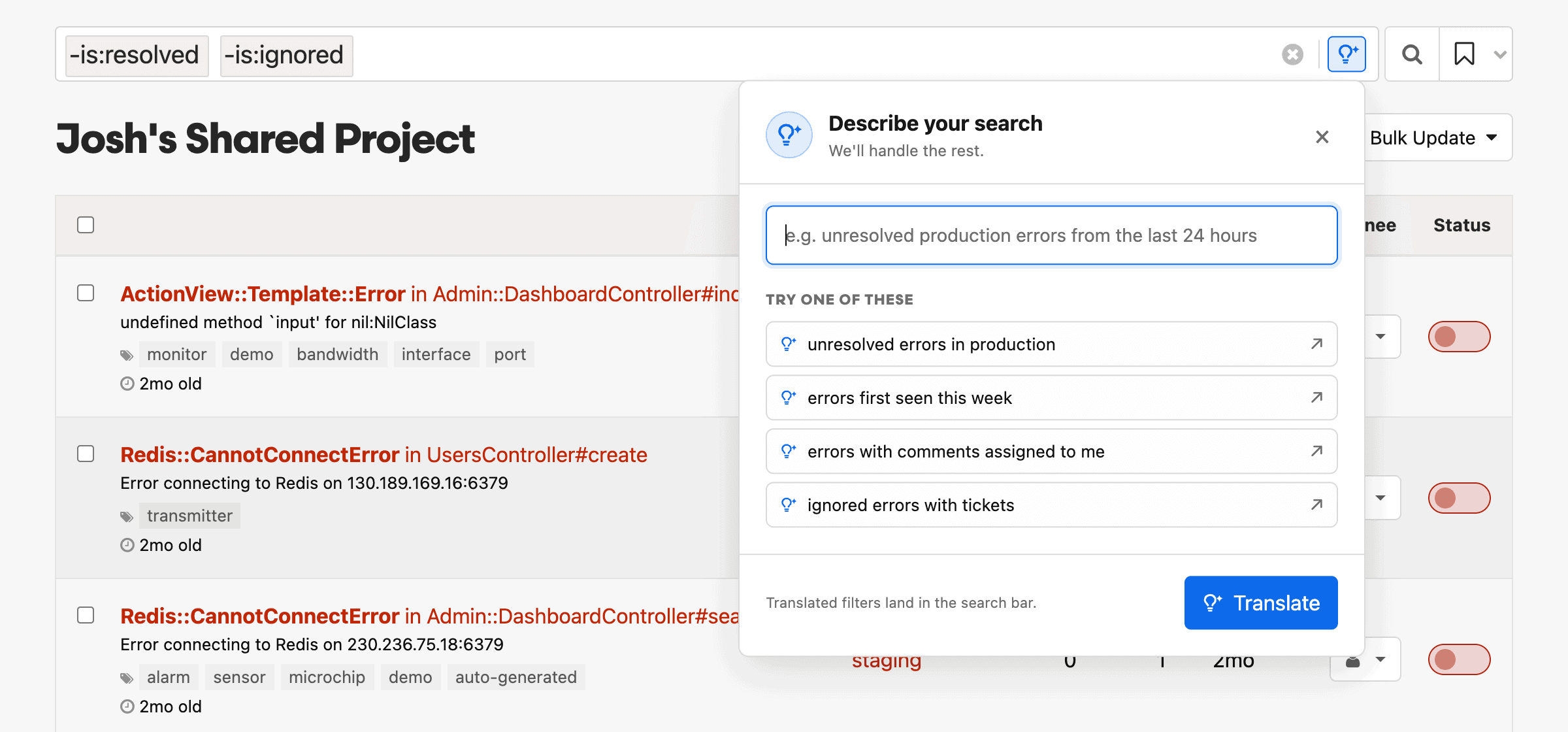
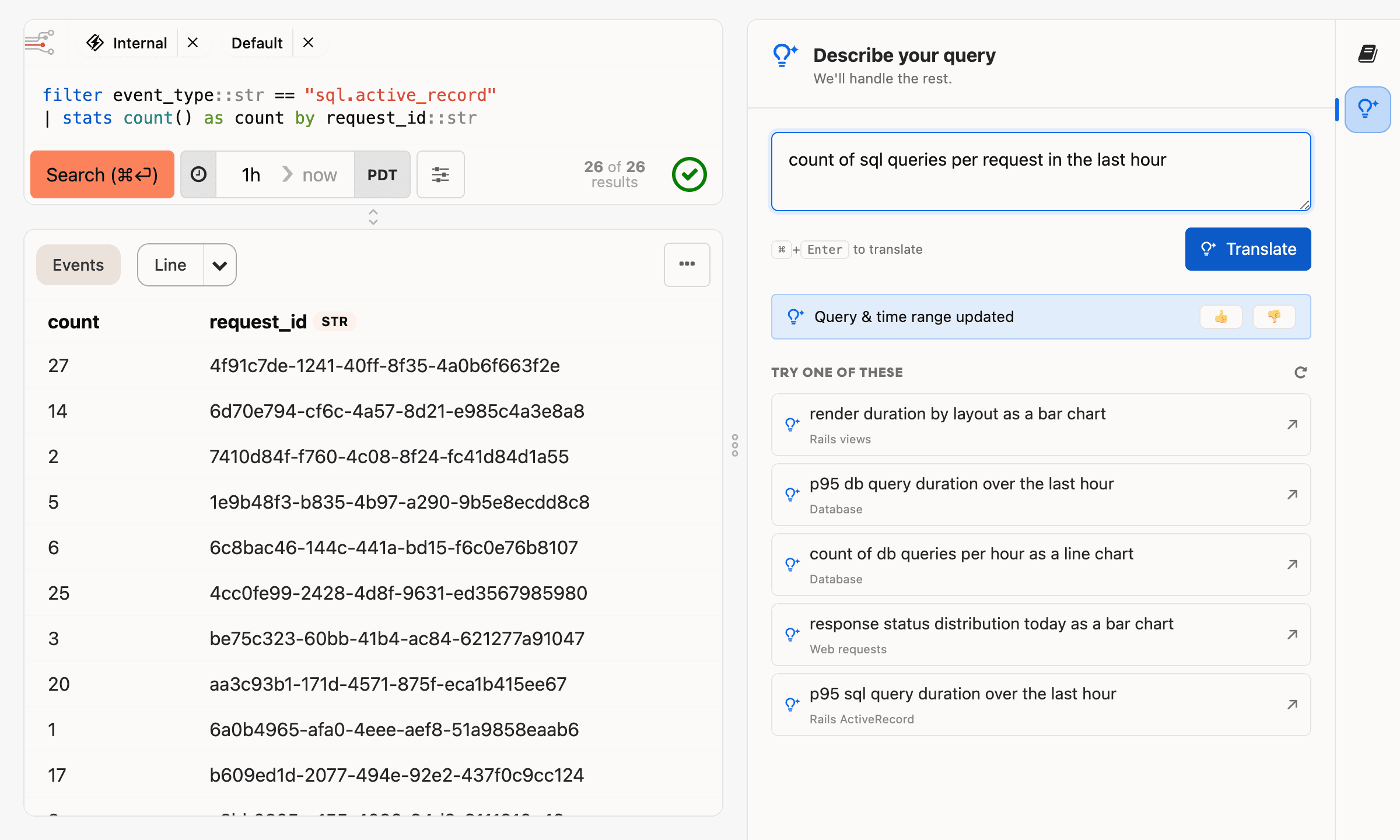
To build these features, we had to teach an LLM to translate English into our proprietary query languages. For Error search, the language has a constrained grammar, so teaching the model to produce correct queries was not terribly hard. Translating Insights queries into BQL, however, proved more challenging, so that's what this article is about: how we taught LLMs to write BadgerQL, and, more importantly, how we measured whether they actually learned it.
Giving the model instructions was the easy part. Figuring out whether those instructions actually worked was the interesting part.
The system prompt
LLMs don't understand BQL out of the box. Default models are not trained on our docs, so when a naive agent attempts to write BQL, it falls back to SQL syntax. A simple way to solve this is to use a system prompt. A system prompt is nothing more than instructions prepended to your actual prompt.
We could have thrown a bunch of our docs content at an LLM and hoped that it would coherently produce useful output, but we wanted to know if our system prompt was actually improving the results. Our hypothesis was that a structured, example-driven system prompt would beat a pile of docs. To validate this, we reached for the same tool we use to solve most other software problems: automated testing.
Test results, not query text
Most Insights functionality runs through an external service we call Opticon. Opticon is responsible for translating BQL queries to ClickHouse SQL and returning results and metadata.
We already spend a considerable amount of effort on integration tests that validate whether BadgerQL produces useful results. Opticon's search integration suite is made up of files that look like this:
badgerql: |
  fields num::int
  | filter num between 0 and 150

events:
  - num: 100
  - num: 200

results_contain:
  - num: 100
Each file tests a specific aspect of BQL, checking that the query returns the events we expect. At this point we have hundreds of test files covering thousands of individual cases.
Instead of standing up a new AI-specific benchmark suite, we taught our existing integration suite how to run LLM-generated queries.
Running LLM-generated queries was straightforward. Deciding whether to count them as correct was harder. This is because a BQL translation can have multiple correct interpretations. Take the test above, for example. Here is a potential prompt:
Show me the
numfield for rows where it's between 0 and 150.
With the right context, the LLM should produce the "ideal" query from the test above. There are many alternatives, however, that are also correct:
# desugar between → two comparisons (inclusive)
fields num::int
| filter num >= 0 and num <= 150

# commute the operands
fields num::int
| filter num <= 150 and num >= 0

# only instead of fields
filter num::int between 0 and 150
| only num

# stash the bounds as aliased literals, filter against them
fields 0 as lo, 150 as hi
| fields num::int
| filter num >= lo and num <= hi
This is one of the simplest examples I could conjure up, so if there are this many permutations for this scenario, you can imagine how many solutions there are to more involved query prompts.
One way to deal with this is to throw more AI at it: have one agent check the
work of another to decide whether the query is valid. We decided to forgo
grading the query itself. Instead, we opted to run it and grade the results. Here is the llm_case block we added to the same test:
llm_case:
  name: "Filter with between"
  description: "Filter rows by an inclusive numeric range using the between operator."
  prompt: "Show me the `num` field for rows where it's between 0 and 150."
Our test suite extracts the LLM cases, sends the system prompt and test prompt to the LLM, and runs the translated BQL through the original integration test. The generated query passes or fails based on whether its results contain the expected events. We don't really care which valid BQL syntax the LLM chooses; we care that the query returns the right events.
Every run gets recorded to a JSON report. Here's a real (trimmed) failure record from a bench run against Claude Haiku 4.5:
{
  "case_id": "not_between.yml[v2]",
  "prompt": "Find rows whose `num` is less than 0 or greater than 150.",
  "expected_badgerql": "fields num::int | filter num not between 0 and 150",
  "generated": "filter num::int < 0 or num::int > 150",
  "actual": [{}],
  "expected": [{ "num": 200 }],
  "status": "wrong_results",
  "reason": "rows_missing"
}
This is the inverse of the between test we saw earlier, and the model nearly
had it: num < 0 or num > 150 is exactly not between -- desugared. But it
left out fields num::int, so the query never injected num into the
results. That's the kind of miss that's easy to overlook when reading a
query, and impossible to overlook when you run it.
We currently have around 50 tests with LLM cases. These were all run against Claude Haiku 4.5:
- Without a system prompt, we got a paltry passing score of 0%.
- With our original hand-rolled prompt, we got a reasonable score of around 71%.
That 71% told us the system prompt was working, but it also told us it wasn't working well enough. Now that we had a way to measure it, we could start improving it.
Improving the prompt
From here, every prompt change became a small experiment: tweak, rerun the suite, see if the score moved. The change that helped most was giving the model better examples of function syntax.
Rather than hand-maintaining those examples in a giant prompt, we attached the
LLM guidance to the same data structures that define BQL expressions. We call
these "expression maps" in Opticon, and most of them are purely data-driven. Here
is an example of the llm clause, which is collated and exported when we
generate the system prompt:
{
  "between" => {
    sql_fn: "and(greaterOrEquals(%{arg0}, %{arg1}), lessOrEquals(%{arg0}, %{arg2}))",
    infix: true,
    llm: {
      core: true,
      note: "Use infix form, not function-call form. Both bounds are inclusive.",
      examples: {
        "(find|show|filter to) events where X is between A and B" => "filter field::int between A and B",
        "(find|show|filter to) events that happened between START and END" => "filter @ts between START and END"
      }
    },
  }
}
A few things to note here: we used regex-like notation to denote multiple valid
phrases, along with variables like A to show where parts of the prompt should
appear in the BQL. The LLMs seemed to respond well to this technique. We also
marked some functions as core, which moved them higher in the system prompt.
That tended to improve results for more common functions.
After a few iterations of these enhancements, the passing score climbed from 71% to 88%.
Sharing the context
Once we had a tested, generated system prompt, it seemed wasteful to keep it trapped inside these two features.
We don't keep these system prompts to ourselves: we publish them in our
llms.txt so that any agent can use them as context when working with
Honeybadger. If you use our new hosted MCP, we include instructions to load
this document into the context automatically before writing any queries.
That gives us one source of truth for our natural-language features, our test suite, and external agents writing BQL.
Conclusion
We didn't teach LLMs BadgerQL by dumping our docs into a prompt and hoping for the best. We gave the LLMs structured examples, ran their queries against real tests, and measured whether they actually worked.
The biggest lesson for us: prompts aren't magic, and they shouldn't be treated as special. They belong in your automated test flow like any other feature. Once our prompt had tests, improving it stopped being guesswork; every change either moved the score or it didn't.
If you want to try it yourself, both features are live in
Honeybadger today. Describe a search on the
Errors page, or describe a query in Insights, and see what comes back. And if
you're building your own agent, point it at our llms.txt: it'll get the same
tested context our features use.

Written by
Kevin WebsterKevin is the freshest Honeybadger (both in time and breakdancing abilities). Kevin has been building things with software since his dad brought home the family IBM 386. He fancies himself a bit of a programming polyglot. When he's not compromising his ability to write Ruby by learning new languages, he enjoys hiking through the Oregon wilderness, hanging with his family, or watching cringeworthy b-list movies.