SIEM alerts: everything you need to know
Let's walk through setting up SIEM (Security Information and Event Management) alerts to monitor security threats in applications. We will explain what SIEM alerts are, why they're relevant with regard to application security, and provide practical examples of common alerts a developer could implement. We will show how to configure simple alerts with Honeybadger Insights.
What is SIEM?
SIEM (Security Information and Event Management) refers to a class of security platforms that aggregate logs and security events from many systems and analyze them to detect threats. Just like in action movies where a thief exploits an unguarded angle, attackers in the cyber world look for weaknesses. A SIEM system works by pulling data from many different sources across the organization, including security system logs, usual and unusual network traffic, and threat intelligence. The SIEM analyzes them in one place to detect suspicious behavior instead of these signals living in silos.
The main aim of SIEM is to be a correlation engine. It doesn’t just collect raw data; it connects the dots using rule-based correlation, statistical analysis, and sometimes machine learning. The SIEM system continuously evaluates events in real time to identify patterns that indicate a real attack, enabling faster threat detection across your environment. Correlation helps prioritize alerts, not necessarily reduce them automatically. What this means is fewer false positives and clearer signals that something genuinely malicious is happening.
The importance of SIEM alerts
Organizations often run dozens or even hundreds of disconnected security tools where each generates alerts that require attention. Analysts are forced to jump between dashboards and manually investigate events. SIEM system addresses this problem by acting as the central nervous system of security operations. It prioritizes alerts by severity to help analysts immediately focus on incidents that pose the greatest risk.
The attackers don't even discriminate based on the size of the organisation. Some do it for the challenge or fun of it. They target organizations of all sizes and take advantage of openings across applications and cloud infrastructure. A SIEM system provides the visibility and context needed to detect these potential threats early, before they cause serious damage. Much like ignoring a staged diversion at the front of a museum and spotting the real break-in at the back, SIEM becomes one of the most powerful defensive tools security teams have.
How to respond to SIEM alerts effectively
Responding to SIEM alerts effectively determines whether a security incident is quickly contained or allowed to turn into a breach. Alert incident response procedures must be built on preparation, documentation, and practiced workflows. The goal is not just to react, but to respond effectively.
-
Establish runbooks for common alert types: Runbooks define exactly what should happen when a specific alert is triggered. For example, when a credential stuffing alert fires, the runbook should outline verification steps such as checking whether multiple accounts are affected, containment actions like blocking the attacking IP range, and notification requirements, including informing affected users. By standardizing incident responses, runbooks ensure consistency and help less-experienced team members handle incidents correctly without improvising under pressure.
-
Triage alerts immediately upon receipt: The first moments after receiving an alert are very important. Spend some time determining whether the alert represents a genuine threat or requires deeper investigation. Review recent similar alerts to see if the event is part of a broader attack pattern. You can also query the SIEM using BadgerQL (Honeybadger's Query Language) for additional context.
-
Document investigation steps and findings: Every alert investigation should leave a record. When alerts turn out to be false, document why they were triggered and whether tuning adjustments can prevent recurrence. When alerts uncover real attacks, record the attack vector, affected systems, and remediation steps taken.
-
Implement automated containment where safe: Certain scenarios, such as IP-based attacks, benefit from automated containment. When an IP triggers credential stuffing alerts, it can be temporarily blocked at the firewall or web application firewall. This allows containment to happen within seconds rather than waiting for manual action. However, automation must be used carefully. Over-automation can disrupt legitimate users.
-
Coordinate incident response across teams: Security incidents often span multiple layers, including applications, infrastructure, and databases. The security team may analyze data of the attack method, development teams patch vulnerable code, and security operations teams apply network-level blocks. Clear communication channels are essential. Many organizations rely on dedicated Slack channels or conference bridges to coordinate effectively during active incidents.
SIEM alert examples and types
SIEM alerts fall into several categories based on detection method and threat type. Each category serves a distinct purpose in the comprehensive security monitoring efforts to improve the security posture. Some identify known attack patterns, and some detect subtle behavioral deviations and enforce regulations. Below is a list of SIEM alerts covering the top SIEM alerts by threat detection method and also internal and external threat types.
-
Signature alerts: Signature-based alerts match specific patterns in log data, such as SQL injection attempts in HTTP requests or known malware file hashes. These alerts trigger when logs contain exact strings or regular expression matches associated with attacks. For example, detecting
' OR '1'='1'in query parameters signals a potential SQL injection probe. -
Anomaly alerts: Anomaly-based alerts establish behavioral baselines and flag deviations. If a user account typically authenticates from New York during business hours, a login from Singapore at 3 AM exceeds normal behavior thresholds. These alerts require sufficient historical data to build accurate profiles.
-
Threshold alerts: Threshold-based alerts trigger when event counts exceed defined limits within time windows. Failed authentication attempts provide a clear example: five failed logins from a single IP address within ten minutes might indicate credential stuffing, while 100 failed logins across different accounts suggest a broader attack.
-
Compliance threat alerts: Compliance reporting enforces regulatory requirements and internal policies. PCI-DSS mandates alerts for unauthorized access attempts to cardholder data, while HIPAA requires notification of protected health information access outside normal workflows. Compliance frameworks require alerting and auditing, but tuning is still necessary to avoid alert fatigue.
Configuring alert triggers and correlation rules
Alert triggers define the conditions that generate notifications for common SIEM solution alerts. Simple triggers evaluate single log entries, while complex triggers correlate events across time windows and security data sources. Start with high-confidence signatures for known attacks before layering in anomaly detection and behavioral analysis.
Authentication alerts should trigger on multiple unsuccessful login attempts, successful logins following failed attempts (credential stuffing success), logins from blacklisted IP addresses, and authentications occurring simultaneously from geographically distant locations. Configure these with appropriate thresholds; three failed attempts might be a typo, but fifteen suggests an attack. Time windows matter too; five failures over 24 hours are less significant than five failures in sixty seconds.
Alerts on the application side monitor for injection attacks, path traversal attempts, and malicious file uploads. Web application firewalls generate logs that SIEM systems ingest and analyze. When requests attempt to access restricted file paths, or when uploaded files contain executable code. These alerts benefit from whitelisting safe patterns to reduce false positives from legitimate applications or user behavior.
Data access alerts flag unusual database queries, excessive record retrieval, and access to sensitive data outside normal application workflows. A user downloading sensitive data, such as customer records, at 2 AM warrants investigation, even if their credentials authenticate successfully. Configure these alerts to understand normal data access patterns.
Reducing false positives through SIEM alerts best practices
Reducing false positives is a core part of SIEM system alerts best practices, as excessive noise diminishes trust in alerting systems. Tuning requires iterative refinement based on investigation outcomes and environmental knowledge.
Whitelist known-safe activities that trigger alerts. Automated security scanners, monitoring systems, and internal tools often generate traffic patterns resembling attacks. Document these sources and exclude them from triggering alerts. For example, vulnerability scanners probe for SQL injection vulnerabilities as part of routine testing; their IP addresses should be whitelisted to prevent false alarms during scheduled scans.
Context development could add business intelligence to raw security events. An alert showing "100 failed login attempts from 203.0.113.45" provides limited context. Combining this with evolving threat intelligence reveals whether the IP belongs to a known botnet, including geolocation, which shows the attack origin, and correlating with past incidents indicates if this IP has targeted the organization previously.
Alert aggregation prevents duplicate notifications for the same incident. When an attacker probes multiple endpoints, each probe might trigger individual alerts. Aggregate these into a single incident showing the attack's scope rather than flooding the team with hundreds of similar notifications.
Managing alert fatigue and team burnout
Alert fatigue occurs when you receive so many notifications that they become desensitized, and you miss important security incidents. If your company receives hundreds of alerts a day, you're likely to get low investigation rates, with analysts ignoring the bulk of alerts.
Implement alert scoring that combines severity, context, and historical accuracy. Alerts that frequently lead to confirmed security incidents receive higher scores than those with poor signal-to-noise ratios. Machine learning models can predict which alerts warrant investigation based on key components like time of day, user reputation scores, and historical attack patterns. This scoring helps security analysts prioritize workloads when alert volumes exceed capacity.
Establish alert ownership and escalation paths. Each alert type needs a designated team responsible for investigation and remediation. Application security alerts route to security teams familiar with the codebase, infrastructure alerts go to operations, and access control alerts might escalate to the security team. Clear ownership prevents alerts from languishing in shared queues where everyone assumes someone else will investigate.
Setting up alerts with Honeybadger Insights
Applications generate a constant stream of events like failed logins, suspicious input, permission changes, and unexpected system or user behavior. Instead of sending raw log files into a traditional SIEM system pipeline and configuring complex agents, Honeybadger Insights is an observability tool that gives you structured security events directly from your application. These events become searchable, filterable, and alertable. This allows you to detect and respond to potential threats in real time without heavy infrastructure.
The idea is simple: treat security threats like application telemetry. Whenever something suspicious happens, you send a structured event to Honeybadger Insights. Then you create queries and alerts that behave like SIEM system rules.
For this guide, we will work with Nodejs. First, install the Honeybadger JavaScript package in your Node.js application. This example uses a basic Express server that reports failed login attempts.
npm init -y
npm install express @honeybadger-io/js
Create a file named server.js and configure Honeybadger.
const express = require("express");
const Honeybadger = require("@honeybadger-io/js");
const app = express();

app.use(express.json());

// Initialize Honeybadger
Honeybadger.configure({
  apiKey: process.env.HONEYBADGER_API_KEY,
  environment: "production",
});

// Simulated login endpoint
app.post("/login", (req, res) => {
  const { username, password } = req.body;

  // Fake authentication logic
  const isValid = username === "admin" && password === "secret";

  if (!isValid) {
    // Send a SIEM-style security event to Honeybadger Insights
    Honeybadger.event({
      type: "security.login.failed",
      user: username,
      ip: req.ip,
      timestamp: new Date().toISOString(),
      metadata: {
        reason: "Invalid credentials",
      },
    });

    return res.status(401).json({ error: "Invalid credentials" });
  }

  res.json({ message: "Login successful" });
});

// Example: suspicious input detection
app.post("/search", (req, res) => {
  const { query } = req.body;

  if (query && query.includes("' OR 1=1")) {
    Honeybadger.event({
      type: "security.sql_injection.detected",
      ip: req.ip,
      query,
      timestamp: new Date().toISOString(),
    });
  }

  res.json({ results: [] });
});

app.listen(3000, () => {
  console.log("Server running on port 3000");
});
In this setup, each security action is shown as a structured event. Instead of parsing logs later, Honeybadger stores these events in Insights, where they can be queried like a lightweight SIEM system dataset.
After events start flowing, you create SIEM-style alerts inside Honeybadger. For example, you can define a query such as:
type:"security.login.failed"
and configure an alert when the event count exceeds a threshold within a time window. This allows you to detect brute-force attacks, suspicious traffic spikes, or repeated injection attempts. You can also filter by IP address, user, environment, or any custom alert metadata you send.
To run the code locally, create a .env file or export your API key in the terminal:
export HONEYBADGER_API_KEY=your_api_key_here
Start the server:
node server.js
Then simulate events using curl or Postman:
curl -X POST http://localhost:3000/login \
  -H "Content-Type: application/json" \
  -d '{"username":"admin","password":"wrong"}'
Each failed request will appear in Honeybadger Insights within seconds. You can repeat the request multiple times to trigger your alert thresholds.
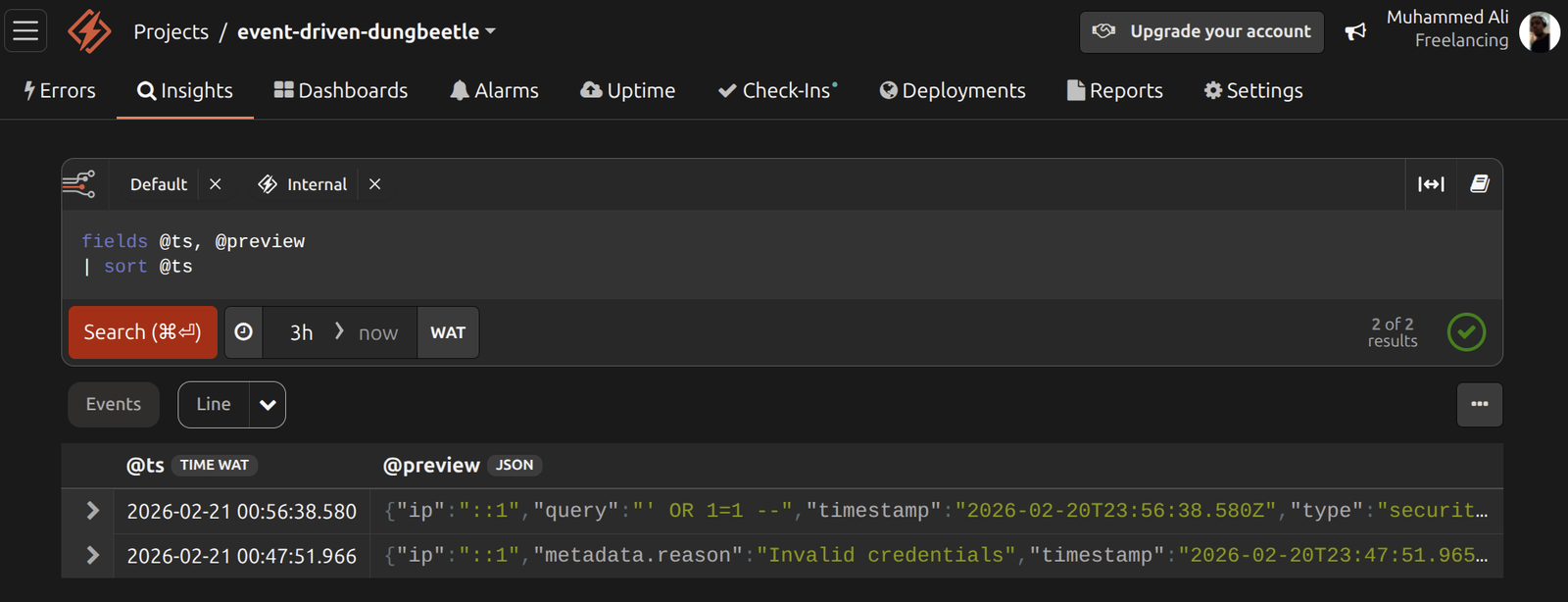
This approach turns your application into the primary source of security intelligence. Instead of forwarding system logs and building fragile parsing rules, you show events at the moment the risk occurs. The result is faster threat detection, cleaner security data, and SIEM-style security monitoring without the operational overhead of traditional security pipelines.
If you want to take this further, you can extend the pattern to permission changes, rate-limit violations, token misuse, or unusual API access patterns.
Benefits of Honeybadger for SIEM alerts
Traditional enterprise SIEM solutions require significant investment in licensing, infrastructure, and specialized personnel. Other security solutions like Splunk, QRadar, and ArcSight need you to have a dedicated security operations center and security teams trained in complex query languages. These platforms also require deep integration work to connect with your existing infrastructure and other security tools already in your stack.
That's not the case for Honeybadger compared to other tools used for security event management. It removes these barriers through developer-focused integration, so you focus more on improving security posture. Setup takes minutes, and installing the package requires just a few commands. The platform automatically captures events through existing error and performance monitoring instrumentation, which lets you enhance threat detection capabilities (improve security posture) without overhauling your entire toolchain.
Alert configuration happens through intuitive web interfaces. Creating a SIEM solution alert resembles configuring a performance threshold, which involves selecting the event pattern, defining the threshold, and specifying notification channels. Structured logging lets you query and analyze data immediately. Notifications integrate seamlessly through Slack, PagerDuty, and webhooks. The platform combines SIEM system capabilities with error tracking and performance monitoring in a single interface to provide a unified dashboard for security incident investigation.
You can sign up for a free trial of Honeybadger to see if this will fit your company’s needs.

Written by
Muhammed AliMuhammed is a Software Developer with a passion for technical writing and open source contribution. His areas of expertise are full-stack web development and DevOps.