The best observability platforms for developers
At some point, logs stop being enough. As applications grow more distributed, understanding what's actually happening in production becomes harder. That's what observability platforms are built for. The hard part is figuring out which one is actually right for your application — and your budget.
This guide covers some popular options: what they do well, where they fall short, and who they're for. Whether you're evaluating an observability tool for the first time or reconsidering your current tools, the goal is to give you enough signal to make the right choice.
What is an observability platform?
Observability tools and platforms are centered around helping engineers understand system performance, visualize data, and ultimately provide comprehensive visibility across the entirety of an organization's systems.
Software applications used to be built with monolithic code bases. This means that the entire application shared one code base, one deployable artifact, and one runtime. Everything was tightly coupled together. While yes, there was a need for typical metrics and logs to analyze data and system performance, there weren't multiple complex systems to aggregate said data sources.
As the internet continued to take over the world, and more and more complex software companies started to take form, a new paradigm of software architecture emerged. In the early 2010s, the concept of "microservices" started to gather steam as the disadvantages of monoliths, such as slower builds, deployment coupling, and harder to maintain modularity, started to create too much friction across engineering teams.
In comparison to a monolithic code base, microservices look to break apart business logic into small, independent services that each can be deployed separately. For example, if you were looking to build an e-commerce apparel company, you may want to have separate microservices for orders, inventory, and customers. The advantages of microservices are numerous, especially for apps that need to scale, and include independent scaling (you can put more resources behind ONE service without having to scale the entire system) and deploys, fault isolation (an issue in one microservice may not bring down the entire application), and stack freedom (one app can be written in Swift, one in Rails, etc.).
However, the existing tools and solutions for observability no longer met the needs of companies utilizing a microservices architecture. With truly distributed systems running in cloud environments, a need for tools that could provide comprehensive insights and visibility started to arise. Software engineering teams needed one unified platform to observe system behavior across all of their infrastructure components.
For example, let's go back to the e-commerce apparel company. The engineers need to be able to have unified observability to be able to identify overall system performance bottlenecks across the entire stack. Let's say the business metric of the number of orders sees a dramatic drop, and the business wants to understand why. A data observability platform might show that an increase in calls to the authentication service is causing increased latency for customers trying to sign in to their accounts, which is causing clients to get frustrated and abandon orders. How does an observability tool capture this telemetry data?
In software engineering terms, you may hear the term "telemetry data" — this typically includes:
- Metrics (numbers over time)
- Logs (text events)
- Traces (end-to-end request flows)
- Events (discrete actions like deploys, errors, or configuration changes)
By bringing together metrics, logs, and traces as observability data, organizations are able to go beyond traditional monitoring to optimize performance, receive real-time, actionable insights, and ultimately reduce operational costs and provide better user interactions.
Types of observability platforms
Not all observability platforms are solving the same problem. Some platforms are built for complex distributed systems: broad feature coverage, enterprise scale, and pricing to match. Developer-focused tools prioritize fast setup and clear, actionable output, with tighter scope and more predictable costs. Logging platforms are built around ingesting and querying massive volumes of log data. Most teams land somewhere on the spectrum between "we need everything" and "we need something that just works."
The features these platforms offer can vary wildly, and the enterprise-focused tools in particular can feel overwhelming. You probably care about a subset of the common features they provide:
-
APM (Application Performance Monitoring): Provides deep visibility into application code across the stack, including features such as distributed tracing, flame graphs, endpoint latency breakdowns, service dependency maps, and profiling of things like CPU, memory, etc.
-
Infrastructure and Database Monitoring: These observability tools allow engineers to keep tabs on their CPU, memory, containers, cluster health, and network and host-level metrics. Engineers can also glean real-time insights into the database performance.
-
Log Management: Observability platforms centralize logs across all sources (application, job processor such as Sidekiq, databases such as Postgres, in-memory store such as Redis, and other cloud services). Engineers are able to see live tails (real-time log streaming), log pipelines (filter, transform, mask), and analyze log data to gain comprehensive insights.
-
Distributed Tracing: One of the key components that make observability tools able to provide deeper insights, observability tools allow engineers to easily observe the end-to-end journey of requests and identify bottlenecks.
-
Real User Monitoring (RUM): RUM tooling allows engineers to monitor actual users on their application. For example, an engineer would be able to look up a specific client and view their individual page load times, any errors, and even replay their actual session.
-
Synthetic Monitoring: Whereas RUM tools are tracking real users' behavior, "synthetic" monitoring is exactly what you would expect it to be — observability tools simulate user behavior using automated checks like typical API calls and frequent user flows like sign-in, login, etc. This can be very beneficial to continuously monitor the state of the application.
-
Dashboards: Oftentimes, it is helpful for engineers to pull insights from multiple tools. For example, an engineer might want to look at the performance of a specific endpoint, alongside business metrics, alongside SLO metrics. Observability tools often provide customizable dashboards so that engineers can gain this comprehensive visibility by creating graphs, time comparisons, and views that can include logs, metrics, and traces.
-
Alerting & SLO Monitoring: These tools help engineers ensure they are being notified of potential issues. For example, observability tools may allow a team to create an alert that pages someone if a Sidekiq queue is greater than a certain amount over a certain time period.
-
Security Monitoring: Observability tools often provide security analytics to identify potential threats or vulnerabilities.
-
CI (Continuous Integration) Visibility: CI is a new-ish software development practice in which teams merge their code changes into a shared main branch, and each merge automatically triggers the build, the test suite to run, any linting or code quality checks, etc. Most observability tools know this is common practice for most dev teams, and provide monitors so that engineers can keep track of pipeline duration, build failures, and metrics related to their test suite — for example, how quickly their tests run and any flaky tests (tests that fail or pass sporadically, and are unrelated to the actual code changes being made).
-
Integration Ecosystem: In order to make an observability platform the right observability tool for your organization, you need to ensure that it can integrate with all of your existing stack. For example, if you use AWS, you will want to make sure you choose an observability tool that can integrate with AWS. This is, of course, a bit of a trivial example given the popularity of AWS.
Six great observability tools
Now that we have a grasp of what observability tools are and why they are important for system performance, especially in distributed systems environments, the next step in our journey is to look at who the players are in this space.
1. Datadog
Overview: Arguably the most popular tooling with an incredible overall market share, Datadog is likely a name in this industry that you are already familiar with. Datadog's centralized platform provides logs, metrics, traces, APM (application performance monitoring), and infrastructure monitoring. It is often the top choice for cloud environments that utilize a heavy microservices architecture.
Key Features:
- APM (Application Performance Monitoring)
- Infrastructure and database monitoring
- Log management
- Distributed tracing
- Real user monitoring (RUM)
- Synthetic monitoring
- Dashboards
- Alerting & SLO monitoring
Pricing: Datadog's pricing model is based on usage and depends on a few different levers, such as the number of hosts, data volume, and features that you choose to integrate. For basic infrastructure monitoring, you are charged per "host" — typically around $15 per host per month. If you enable additional features, such as APM, your cost goes up to around $30 per host per month. For other services, pricing is based on how much you use them. For example, per metric, per GB of ingested log data, etc. One of the downsides of Datadog is that its pricing model can be quite complex.
Overall Pros: Trusted by many large companies, strong real-time debugging and dashboarding/visualization tools, full product suite.
Cons: Can be expensive, and the pricing model itself can be complex, may be overkill for smaller companies.
2. New Relic
Overview: Another strong player in the observability tools space, New Relic, is also highly sought after by larger companies. It also includes a full product suite that ingests telemetry data (logs, metrics, traces, events) and allows engineers to monitor system performance and visualize data.
Key Features:
- APM (Application Performance Monitoring)
- Infrastructure and database monitoring
- Log management
- Distributed tracing
- Real user monitoring (RUM)
- Synthetic monitoring
- Dashboards
Pricing: New Relic's pricing is usage-based, centered primarily on data ingestion and user "seats" (i.e, how many users will be utilizing their tools). New Relic does have a free tier, but after that, additional usage is based on GB of data ingested. "Seats" include "full platform users" who need access to advanced observability features, and "basic users" who are free.
Overall Pros: Strong integration support (780+), offers "intelligent observability" which utilizes AI to predict issues and automate workflows, and offers a "free tier."
Cons: Utilizes its own query language (NRQL), which creates a steep initial learning curve, and does not have as strong infrastructure tooling as other options.
3. Dynatrace
Overview: Dynatrace is an enterprise-grade observability and automation platform known for its AI-driven insights. It is often the best observability tool for organizations operating large distributed systems in multi-cloud or Kubernetes-heavy environments.
Key Features:
- APM (Application Performance Monitoring)
- Infrastructure and database monitoring
- Log management
- Distributed tracing
- Real user monitoring (RUM)
- Synthetic monitoring
- Dashboards
Pricing: Dynatrace's pricing model centers around host units and data volume, dependent on which modules are being used. It is one of the more expensive options in the industry.
Overall Pros: Less manual setup, known for being "best in class" for AI-assisted root cause analysis.
Cons: Very expensive, more complex procurement and onboarding.
4. Honeybadger
Overview: Honeybadger is a developer-focused observability platform built around the things most teams actually need: error tracking, uptime monitoring, cron & heartbeat monitoring, application performance, and log management. Setup takes minutes. You can send structured event data and query it directly, with automatic dashboards and alerting on top. It's designed to give developers direct access to their data without black-box abstractions or a dedicated ops team to run it.
Key Features:
- Error and exception tracking
- Uptime and cron/heartbeat monitoring
- Performance insights
- Log management and event tracking
- Querying, dashboards, and alerting
Pricing: Honeybadger's pricing is straightforward based on data volume, with no cap on users or hosts. It is typically much more affordable than other observability tools that tier on those dimensions.
Overall Pros: Fast, easy setup; strong documentation and integrations with common tools like Slack and GitHub, and simple and transparent pricing.
Cons: Not the right fit if you're running a heavily distributed microservices architecture. Deep infrastructure monitoring requires more manual setup compared to dedicated enterprise platforms.
5. Splunk
Overview: Splunk is another popular option that was originally most known for its log indexing and search, but expanded into a full observability suite that includes all of the typical features. It is known for its deep log management capabilities and ability to handle massive volumes of machine-generated log data.
Key Features:
- Log Management and Search
- APM (Application Performance Monitoring)
- Infrastructure and Database Monitoring
- Distributed Tracing
- Real User Monitoring (RUM)
- Synthetic Monitoring
- Dashboards
Pricing: The pricing varies depending on whether or not your team utilizes their traditional log product or their full observability platform. For their observability tool, pricing is typically based on the number of hosts.
Overall Pros: Supports open standards such as OpenTelemetry, highly customizable dashboards, and ties into Splunk's other offerings if you already utilize them.
Cons: Higher learning curve given its feature set, still can be cost-prohibitive depending on your host count, often overkill for smaller projects and teams.
6. Sentry
Overview: Sentry is a developer-focused observability platform that is popular for its error and performance monitoring. It has a strong following with product engineering teams who want to better understand how code changes impact application health and user experience.
Key Features:
- Error Tracking & Alerting
- APM (Application Performance Monitoring)
- Release & Deployment Health Analytics
- Distributed Tracing
- Dashboards
- Session & User Impact Visibility
Pricing: Pricing is based on a combination of event-based usage and plan tiers. There is a free tier available. Similar to other platforms, pricing increases as the volume of events grows.
Overall Pros: Sentry has a generous free tier that can be utilized for smaller companies or if you just want to try it out. Sentry also offers a strong integration ecosystem and places a heavy emphasis on helping developers accelerate root cause analysis and triaging issues.
Cons: Does not provide a full observability suite like Datadog and New Relic do, so it may not be relevant for larger companies. Their distributed tracing is also not as robust as some of the other players outlined in this article.
What to look for in an observability tool
So, you may be asking yourself — when do I need to start thinking about a data observability tool, and how do I choose? Typically, you may start thinking about choosing an observability tool when you are no longer able to utilize basic logs and ad-hoc debugging to identify and solve problems in production.
Maybe you have started to utilize background jobs or have introduced asynchronous workflows. Maybe you have started down the path of breaking down a monolithic code base into microservices.
The main red flag indicating that you may need to add an observability tool to your stack is if you (and your team) start noticing an increasing amount of time that it takes to resolve incidents, and feel like you do not have a true understanding of how your code behaves in production.
OK, so you have decided that you need a unified observability platform now that traditional monitoring tools are not up to snuff. How do you choose the right fit? Here are some questions to consider:
What type of environment does my application run in?
For example, if you are running distributed systems with microservices, you will want to prioritize platforms with strong distributed tracing and service dependency mapping.
What are my biggest pain points?
When considering the most effective observability tool for your team, think about where your problems lie. Is your biggest pain point debugging failures or log management? Then, you may want to focus on a data observability tool with advanced log indexing and search.
How big is my team?
What observability tool is right for you will also heavily depend on the size of your team. If your team is small, you may want to prioritize tools that are more lightweight and easy to set up. If, however, you are part of a multi-service enterprise organization, you will likely need an observability tool that offers tools that can be used in complex environments and have a strong reputation in the industry — the last thing you want to worry about is your observability tool going offline or having bugs of its own.
What is my budget?
And then, there's money. Ultimately, while you may love to have the shiniest observability tool with the most advanced feature set, it may not realistically be in your budget. You also need to consider pricing structures... if your application spits out a large amount of log data from lots of different data sources, platforms whose pricing is based on data ingestion may become extremely expensive very quickly.
Reflecting on the questions above should help point you in the right direction.
When is Honeybadger observability the right fit?
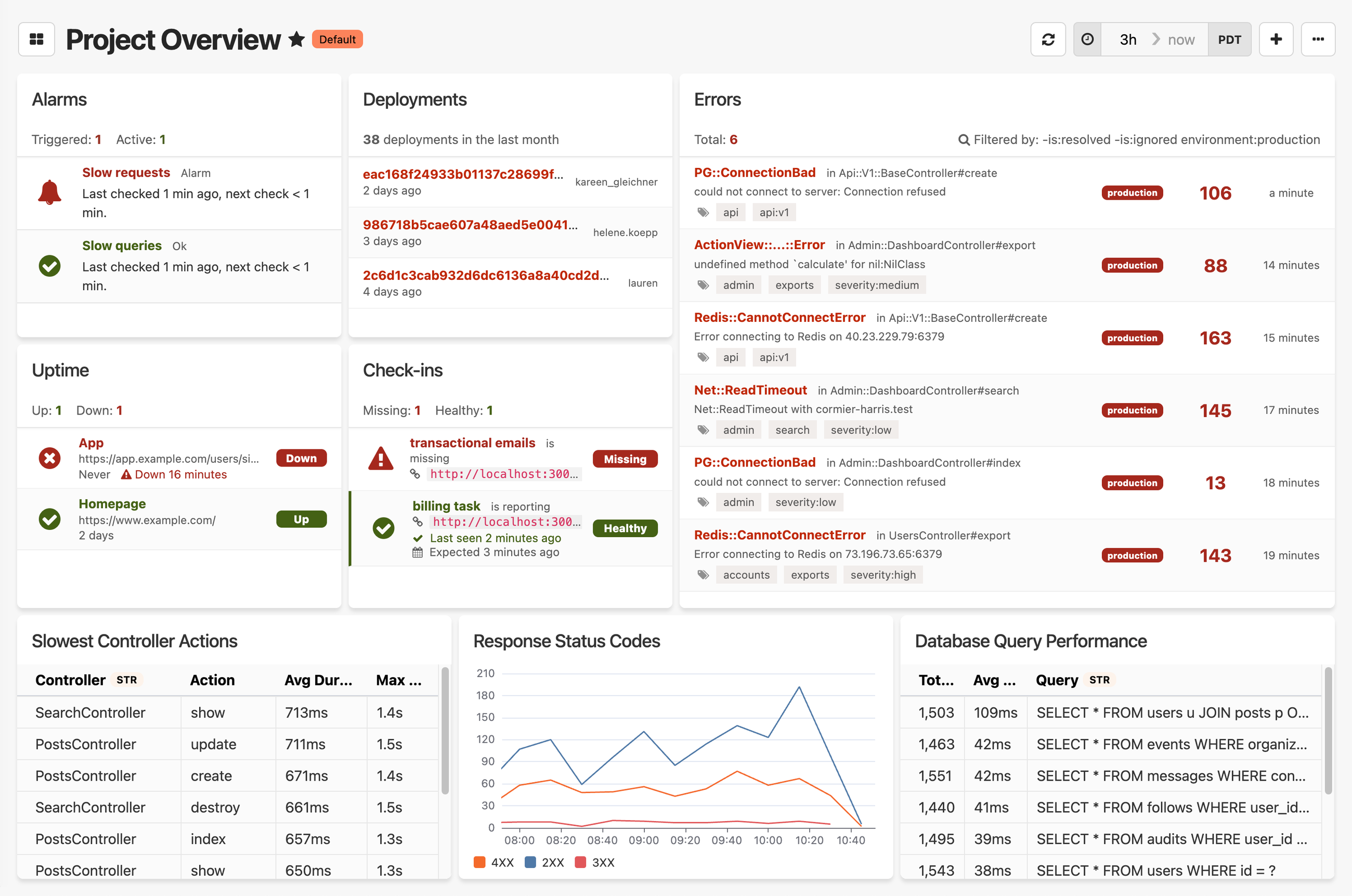
We built Honeybadger for teams who are tired of paying for features they don't use, and want a simpler alternative. If you run a monolith or a reasonable number of distributed services and want visibility into errors, downtime, and application performance — without a complex setup or a surprising bill — Honeybadger might be the right fit.
It's not the right tool if your primary need is deep infrastructure monitoring across a large microservices architecture. For that, Datadog or Dynatrace will serve you better. But if you want something that works out of the box, surfaces actionable issues, and doesn't require a dedicated team to maintain, give Honeybadger a try.

Written by
Julie KentJulie is an engineer at Stitch Fix. In her free time, she likes reading, cooking, and walking her dog.