Heroku vs AWS
Heroku vs AWS: these cloud platforms represent fundamentally different approaches to application cloud hosting. The decision between them often determines whether your team ships features in hours or spends days configuring infrastructure. Both platforms represent different philosophies in cloud computing, with Heroku prioritizing developer experience while AWS maximizes infrastructure control. Modern applications rely on technologies called cloud computing to deliver scalable, on-demand infrastructure without maintaining physical servers.
This Heroku vs AWS comparison examines the factors that impact your choice: deployment workflows (Git-push simplicity versus infrastructure configuration), cost structures (transparent per-dyno pricing versus compounded service charges), scaling approaches (instant dyno multiplication versus auto-scaling policies), operational overhead (managed updates versus manual maintenance), and migration complexity (platform lock-in versus portable architectures).
Heroku vs AWS: things to consider
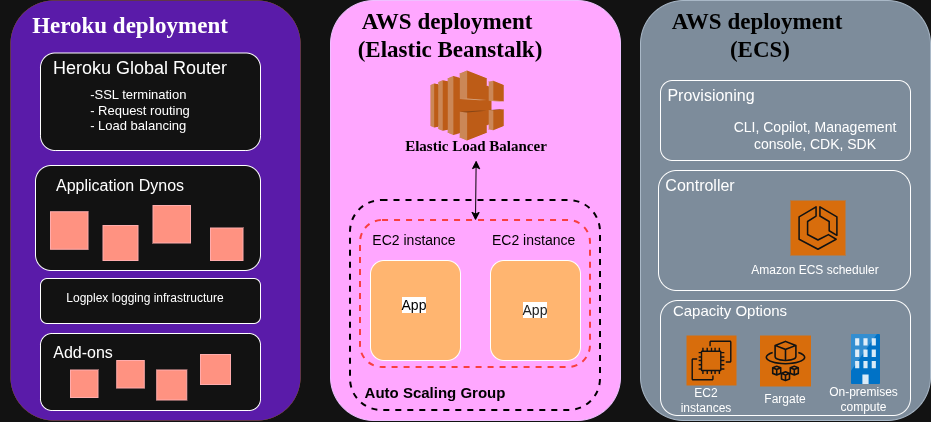
Heroku platform operates as an opinionated PaaS platform built atop AWS infrastructure, abstracting away server management and underlying infrastructure completely. The platform's containers equivalent on Heroku are called dynos, which handle application processes. It runs on lightweight Linux containers that boot from a slug (compiled application bundle). Each dyno receives 512MB of memory in the cheapest tier and scales to multiple gigabytes in performance tiers. The filesystem is ephemeral, which resets with each dyno restart. This forces stateless application design and external storage for persistent data.
As an AWS IaaS platform, AWS equips developers with discrete building blocks like EC2 instances, Lambda functions, ECS containers, RDS databases, Amazon Simple Storage Service (or Amazon S3) buckets, that developers assemble into custom architectures and complex infrastructure. An EC2 t3.micro instance provides 1GB of memory and two vCPUs with full filesystem access and persistent storage via EBS volumes. Lambda executes functions in response to events with 128MB to 10GB configurable memory. AWS functions as a comprehensive cloud service provider offering over 200 services, while Heroku operates as a focused PaaS layer.
This enables architectures ranging from monolithic EC2 deployments to serverless microservices, but shifts infrastructure decisions to development teams. AWS Elastic Compute Cloud (EC2) provides the foundational infrastructure that many cloud services build upon, including Heroku itself.
Heroku's infrastructure buildpack system detects application programming languages and automatically configures runtime environments. A Node.js application with a package.json triggers the Node.js buildpack, which installs dependencies, compiles assets, and prepares the execution environment. AWS offers similar automation through Elastic Beanstalk, but most DevOps engineers (AWS developers) construct custom deployment pipelines using CloudFormation templates or Terraform configurations that explicitly define every resource.
The networking models differ substantially. Heroku applications receive an *.herokuapp.com subdomain by default, with routing managed transparently through the platform's load balancer. Custom domains require DNS configuration, but no manual load balancer setup.
AWS, on the other hand, requires explicit virtual private cloud (VPC) configuration, subnet allocation, security settings through security group rules, elastic load balancing through load balancer provisioning, and target group configuration before applications become accessible on the internet. Engineers who manage AWS infrastructure spend significant time in the AWS Management Console configuring VPCs, security groups, and access management policies.
Deployment workflows: Git-push simplicity vs infrastructure configuration
For deploying an app, Heroku centers on Git-based workflows with minimal configuration. Developers push code to a Heroku Git remote, triggering an automatic build process that creates a new slug, deploys it across dynos, and performs health checks before routing traffic. The entire sequence completes without manual intervention:
# Initial Heroku setup
heroku create myapp
heroku addons:create heroku-postgresql:essential-0

# Deploy with a single command
git push heroku main

# View application logs
heroku logs --tail

# Scale application
heroku ps:scale web=2
Heroku's intuitive Heroku platform dashboard allows developers to manage deployments, scale dynos, and monitor applications without deep cloud computing knowledge. The platform handles dependency resolution, asset compilation, and process management based on the Procfile specification, enabling rapid app development without manual server configuration. A typical Node.js application requires only a Procfile defining process types:
web: node server.js
worker: node worker.js
Heroku's dyno manager reads this configuration and manages process lifecycles. Database credentials, API keys, and configuration values pass through environment variables accessible via process.env, with the platform injecting connection strings for provisioned add-ons.
AWS services require explicit infrastructure definition and AWS environment setup before code deployment, introducing the AWS learning curve that teams must navigate. Using AWS Elastic Beanstalk provides the closest analog to Heroku's experience, but even this managed service demands configuration files defining environment settings, instance types, and scaling parameters. A minimal Elastic Beanstalk configuration in .ebextensions/nodecommands.config will look like this:
option_settings:
  aws:elasticbeanstalk:container:nodejs:
    NodeCommand: "node server.js"

  aws:autoscaling:launchconfiguration:
    InstanceType: t3.small

  aws:elasticbeanstalk:environment:
    EnvironmentType: LoadBalanced
Deployment proceeds through the AWS powerful CLI or EB CLI, which packages the application, uploads it to S3, and updates the environment:
# Initialize Elastic Beanstalk
eb init -p node.js-18 myapp

# Create environment with database
eb create myapp-prod --database.engine postgres --database.size 20

# Deploy application
eb deploy

# Access logs
eb logs

# Scale instances
eb scale 2
If you want to bypass Elastic Beanstalk, you would have to construct deployment pipelines manually. A common pattern uses AWS CodePipeline to orchestrate source control integration, CodeBuild for compilation, and ECS for container orchestration.
Container-based AWS deployments using ECS Fargate require a task definition JSON specifying container images, CPU and memory allocation, environment variables, and networking configuration:
{
  "family": "myapp",
  "networkMode": "awsvpc",
  "requiresCompatibilities": ["FARGATE"],
  "cpu": "256",
  "memory": "512",
  "containerDefinitions": [
    {
      "name": "web",
      "image": "123456789.dkr.ecr.us-east-1.amazonaws.com/myapp:latest",
      "portMappings": [
        {
          "containerPort": 3000,
          "protocol": "tcp"
        }
      ],
      "environment": [
        {
          "name": "DATABASE_URL",
          "value": "postgresql://user:pass@db.example.com:5432/dbname"
        }
      ],
      "logConfiguration": {
        "logDriver": "awslogs",
        "options": {
          "awslogs-group": "/ecs/myapp",
          "awslogs-region": "us-east-1",
          "awslogs-stream-prefix": "ecs"
        }
      }
    }
  ]
}
This task definition connects to a service definition that integrates with Application Load Balancers, configures health checks, and manages deployment strategies (rolling updates, blue-green deployments). The manual assembly process provides control over resource allocation but increases deployment complexity by an order of magnitude compared to Heroku's Git-push model.
Cost models and pricing analysis
Heroku vs AWS pricing comparison may not be as straightforward as you might think. The choice between these cloud platforms ultimately depends on whether teams value deployment simplicity or infrastructure flexibility. Heroku's pricing follows a straightforward per-dyno model. The Basic plan charges $7 monthly per dyno, providing 512MB memory and automatic SSL. Standard dynos cost $25-50 monthly with 512MB-1GB memory. Performance dynos range from $250-500 monthly for 2.5GB-14GB memory. Add-ons follow similar transparent pricing. Heroku Postgres Essential-0 costs $5 monthly for 1GB storage and 20 connections, while Essential-1 provides 10GB storage for $9 monthly.
AWS pricing compounds multiple service charges. AWS instance pricing starts at approximately $15 monthly for an EC2 t3.small instance (2 vCPUs, 2GB memory) in us-east-1 with on-demand pricing, but requires additional charges for EBS storage ($0.10 per GB-month), data transfer ($0.09 per GB egress), and load balancer operation ($16 monthly base plus $0.008 per LCU-hour). While AWS offers free tiers for experimentation (750 hours of t2.micro monthly), reserved instances reduce EC2 costs by 40-60% with one or three-year commitments for production workloads, introducing capacity planning complexity we don't have in Heroku's monthly subscriptions.
Consider a Node.js/React application serving 10,000 monthly active users with moderate traffic patterns. The architecture includes a web server, background worker, PostgreSQL database, and Redis cache:
Heroku deployment:
- 2x Standard-1X web dynos (1GB each): $50/month
- 1x Standard-1X worker dyno: $25/month
- Heroku Postgres Standard-0 (64GB, 120 connections): $50/month
- Heroku Redis Premium-0 (100MB): $15/month
- Total: $140/month
AWS deployment (Elastic Beanstalk):
- 2x t3.small EC2 instances: $30/month
- Application Load Balancer: $20/month (estimated with LCU charges)
- RDS PostgreSQL db.t3.micro (1 vCPU, 1GB, 20GB storage): $25/month
- ElastiCache Redis cache.t3.micro (0.5GB): $12/month
- EBS storage (20GB across instances): $2/month
- Data transfer (estimated 50GB egress): $4.50/month
- Total: $93.50/month
AWS deployment (ECS Fargate):
- 2x Fargate tasks (0.5 vCPU, 1GB each, continuous): $36/month
- Application Load Balancer: $20/month
- RDS PostgreSQL db.t3.micro: $25/month
- ElastiCache Redis cache.t3.micro: $12/month
- Data transfer: $4.50/month
- Total: $97.50/month
Organizations leveraging cloud computing services from either provider must consider long-term operational costs beyond monthly subscription fees. Heroku's simplified pricing will eliminate surprise charges from misconfigured computing resources, and there will be no accidental fees. AWS requires constant cost monitoring through Cost Explorer, budget alerts, and tagging strategies to prevent billing surprises.
Note: It may look like you will spend less on AWS, but the extra technical expertise required to make AWS run as expected might increase the overall expense for deployment in the long run.
Deployment features comparison
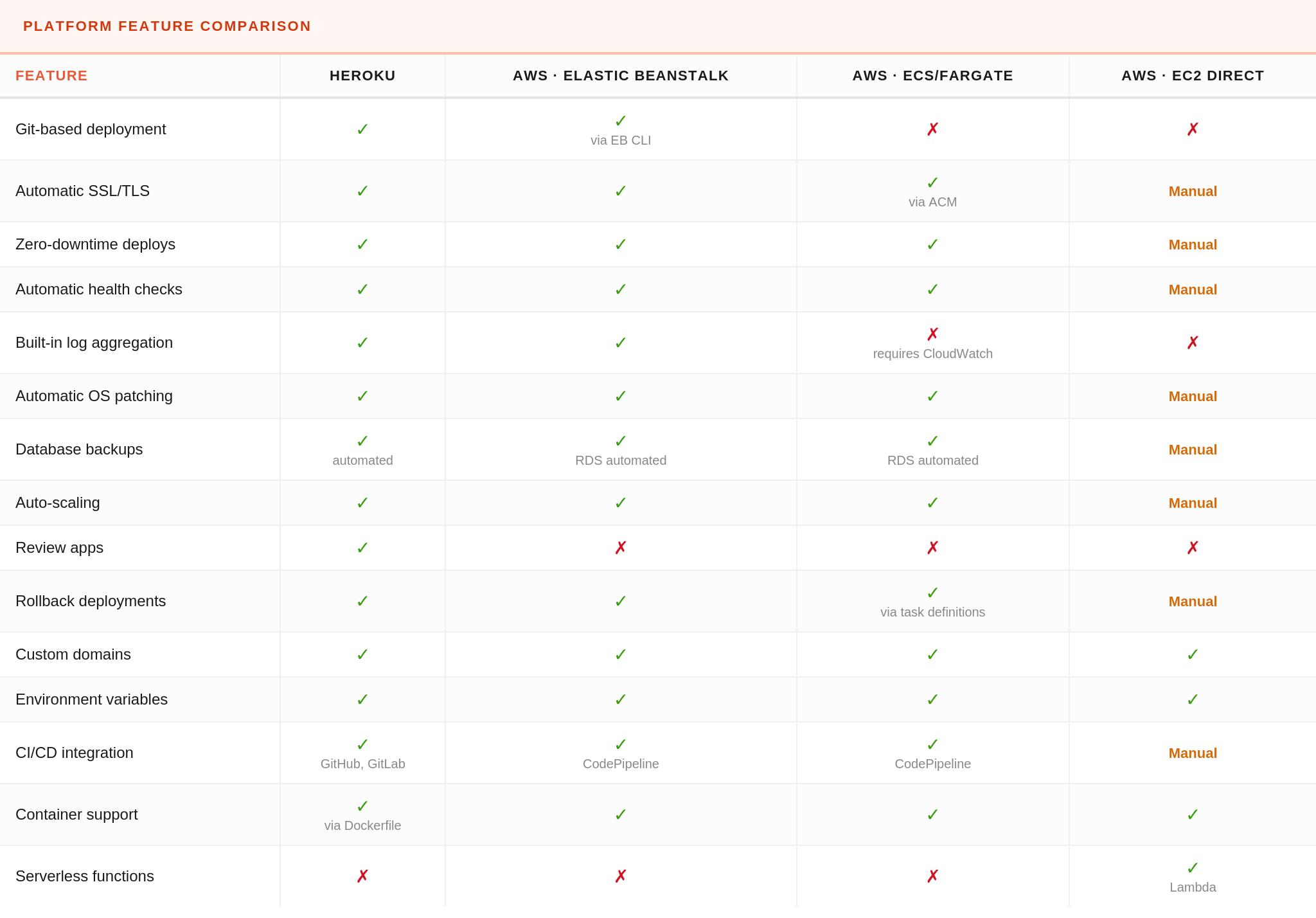
Heroku and AWS offer overlapping capabilities with vastly different implementation approaches. The following table compares deployment features across Heroku and three common AWS deployment patterns (Elastic Beanstalk (managed PaaS), ECS Fargate (container orchestration), and direct EC2 management).
Features marked "Manual" require custom implementation through scripts, configuration management tools, or third-party services rather than automation provided by the platform.
Scaling AWS vs Heroku: performance and operational tradeoffs
Heroku and AWS manage cloud infrastructure differently, as we know. Heroku hides complexity behind automation while AWS demands explicit configuration at every level. Scaling Heroku applications works through dyno multiplication for horizontal scaling (launching multiple app instances) and dyno type selection for vertical scaling. Scaling to 10 Standard-2X dynos (creating multiple app instances of 1GB each) happens instantly via the CLI or dashboard without application code changes. The platform's intelligent routing distributes requests across available dynos using a routing algorithm that occasionally produces request queuing under heavy load. Performance-M dynos provide dedicated computing resources and reduced request latency compared to Standard dynos' shared infrastructure.
AWS auto-scaling operates at the infrastructure layer. Elastic Beanstalk configurations specify scaling triggers based on CloudWatch metrics. A typical configuration scales EC2 instances when the average CPU exceeds 70% for five minutes:
option_settings:
  aws:autoscaling:asg:
    MinSize: 2
    MaxSize: 10

  aws:autoscaling:trigger:
    MeasureName: CPUUtilization
    Statistic: Average
    Unit: Percent
    UpperThreshold: 70
    UpperBreachScaleIncrement: 2
    LowerThreshold: 30
    LowerBreachScaleIncrement: -1
ECS Fargate enables finer-grained scaling through target tracking policies on custom CloudWatch metrics. Teams emit application-level metrics (active connections, queue depth, response times) to CloudWatch and configure scaling policies responding to business logic rather than infrastructure metrics. This scaling responds to load patterns that infrastructure metrics miss.
Lambda functions scale automatically to concurrent execution limits (1,000 concurrent invocations by default, increasable via service quotas). Each invocation runs in an isolated execution context with dedicated memory and CPU allocation. Cold start latency (100-800ms for Node.js functions) impacts performance for infrequently accessed endpoints but disappears under sustained load as Lambda maintains warm execution contexts.
Heroku's ephemeral filesystem and 30-second request timeout constrain certain workload types. Long-running background jobs exceeding 30 seconds require worker dynos rather than web dynos. File uploads must stream directly to S3 or similar external storage since filesystem writes disappear on dyno restart.
AWS imposes no such timeout restrictions. EC2 and ECS tasks run indefinitely, enabling long-running processes, persistent WebSocket connections, and stateful application architectures. The flexibility introduces operational responsibilities that Heroku manages automatically. Teams must implement health checks, graceful shutdown handlers, and restart policies that Heroku provides out of the box.
Network performance follows similar patterns. Heroku's shared routing infrastructure introduces variable latency (typically 10-50ms) between request receipt and application processing. AWS Application Load Balancers add 1-5ms latency with predictable performance characteristics. Teams requiring single-digit millisecond response times deploy on AWS with dedicated load balancers, placement groups for reduced inter-instance latency, and Enhanced Networking for 25-100Gbps network bandwidth.
When to choose Heroku, when to choose AWS, and when to use both
Understanding the architectural differences between Heroku and AWS helps you select the right foundation for web apps, APIs, and mobile apps. Heroku suits teams prioritizing rapid app development velocity and a streamlined deployment process over infrastructure optimization, avoiding the AWS learning curve. Startups validating product-market fit, agencies shipping client projects rapidly, and small teams without dedicated operations staff benefit from Heroku's reduced operational overhead. The platform eliminates infrastructure decisions that distract from product development.
Choose Heroku when building highly scalable web applications that fit platform constraints: stateless web applications, API servers, scheduled background jobs with reasonable duration, and traffic patterns under 100 requests per second. The 30-second request timeout handles most HTTP endpoints adequately. Applications requiring PostgreSQL, Redis, Kafka, Elasticsearch, or other common infrastructure components benefit from the managed services Heroku provides through add-ons with automatic backups, monitoring tools, and maintenance.
AWS services become necessary when applications demand infrastructure flexibility beyond Heroku's abstractions, despite the steeper AWS learning curve for DevOps engineers. Machine learning inference workloads requiring GPU instances, real-time analytics processing terabytes daily, multi-region active-active deployments, or HIPAA/SOC 2 compliance with dedicated tenancy all exceed Heroku's capabilities. Teams optimizing infrastructure costs at scale achieve 50-70% savings through reserved instances, spot instances, and resource right-sizing, which Heroku's fixed pricing model prevents.
Hybrid architectures combine both platforms strategically. A common pattern deploys the core web application on Heroku for rapid iteration while offloading specialized workloads to AWS, like video transcoding in AWS Lambda, data analytics in EMR, machine learning inference in SageMaker, and file storage in S3, all part of the broader AWS ecosystem. Heroku applications' integration with AWS services happens through API endpoints or direct SDK calls using IAM credentials stored in Heroku config vars.
Migration considerations and common pitfalls
Migrating from Heroku to AWS requires addressing architectural assumptions baked into Heroku applications. Applications writing temporary files, caching assets locally, or storing session data on disk fail when moved to AWS without refactoring to Redis, S3, or database-backed storage.
Environment variable management becomes explicit during AWS migration. Heroku injects DATABASE_URL and other add-on credentials automatically, while AWS requires manual configuration through Systems Manager Parameter Store, Secrets Manager, or environment variables in task definitions. The migration checklist must enumerate every config var and establish AWS equivalents:
# Export Heroku environment variables
heroku config --shell > .env.heroku

# Convert to AWS Systems Manager parameters
while IFS='=' read -r key value; do
  aws ssm put-parameter \
    --name "/myapp/prod/$key" \
    --value "$value" \
    --type "SecureString"
done < .env.heroku
Database migration requires careful planning around downtime windows and replication lag. The recommended approach establishes AWS RDS as a follower to Heroku using logical replication, allowing traffic cutover with minimal downtime.
Once replication lag stabilizes (typically under one second), maintenance mode redirects traffic to AWS while the final database sync completes. The process works for databases under 100GB, but becomes impractical for terabyte-scale datasets requiring offline migration windows or more sophisticated replication tooling.
Applications using Heroku add-ons, including review apps for testing branches, must replace each with AWS equivalents or third-party SaaS. Heroku Redis maps to ElastiCache, Heroku Kafka to Amazon MSK, Heroku Scheduler to CloudWatch Events + Lambda.
DNS cutover represents the final migration step. Heroku applications respond to myapp.herokuapp.com and custom domains through Heroku's edge routing. Amazon Web Services migrations require updating DNS records to point at CloudFront distributions, Application Load Balancers, or API Gateway endpoints.
Choosing the right platform for your team
This Heroku vs AWS comparison makes one thing clear: these cloud platforms aren't competitors—they're cloud services built for different stages of a product's life, each with distinct approaches to cloud computing and infrastructure management. Heroku gives you the fastest path to a working, scalable application with almost no operational overhead, while Amazon Web Services offers the flexibility needed for complex architectures, large-scale optimizations, and workloads that exceed platform limits.
DevOps engineers moving between the two must plan for changes in deployment workflows, environment management, and infrastructure responsibilities, especially when shedding Heroku’s built-in conveniences. The comparison between Heroku and AWS extends beyond pricing to include developer productivity, operational overhead, and long-term scalability.
Like this article? Join the Honeybadger newsletter to learn more.

Written by
Muhammed AliMuhammed is a Software Developer with a passion for technical writing and open source contribution. His areas of expertise are full-stack web development and DevOps.