Errors in Python: types, causes, and examples
Errors in Python are issues in a program that cause incorrect results or prevent proper execution. Some Python errors are loud and obvious, and your code barely gets started before it throws an error that tells you exactly what went wrong. Other errors are more subtle, allowing your Python program to run without complaints while silently producing incorrect results that only become apparent later. These differences become clearer when you group errors in Python based on how they occur and how they impact execution.
For example, syntax errors get caught before the code even runs, and runtime errors blow up mid-execution. System-level errors have nothing to do with your code—and they still stop execution—while logical errors don’t stop execution but produce incorrect results. Understanding the different types of errors and learning how to avoid them is essential for writing reliable and robust code. Let's look at the different types of errors in Python, their causes, and how to avoid them.
Different types of errors in Python
We can broadly categorize Python errors into four types, as shown in the following image:
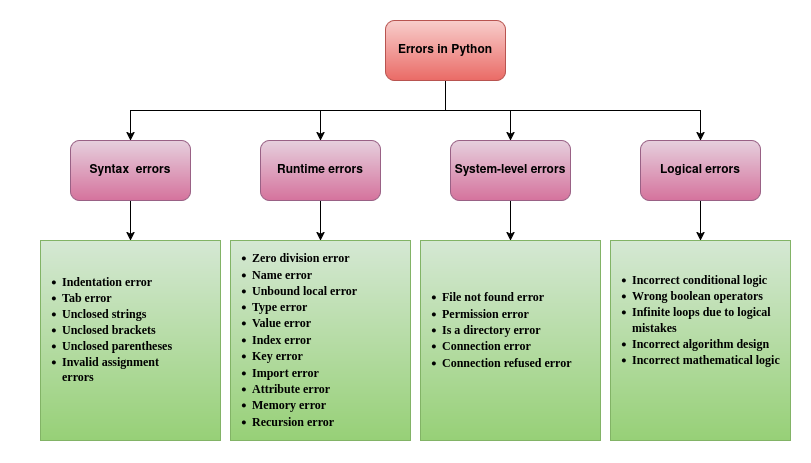
- Syntax errors: Syntax errors in Python occur due to invalid syntax, incorrect indentation, or typos. These errors are detected before the program is executed, while the Python interpreter parses the code.
- Runtime errors: In Python, runtime errors occur during execution when the program encounters an invalid operation.
- System-level errors: System-level errors in Python are raised by the runtime environment or the operating system due to issues such as memory overflow or interruptions.
- Logical errors: Logical errors occur when the program's logic is incorrect, even though the code runs without errors, producing incorrect results.
Let's discuss all these Python error types one by one in detail with examples, starting with syntax errors.
Syntax errors in Python
Syntax errors are the errors caused by invalid code structure, typos, incorrect indentation, etc. For example, an if block is defined in Python using the if keyword, a boolean condition, and the : character. If we skip : while writing an if block in Python, the code runs into SyntaxError with the error message SyntaxError: expected ':', as shown in the following example:
if x > 10
    print("Honeybadger")
This code gives the following error message:
  File "/path/to/code.py", line 1
    if x > 10
             ^
SyntaxError: expected ':
Syntax errors occur when the interpreter cannot parse the code because it violates Python’s grammar rules. Let's discuss some of the common syntax errors in Python.
Indentation errors in Python
Python uses spaces and tabs for code indentation. The code will run into IndentationError if a code block doesn't have correct indentation. For example, defining an if block requires us to indent the lines in the if block to the right by two/four spaces. If we don't indent the lines in the if block, the code runs into IndentationError with the error message IndentationError: expected an indented block after 'if' statement on line x.
if x > 10:
print("Honeybadger")
The unindented if block gives the following error:
  File "/path/to/code.py", line 2
    print("Honeybadger")
    ^
IndentationError: expected an indented block after 'if' statement on line 1
Similarly, we need to indent the code block inside a function definition. Not doing so gives us an IndentationError with the message IndentationError: expected an indented block after function definition on line x, as shown below:
def say_hello(name):
print(f"Hi {name}, you are at Honeybadger")
In this code, the print statement inside the say_hello() function isn't indented to the right. Hence, the code gives the following error:
  File "/path/to/code.py", line 2
    print(f"Hi {name}, you are at Honeybadger")
    ^
IndentationError: expected an indented block after function definition on line 1
When you indent a code block, it is important to keep the indentation the same for each statement in the code block. Otherwise, the program runs into IndentationError. For example, if you indent the first statement of a code block by four spaces and the second statement by two spaces, the program will run into IndentationError with the error message IndentationError: unindent does not match any outer indentation level, as shown in the following example:
def say_hello(name):
    print(f"Hi {name}, you are at Honeybadger")
  print("Great seeing you here.")
Output:
  File "/path/to/code.py", line 3
    print("Great seeing you here.")
                                   ^
IndentationError: unindent does not match any outer indentation level
Similarly, if you indent the first statement in a code block by two spaces and the second statement by four spaces, the program will run into IndentationError with the message IndentationError: unexpected indent, as shown below:
def say_hello(name):
  print(f"Hi {name}, you are at Honeybadger")
    print("Great seeing you here.")
Output:
  File "/path/to/code.py", line 3
    print("Great seeing you here.")
IndentationError: unexpected indent
Tab error
TabError is a specific indentation error caused by mixing tabs and spaces to indent code blocks. For instance, you can indent a statement by the same distance using four spaces or one tab. Visually, it looks the same. However, if you indent a statement in a code block using a tab and another using four spaces, the program will run into TabError with the error message TabError: inconsistent use of tabs and spaces in indentation, as shown in the following example:
def say_hello(name):
    print(f"Hi {name}, you are at Honeybadger") # Indentation using Tab
    print("Great seeing you here.")  # Indentation using four spaces
Output:
  File "/path/to/code.py", line 3
    print("Great seeing you here.")  # Indentation using four spaces
TabError: inconsistent use of tabs and spaces in indentation
Python 3 explicitly disallows mixing tabs and spaces for indentation in a way that makes the meaning ambiguous, and you should always avoid it.
Unclosed strings/ brackets/ parentheses
A Python program runs into a SyntaxError if you don't close a string, parentheses, or a bracket. For example, if you don't close a string, the program runs into SyntaxError with the message SyntaxError: unterminated string literal.
if x > 10:
    print("Honeybadger)
In this code, the closing " is missing in the "Honeybadger string. Due to this, the program runs into SyntaxError, as shown below:
  File "/path/to/code.py", line 2
    print("Honeybadger)
          ^
SyntaxError: unterminated string literal (detected at line 2)
Similarly, if we forget the closing parenthesis while calling a function or defining a tuple, the program runs into SyntaxError with the message SyntaxError: '(' was never closed, as shown below:
print("Honeybadger"
Output:
  File "/path/to/code.py", line 1
    print("Honeybadger"
         ^
SyntaxError: '(' was never closed
Just like parentheses, if we miss the closing bracket while defining a list, the program runs into SyntaxError with the message SyntaxError: '[' was never closed, as shown below:
my_list = [1, 2, 3
Output:
  File "/path/to/code.py", line 1
    my_list = [1, 2, 3
              ^
SyntaxError: '[' was never closed
Invalid assignment errors
Invalid assignment errors are mostly caused by assigning values to literals or function calls. For example, if we assign the value "Honeybadger" to a string literal "name", the program throws a SyntaxError with the message SyntaxError: cannot assign to literal here. Maybe you meant '==' instead of '='?, as shown below:
"name" = "Honeybadger"
Output:
  File "/path/to/code.py", line 1
    "name" = "Honeybadger"
    ^^^^^^
SyntaxError: cannot assign to literal here. Maybe you meant '==' instead of '='?
Similarly, if we assign a value to a Python keyword, the program runs into a SyntaxError. For example, assigning the value Honeybadger to a variable class results in a SyntaxError with the message SyntaxError: invalid syntax, as class is a Python keyword.
class = "Honeybadger"
Output:
  File "/path/to/code.py", line 1
    class = "Honeybadger"
          ^
SyntaxError: invalid syntax
An assignment error also occurs when we miss a = character while comparing values using the equality operator. For example, if we use = instead of == to compare two values, the program runs into SyntaxError with the error message SyntaxError: invalid syntax. Maybe you meant '==' or ':=' instead of '='?, as shown below:
name = "Honeybadger"
input_string = "Honeybadger"
if name = input_string:
  print(name)
Output:
  File "/path/to/code.py", line 3
    if name = input_string:
       ^^^^^^^^^^^^^^^^^^^
SyntaxError: invalid syntax. Maybe you meant '==' or ':=' instead of '='?
How to avoid syntax errors in Python?
Syntax errors occur due to incorrect indentation, mismatched delimiters, missing punctuation, invalid variable names, or incorrect operators. You can avoid syntax errors using the following best practices:
- Always add the required colon
:after block statements likeif,for,while,def, andclass. - Avoid using reserved keywords such as
class,for,if, orreturnas variable names. - Always close all the parentheses
(), brackets[], and braces{}. - Close all string literals with matching quotation marks
'or". - Follow Python syntax rules and ensure statements are written in the correct format.
- Maintain consistent indentation, preferably using 4 spaces per indentation level, and do not mix tabs and spaces for indentation.
In addition to the above practices, you can use IDEs or code editors such as PyCharm, Spyder, or VS Code that provide syntax highlighting and linting to detect syntax errors early.
Runtime errors in Python
Runtime errors occur in a Python program after it passes the syntax check and starts executing, when something goes wrong. Examples of runtime errors in Python include ZeroDivisionError, NameError, TypeError, and ValueError. Let’s discuss the different runtime errors, their causes, and ways to avoid them.
Zero division error
The ZeroDivisionError exception is one of the most common arithmetic errors that occurs if the denominator of a division operation is zero.
x = 10 / 0
Here, we are dividing 10 by 0. Hence, the program runs into ZeroDivisionError with the error message ZeroDivisionError: division by zero:
Traceback (most recent call last):
  File "/path/to/code.py", line 1, in <module>
    x = 10 / 0
ZeroDivisionError: division by zero
Name error
The NameError exception is a runtime error that occurs when a variable is referenced before assignment.
y = x / 10
In this code, we tried to divide x by 10 without defining x or assigning it a value. Hence, the variable name x isn't present in the scope of the program, and the program runs into a NameError exception with the error message NameError: name 'x' is not defined.
Traceback (most recent call last):
  File "/path/to/code.py", line 1, in <module>
    y = x / 10
NameError: name 'x' is not defined
The NameError exception also occurs if you use a variable first and define it later in the program. For example, consider the following code:
print(greeting)
greeting = "Hi, you are at Honeybadger"
Here, we have referenced the variable greeting and later assigned it a value. Hence, the program throws a NameError exception.
Traceback (most recent call last):
  File "/path/to/code.py", line 1, in <module>
    print(greeting)
NameError: name 'greeting' is not defined
Unbound local error
The UnboundLocalError exception occurs when a local variable is referenced before assignment, in a function or method. For instance, consider the following code:
def say_hello():
    print(greeting)
    greeting = "Hi, you are at Honeybadger"

say_hello()
In this code, we have referenced the variable greeting before assigning it a value in the say_hello() function. When we call the say_hello() function, the program raises the UnboundLocalError exception with the message UnboundLocalError: local variable 'greeting' referenced before assignment.
Traceback (most recent call last):
  File "/path/to/code.py", line 5, in <module>
    say_hello()
  File "/path/to/code.py", line 2, in say_hello
    print(greeting)
UnboundLocalError: local variable 'greeting' referenced before assignment
Here, if we hadn't assigned any value to the variable after the print statement, the program would have run into a NameError exception, as shown below:
def say_hello():
    print(greeting)
    print("Hi, you are at Honeybadger")

say_hello()
Output:
Traceback (most recent call last):
  File "/path/to/code.py", line 5, in <module>
    say_hello()
  File "/path/to/code.py", line 2, in say_hello
    print(greeting)
NameError: name 'greeting' is not defined
Type error
The TypeError exceptions in Python occur when an operation is applied to a value or variable of an incompatible data type. For example, adding an integer and a string results in a TypeError exception with the error message TypeError: unsupported operand type(s) for +: 'int' and 'str', as shown below:
x = 10 + "Honeybadger"
Output:
Traceback (most recent call last):
  File "/path/to/code.py", line 1, in <module>
    x = 10 + "Honeybadger"
TypeError: unsupported operand type(s) for +: 'int' and 'str'
Similarly, calling a non-callable object or iterating on a non-iterable object also results in a TypeError exception, as shown below:
name = "Honeybadger"
name()
Output:
Traceback (most recent call last):
  File "/path/to/code.py", line 2, in <module>
    name()
TypeError: 'str' object is not callable
In this code, we defined a string variable name and tried to use it as a function in the second line. Hence, the program throws a TypeError exception with the message TypeError: 'str' object is not callable.
Value error
The ValueError exception occurs in a Python program when we use an input or a variable with the correct data type but an inappropriate value. For instance, the int() function converts a string to an integer. If the string passed to the int() function cannot be converted into an integer, the program runs into a ValueError exception, as shown in the following example:
x = int("10")
y = x + int("Honeybadger")
print(y)
In this code, the statement x=int("10") executes successfully because "10" is successfully converted into an integer. However, the string "Honeybadger" cannot be converted to an integer. Hence, the second line of the code raises a ValueError exception with the error message ValueError: invalid literal for int() with base 10: 'Honeybadger', as follows:
Traceback (most recent call last):
  File "/path/to/code.py", line 2, in <module>
    y = x + int("Honeybadger")
ValueError: invalid literal for int() with base 10: 'Honeybadger'
Similarly, square roots aren't defined for negative numbers. Hence, passing a negative number to the math.sqrt() function results in a ValueError exception due to an inappropriate value.
import math
x = math.sqrt(-10)
Output:
Traceback (most recent call last):
  File "/path/to/code.py", line 2, in <module>
    x = math.sqrt(-10)
ValueError: math domain error
In this code, -10 has the correct integer data type that the sqrt() function requires. However, it is an invalid value, and we get a ValueError exception with the message ValueError: math domain error.
Index error
The IndexError exception occurs in a Python program when we try to access an element at an index that doesn't exist in an iterable object like a string, list, or tuple. For example, if a list has six elements and we try to access the element at index 6 (the seventh element), the program runs into an IndexError exception with the message IndexError: list index out of range, as shown below:
my_list = [1, 2, 3, 4, 5, 6]
print(my_list[6])
Output:
Traceback (most recent call last):
  File "/path/to/code.py", line 2, in <module>
    print(my_list[6])
IndexError: list index out of range
Similarly, if we try to access an element at a non-existent index in a string, the program runs into an IndexError exception with the message IndexError: string index out of range, as shown in the following code:
name = "Honeybadger"
print(name[20])
In this code, we tried to access the character at index 20 in the string. However, the string is eleven characters long. Hence, the program raises an IndexError exception.
Traceback (most recent call last):
  File "/path/to/code.py", line 2, in <module>
    print(name[20])
IndexError: string index out of range
Key error
KeyError exceptions occur when we try to access a non-existent key in a Python dictionary. For instance, the dictionary in the following code has keys "a", "b", "c", and "d". When we try to fetch a value with the key "e", the program runs into a KeyError exception, as shown below:
my_dict = {"a": 1, "b": 2, "c": 3, "d": 4}
print(my_dict["e"])
Output:
Traceback (most recent call last):
  File "/path/to/code.py", line 2, in <module>
    print(my_dict["e"])
KeyError: 'e'
Module not found error
The ModuleNotFoundError occurs when we try to import a module that hasn't already been installed or downloaded to the Python module search path.
For example, suppose you want to use Honeybadger for error monitoring in a Python application. However, if you don't install honeybadger using pip and start directly by importing the honeybadger module into your code, the program will run into ModuleNotFoundError with the message ModuleNotFoundError: No module named 'honeybadger'.
import honeybadger
print("You are at Honeybadger")
Output:
Traceback (most recent call last):
  File "/path/to/code.py", line 1, in <module>
    import honeybadger
ModuleNotFoundError: No module named 'honeybadger'
ModuleNotFoundError is a specific type of ImportError that occurs when Python cannot find the module file being imported.
Import errors in Python
ImportError is a more general exception that can occur for various reasons during the import process, even when the module file exists but cannot be imported successfully due to dependency requirements or other issues. If a module exists but raises an exception while being imported, Python raises ImportError.
For instance, if we try to import a non-existent function from the honeybadger module after installing it, the program runs into an ImportError exception.
from honeybadger import nonexistingfunction
Here, we tried to import nonexistingfunction from the honeybadger module. Hence, the program raises an ImportError with the message ImportError: cannot import name 'nonexistingfunction' from 'honeybadger':
Traceback (most recent call last):
  File "/path/to/code.py", line 1, in <module>
    from honeybadger import nonexistingfunction
ImportError: cannot import name 'nonexistingfunction' from 'honeybadger'
Attribute error
In Python, every object has a set of associated attributes, i.e., field names and methods. For example, a Python list has the append() method that we use to add new values to a list. However, a tuple, an integer, a string, or a floating-point value doesn't have the append() method. Hence, if we invoke the append() method on a tuple, the program raises an AttributeError exception.
my_tuple = (1, 2, 3, 4, 5)
my_tuple.append(6)
In this code, we have used the append() method on a tuple. Hence, the program throws an AttributeError exception with the message AttributeError: 'tuple' object has no attribute 'append'.
Traceback (most recent call last):
  File "/path/to/code.py", line 2, in <module>
    my_tuple.append(6)
AttributeError: 'tuple' object has no attribute 'append'
Memory error
MemoryError in Python is a built-in exception that occurs when a program fails to allocate memory for a Python object. It usually occurs when handling extremely large datasets, constructing oversized data structures, or running inefficient code that leads to excessive memory consumption or memory leaks.
For example, creating a huge list having ten billion elements can lead to a MemoryError exception, as shown below:
my_list = [10] * (10**10)
Output:
Traceback (most recent call last):
  File "/path/to/code.py", line 1, in <module>
    my_list = [10] * (10**10)
MemoryError
While MemoryError is a runtime error, it often indicates that the program has exceeded a system limit, such as running out of RAM or exceeding the operating system's address space limit.
Recursion error
A recursion error is a runtime error that occurs when the recursion depth exceeds the limit of 1000 recursive calls. The RecursionError exception occurs if we forget to add a base case or a terminating condition while defining a recursive function. For instance, consider the following increment_till_hundred() function:
def increment_till_hundred(x):
    x += 1
    print(x)
    increment_till_hundred(x)

increment_till_hundred(80)
In the increment_till_hundred() function, we haven't defined any termination condition if the value of x reaches 100. Hence, the function keeps making the recursive call, exceeding the limit of 1000 recursive calls, and the program runs into RecursionError with the message RecursionError: maximum recursion depth exceeded while calling a Python object, as shown below:
Traceback (most recent call last):
  File "/path/to/code.py", line 6, in <module>
    increment_till_hundred(80)
  File "/path/to/code.py", line 4, in increment_till_hundred
    increment_till_hundred(x)
  [Previous line repeated 994 more times]
  File "/path/to/code.py", line 3, in increment_till_hundred
    print(x)
RecursionError: maximum recursion depth exceeded while calling a Python object
How to avoid runtime errors in Python?
Runtime errors are difficult to detect because they do not prevent the program from starting execution, unlike syntax errors. Hence, the program runs normally at first, and the error may only appear later when the line containing the problematic code is executed. To avoid runtime errors, you can use the following best practices:
- Always validate the input data before processing to ensure it has the correct data type, format, and range.
- Always implement exception handling in your Python code to catch and handle runtime errors gracefully, rather than crashing the program.
- Perform type checking using the
isinstance()function or convert the data type of values usingint(),float(), andstr()functions before applying operations on values. - Maintain a properly configured runtime environment, ensuring all required modules, dependencies, and system libraries are correctly installed.
- Test the code with different edge cases to identify potential runtime failures early.
Apart from the above practices, always write modular, well-structured code so you can easily isolate and debug errors if they occur.
System-level errors in Python
System-level errors occur in a Python program when it encounters issues such as I/O failures, memory overflows, or connection errors. All the system-level errors in Python are raised using the OSError exception or its subclasses. Let's discuss the different system-level errors in Python and how to avoid them.
File not found errors in Python
The FileNotFoundError exception occurs when we try to read a non-existent file. For example, suppose that we want to read a text file named sampletextfile.txt using the open() function. If the file doesn't exist, the program runs into FileNotFoundError with the message FileNotFoundError: [Errno 2] No such file or directory: 'sampletextfile.txt', as shown below:
file = open("sampletextfile.txt", "r")
Output:
Traceback (most recent call last):
  File "/path/to/code.py", line 1, in <module>
    file = open("sampletextfile.txt", "r")
FileNotFoundError: [Errno 2] No such file or directory: 'sampletextfile.txt'
Permission error
If a file exists and we don't have permission to read or modify it, the program raises a PermissionError exception. For example, suppose that we have a file samplefile.txt with only read access, as shown in the image:
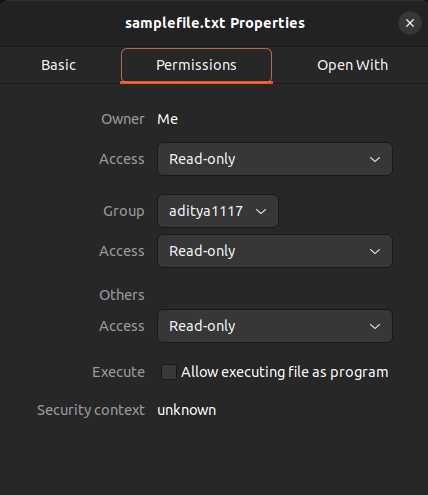
Now, if we try to open the file in append mode and modify it, the program raises a PermissionError exception with the message PermissionError: [Errno 13] Permission denied: 'samplefile.txt'. However, opening the file in read mode will not cause any issues, as we have permission to read it.
file = open("samplefile.txt", "a")
Output:
Traceback (most recent call last):
  File "/path/to/code.py", line 1, in <module>
    file = open("samplefile.txt", "a")
PermissionError: [Errno 13] Permission denied: 'samplefile.txt'
Is a directory error
We can open files using the open() function in Python. However, if you try to open a directory using the open() function, the program raises the IsADirectoryError exception.
file = open("/path/to/directory", "r")
In this code, /path/to is a directory. Hence, the program throws an IsADirectoryError exception with the message IsADirectoryError: [Errno 21] Is a directory
Traceback (most recent call last):
  File "/path/to/code.py", line 1, in <module>
    file = open("/path/to/directory", "r")
IsADirectoryError: [Errno 21] Is a directory: '/path/to/directory'
Connection error
In Python, the ConnectionError exception occurs due to network issues such as a lost internet connection, DNS errors, server downtime, or when the client fails to establish a connection to the server within a specified time limit. For instance, using the requests module to make an API call without connecting the system to the network results in the ConnectionError exception, as shown below:
import requests
response = requests.get('https://jsonplaceholder.typicode.com/todos/1')
Output:
Traceback (most recent call last):
  File "/path/to/code.py", line 4, in <module>
    response = requests.get('https://jsonplaceholder.typicode.com/todos/1')
  .
  .
  File "/home/user/.local/lib/python3.10/site-packages/requests/adapters.py", line 700, in send
    raise ConnectionError(e, request=request)
requests.exceptions.ConnectionError: HTTPSConnectionPool(host='jsonplaceholder.typicode.com', port=443): Max retries exceeded with url: /todos/1 (Caused by NameResolutionError("<urllib3.connection.HTTPSConnection object at 0x7400d45a6c80>: Failed to resolve 'jsonplaceholder.typicode.com' ([Errno -3] Temporary failure in name resolution)"))
Connection refused error
The ConnectionRefusedError is a subclass of ConnectionError, which specifically indicates that a connection attempt was explicitly refused by the remote host. It occurs due to an incorrect IP address or port number, firewall blocking, or if the server is not running or has reached its maximum capacity for pending connections. For example, consider the following code:
import socket
s = socket.socket(socket.AF_INET, socket.SOCK_STREAM)
s.connect(("localhost", 9999))
We have not run any application on port 9999. Hence, when the Python program tries to connect to the port, the program runs into ConnectionRefusedError with the message ConnectionRefusedError: [Errno 111] Connection refused, as shown below:
Traceback (most recent call last):
  File "/path/to/code.py", line 3, in <module>
    s.connect(("localhost", 9999))
ConnectionRefusedError: [Errno 111] Connection refused
How to avoid system-level errors in Python?
System-level errors in Python are often caused by missing files, insufficient permissions, memory limitations, or network failures. Although we cannot always prevent them, we can minimize system-level errors through careful resource management, validation checks, and proper exception handling. You can use the following practices to avoid system-level errors in Python.
- Always check whether files and directories exist before performing file operations.
- Check access permissions to ensure the program has the required read, write, and execute permissions for files and directories.
- Manage memory efficiently by avoiding extremely large data structures and using generators or batch processing for large datasets.
- Use context managers (
withstatement) when working with files, sockets, or other resources to ensure they are automatically closed after use. - Ensure required system resources, such as disk space, memory, and network connectivity, are available.
The best way to avoid system-level errors is to anticipate potential failures and write defensive code that validates resources and handles exceptions gracefully, since these are mostly caused by environmental or resource constraints.
Logical errors in Python
A logical or semantic error in Python occurs when a program runs without crashing or raising exceptions but produces incorrect or unintended results due to flawed code logic. Unlike syntax errors or runtime errors, Python cannot detect logical errors automatically because the code is syntactically valid and executes successfully. Logical errors occur due to incorrect algorithms, wrong conditions, faulty calculations, or mistaken assumptions in program logic.
For example, consider that you are writing a Python application to determine the voting eligibility of a person based on their age. It is given that a person aged 18 or older is eligible to vote. Now consider the following code:
if age > 18:
    print("Eligible to vote")
else:
    print("Not eligible")
This code executes successfully. But it produces incorrect output for people aged 18 due to an incorrect condition. Hence, we should have used the >= operator instead of the > operator in the if block.
Logical errors can also occur due to incorrect use of logical operators. For example, suppose we need to determine whether a person is of working age, defined as 18 to 60 years old, inclusive. Now, consider the following code:
age = 70
if age >= 18 or age <= 60:
    print("Working age")
Output:
Working age
This code prints "Working age" even if the person is over 60 years old because the first condition is True, and the or operator evaluates to True if either operand is True. Hence, we should have used the and operator rather than the or operator to get the correct output.
Logical errors are much harder to detect because the Python application does not run into exceptions. The output may appear reasonable but will still be incorrect. We can detect and avoid logical errors through unit testing, debugging, and code review, ensuring there are no flaws in the code.
Know your errors before your users do
No matter how experienced you get, errors in an application never fully disappear. What changes is how quickly you recognize them, how calmly you respond, and how efficiently you solve the errors. In this article, we discussed the different syntax errors, runtime errors, system-level errors, and logical errors in Python and how to avoid them. While we cannot eliminate errors entirely, we can significantly reduce them by following error-handling best practices.
It is important to recognize that not every error can be caught during development. Certain bugs only emerge in production, often triggered by specific user actions in unpredictable sequences that may not be covered by testing. When this occurs, users may encounter an error before the development team discovers it. This is where error tracking and application monitoring become essential.
Honeybadger provides error tracking, logging, uptime monitoring, and performance monitoring under one roof. Sign up for a free trial of Honeybadger to monitor your applications by combining error tracking, logging, and uptime monitoring, so you always know the state of your application and can catch errors before they snowball.
