---
title: "Security Risks On Rails: Misconfiguration and Unsafe Integrations"
published: "2021-12-27"
publisher: Honeybadger
author: Diogo Souza
category: Ruby articles
tags:
- Ruby
- Rails
description: "In the third and final article of our series on the OWASP Top 10 Web Application Security Risks, we’ll explore the lesser-known risks associated with the development of web applications on Rails when it comes to threats involving security misconfiguration, JSON escaping, etc."
url: "https://www.honeybadger.io/blog/rails-security-risks-part-3/"
---
In the third and final article of our series on the OWASP Top 10 Web Application Security Risks, we’ll explore the lesser-known risks associated with the development of web applications on Rails when it comes to threats involving security misconfiguration, JSON escaping, etc.
We’ll also discuss the importance of logs and metrics to increase the level of security of your applications.
As with the other articles, [RailsGoat](https://github.com/OWASP/railsgoat) will be used to explore some aspects of these threats in practice. If you're new here, please refer to the previous two articles to get the app set up and get acquainted with what we’ve explored so far. Let's jump right in!
# Security Misconfiguration
At this point in the series, we’ve explored several different ways in which attackers will attempt to exploit your applications to find all sorts of gaps that weren’t filled.
When it comes to configurations in general, it’s not that uncommon to see applications that expose unprotected files/directories, access applications with default credentials that weren’t supposed to be exposed at production, among many more possible scenarios.
For these types of flaws, there’s a grouping area that embraces a list of bad practices every Ruby on Rails developer should be aware of: [security misconfiguration](https://owasp.org/www-project-top-ten/2017/A6_2017-Security_Misconfiguration). They can happen in all parts of an application, not only the ones related to DevOps, for example.
Network services and servers, including database, web, and application servers, are on the list. Are you adding a new framework to your application or to your CI/CD? Make sure to consult the vulnerabilities involved with them, including vulnerabilities and known risks the framework itself exposes based on some practices or misuses the developers may commit.
## Mass Assignment
It’s very common for frameworks, such as Ruby on Rails and NodeJS, to allow some sort of automatic binding for the params of HTTP requests into variables and objects that live within the developers’ code.
This is targeted primarily as a matter of achieving productivity with that framework. However, it can be dangerous.
If an attacker knows about that framework particularity and tries to intentionally overwrite the sent params into unwanted variables that the app code will understand, then you’d be in a bad situation.
This type of attack is widely known as a _mass assignment_ but can also be called auto-binding or object injection in other languages and frameworks.
Let’s say that you have an endpoint to create a user in your API, and it does so based on the passed params:
```ruby
def newUser params[:user] # => {:name => "name"} @user = User.new(params[:user]) end
```
It doesn’t sound like a threat until you realize that the user record holds sensitive attributes that shouldn’t be exposed, such as a _boolean_ stating that it’s an admin user:
```ruby
params[:user] # => {:name => "name", :admin => true}
```
Luckily, if you’re working with any version of Rails later than 4, you’d be good since these versions of Rails enforce the concept of [strong parameters](https://guides.rubyonrails.org/action_controller_overview.html#strong-parameters), which is a way to require developers to explicitly define what parameters are allowed to be mass assigned, ignoring all the rest:
```ruby
params.require(:user).permit(:name) # => {:name => "name"}
```
If the developer doesn’t specify the permitted attributes, Rails will raise an `ActiveModel::ForbiddenAttributesError` exception.
If you’re working with any version of Rails earlier than 4, you’ll need to be careful since your app is [not automatically protected](https://guides.rubyonrails.org/v3.2.9/security.html#mass-assignment) against mass assignment.
To avoid this problem, you can make use of the “`whitelist_attributes`” configuration option. In the _application.rb_ file, you may add the following config line:
```ruby
config.active_record.whitelist_attributes=true
```
This will force your Rails application to require that any attribute aimed to be mass assigned be declared after the `attr_protected` reserved word:
```ruby
attr_protected :admin
```
Optionally, you can also attach each attribute to a specific role by using the alias `:as`, as shown below:
```ruby
attr_protected :salary, :as => :admin
```
If you’re migrating from Rails 3 to a newer version and still don’t want to deal with that specific part, Rails still allows the use of the [protected\_attributes](https://github.com/rails/protected_attributes) gem for a smoother upgrade path, but be mindful that this is just until version 5. From there on, no more support will be provided.
## JSON Escaping
We’ve already explored the importance of properly escaping your entities in the previous articles. Although it may seem like an old-fashioned type of issue, escaping HTML entities in your JSON responses is important to avoid dangerous exploitation of your apps.
Rails already provides a well-known config for automatically doing this on the _config/initializers/html\_entities.rb_ file:
```ruby
ActiveSupport::escape_html_entities_in_json = true
```
This allows Rails to escape any HTML content in JSON responses, which is great. Make sure to always double-check whether the value is set to `true` since there’s [some controversy](https://github.com/rails/rails/issues/15364) about the default value, depending on the version of Rails.
## Dealing with Secrets and Credentials
You probably have configured the _config/database.yml_ and _config/secrets.yml_ files many times in the past. When the project is in the beginning stage, everything’s new. There is a rush to deliver the first features, so it’s easy to forget to properly store the information in these files and thereby fail protect it from being stolen.
This type of data shouldn’t be in your Git repository because it's too sensitive.
There’s this cool phrase a lot of devs use: [strict separation of code from configs](https://12factor.net/config). Why separate them? Well, the simple fact that your app may substantially change settings, such as database credentials, from one environment to another (e.g., from the testing env to production) proves that this type of data belongs more to the environment itself than to the application.
The application simply makes use of it to understand where it is located at the moment. Who am I dealing with right now?
More than that, configs from one environment may not apply to others and may require different levels of security, encryption, roles, and so on.
So, why not keep these configs in the environment as variables? This way, you can let the DevOps tools securely take care of them and make sure that the right versions are in the right places. It’s flexible, easily updated when it’s required, and kept safely away from source code repositories. Everyone’s safe, and everyone’s happy!
Finally, be mindful that some files, such as _config/master.key_, should not be stored in code repositories. Just pay attention to whatever is configuration-sensitive and reserve a dedicated location to store it.
# Vulnerable External Components
As we’ve said at the intro of this article, developers make use of frameworks, libraries, and all sorts of external components to gain productivity and not reinvent the wheel. However, it’s very important to pay attention to what components (especially which version of them) you’re bringing home.
jQuery, for example, is known as a champion in terms of [known vulnerabilities](https://snyk.io/vuln/npm:jquery). Most of them are usually associated with XSS that are not being evicted in some specific versions for some browsers, like the inglorious Internet Explorer.
If you take a look at the JavaScript dependencies of the RailsGoat project in the _app/assets/javascripts_ folder, you may see that there’s a bunch of jQuery files there. Among them is _jquery.snippet.js_.
On line 391, you may see the function `snippetPopup()` being declared. Take a look at how it mounts the HTML code:
```javascript
'Snippet :: Code View :: '+location.href+''
```
We’ve seen what it can do with your app. Let's say that someone sends a link with the following content:
```javascript
#
```
Then, we’re going to have the script `myXXSScript()` run. This happens because the # symbol effectively closes the `title` and `head` tags and adds a third one as a `script` tag with malicious content.
The solution is simple; we need to sanitize the value of the `href` before using it on the popup code. However, this would require you to change the jQuery file code or submit an issue and wait for them to release a new version with that fix.
This is a great example of how easy it is for you to import external components that can work as a threat to your applications without you noticing them.
The same can happen to Ruby gems; some may have dangerous vulnerabilities that’ll compromise your app safety. So, how can we address this problem?
# Security Assessment
There are dozens of code security check tools available out there, such as Codeclimate, Hakiri, the Burp Suite, and many more. If you work with a company that can afford any of these, be sure to make good use of them since they’ll give you great reports on several vulnerabilities and eventual problems with your code.
Sonar also has a handful of tools, such as [SonarSource](https://www.sonarsource.com/ruby/), to provide static code analysis for your Ruby code and help you find bugs, security vulnerabilities, and code smells. It’s easy to use and to integrate with your IDE and CI/CD jobs.
## Security Gems
Alternatively, there are some neat Ruby on Rails gems to help out with security checks through scan processes similar to Sonar’s.
Let’s take the super famous gem [bundler-audit,](https://github.com/rubysec/bundler-audit) for instance. It works closely with [bundler](https://bundler.io/) to provide patch-level verification for your project gems, such as vulnerability checks, insecure gem sources, etc.
Test it out with the RailsGoat project. To install it, simply run the following command:
```bash
gem install bundler-audit
```
Then, cd into the Rails project and run the `bundler-audit` command. Among the many listed problem items it identified and printed for this command, the one shown below summarizes the report style:
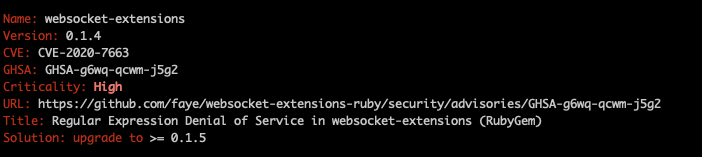_Example of an issue found by bundler-audit for the RailsGoat project_
As you can see, it scans the entire code of the project, searching for known vulnerabilities and categorizing them based on priority. There’s even a link to the GitHub issue in which you may find more details about the whys behind it.
The good part is the _Solution_ item, which advises you on how to fix the given issue. Be aware, though, that sometimes, it’s not as simple as just upgrading the version of the gem. This is because some of these upgrades come with breaking changes that you must check to avoid introducing new problems.
Another great lib for this is [Brakeman](https://github.com/presidentbeef/brakeman), which can be installed in a very similar process and gives you even more detailed reports:
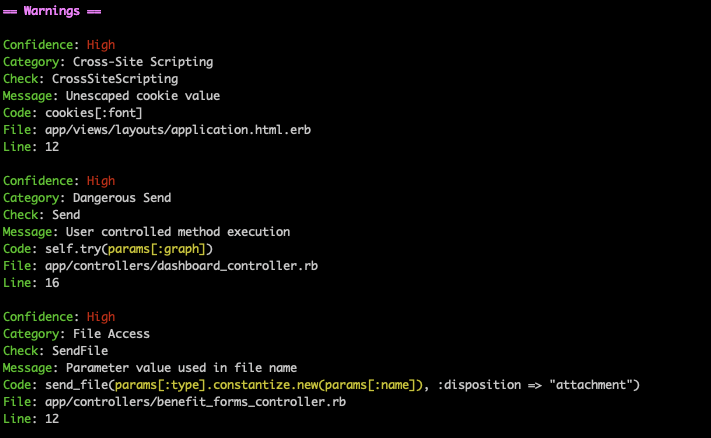_Brakeman report for the RailsGoat project_
Alternatively, you can ask Brakeman to save the results into an HTML output file, which is much better for visualization:
```bash
brakeman -o brakeman_results.html
```
The image below gives you an idea of what the report may look like:
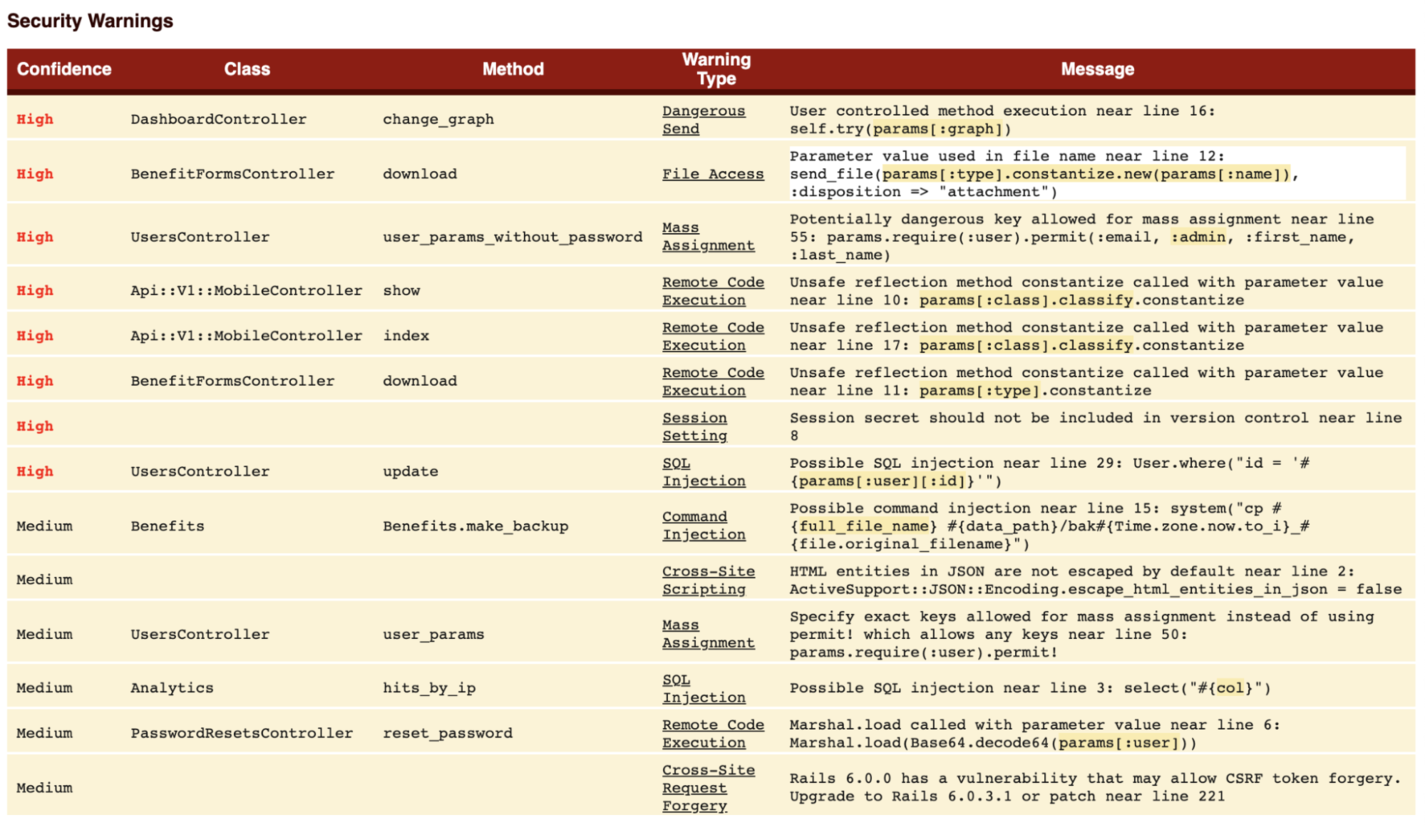_Brakeman HTML report_
If you click a message, item it’ll toggle the specific lines of the code in which the problem was identified:
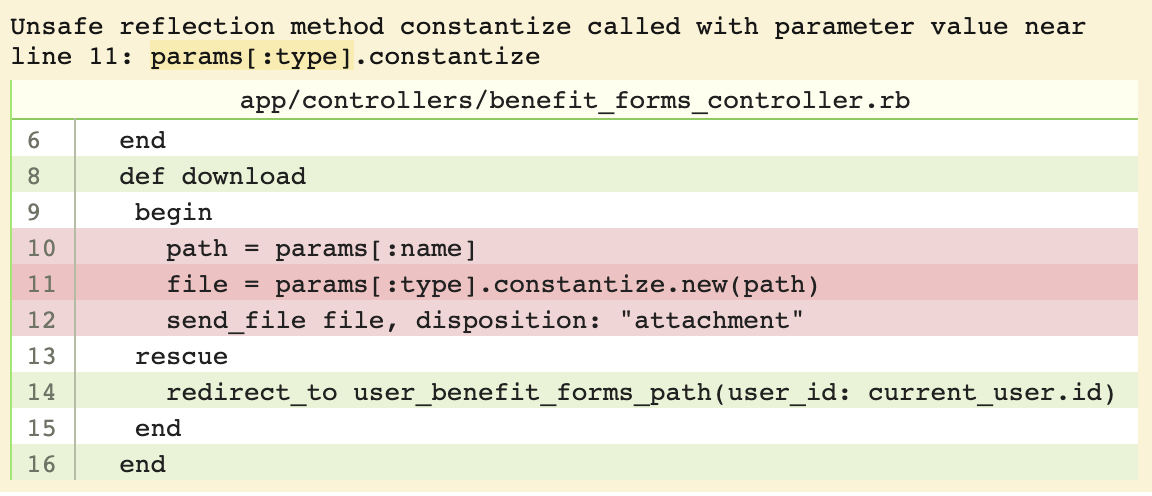_Code issue visualization on Brakeman report_
Other useful gems you may take a look at are [dawnscanner](https://github.com/thesp0nge/dawnscanner), [reek](https://github.com/troessner/reek), and [hakiri\_toolbelt](https://github.com/hakirisec/hakiri_toolbelt).
## Security on GitHub
Many developers use GitHub as a centralized oasis for all their code-related stuff. Not only open-source developers but also many enterprises have switched to the platform because it provides many features.
When you create a new repository, there’s a tab called _Security_ that holds many great functionalities:
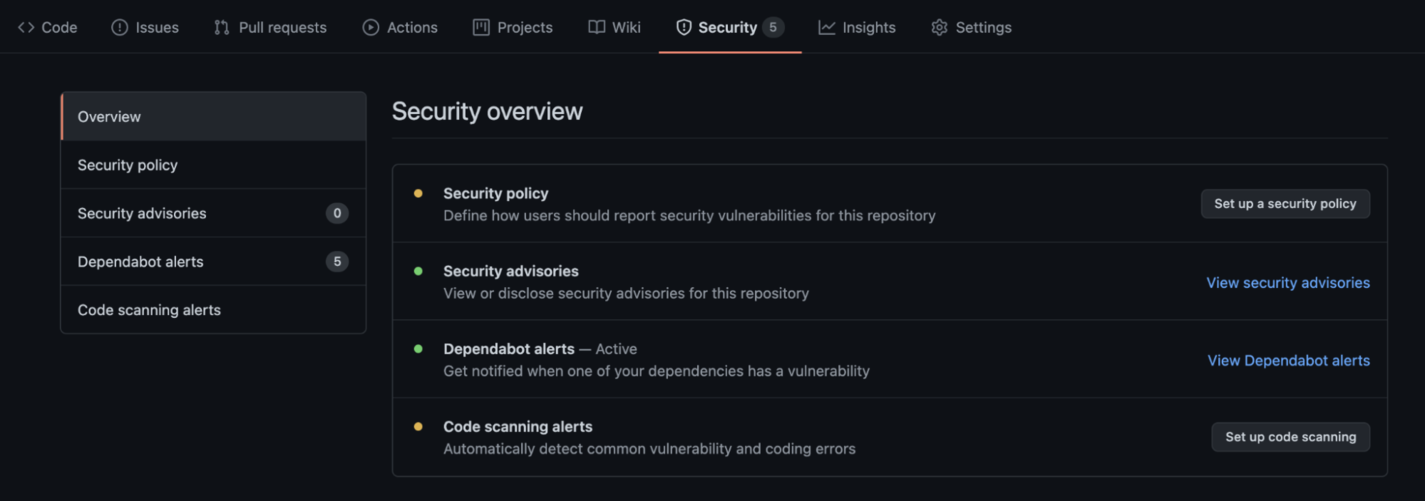_GitHub Security tab_
Among them, perhaps one of the most useful features is the [Dependabot](https://docs.github.com/en/code-security/supply-chain-security/about-dependabot-security-updates) security updates. It is a large community-driven online repository of vulnerabilities for the majority of languages, platforms, and frameworks that GitHub uses to check the code from your repository to find issues on the dependencies you’re using.
If you want, GitHub also tries to fix them automatically via pull requests, along with good explanations on the problem it’s trying to address there.
Can you spot the section called _Security Advisories_ on the previous image? This is what GitHub primarily used to create the graph of vulnerabilities. If you’re one of the people involved in a specific open-source project, you can warn GitHub that something is not good with version _XYZ_ of a library, for example.
You’ll receive notifications on each new vulnerability introduced to the repository, as shown below:
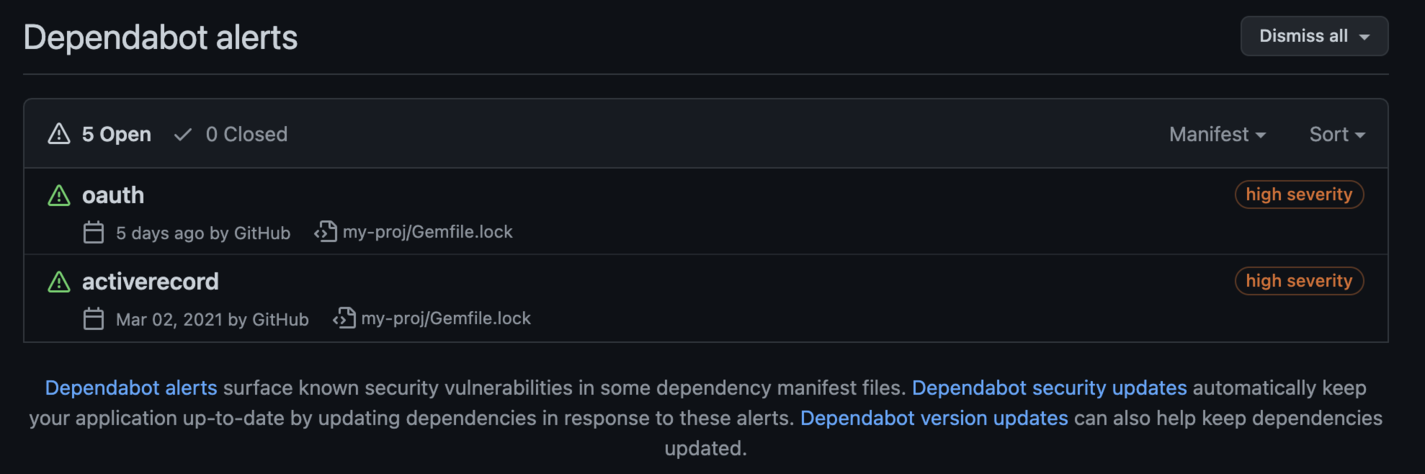_List of Dependabot alerts_
When you click an item of the list, you’ll be redirected to the details with recommended fixes, links, and documentation references to the specific issue.
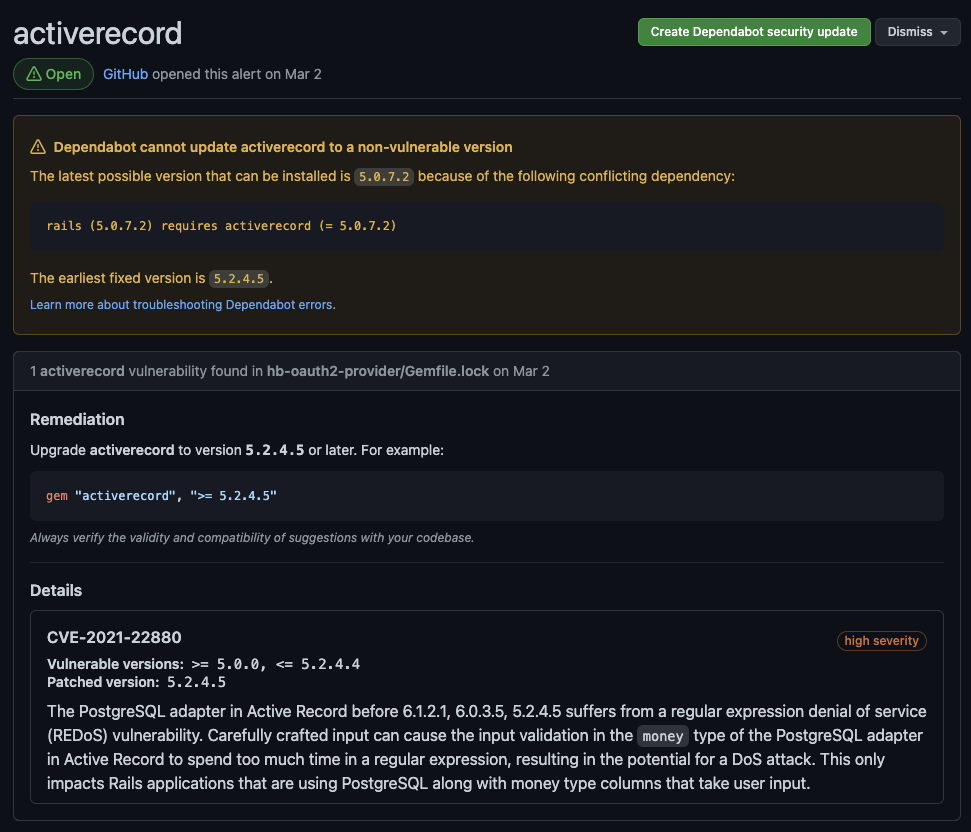_Details of the Dependabot security alert_
It’s interesting to note that sometimes, GitHub cannot update the dependency by itself since it introduces breaking changes or dependency conflicts. It’ll state this in a dedicated alert so that you know how to proceed.
GitHub has even released a dedicated semantic code analysis engine called [CodeQL](https://securitylab.github.com/tools/codeql/) specifically for discovering vulnerabilities across your codebases. Giving a read would be worth your time.
# Wrapping Up
It’s been quite a journey until this point, and it’s great to have you all on board. In three articles, it is not possible to summarize all the important information and guidelines necessary to deal with security threats as Rails developers, but I’m happy to say that we tackled the more critical parts.
As I stated before, it’s essential to always keep updated on new and trending security threats since hackers' creativity ensures that threats will continue to evolve quickly. The [OWASP Top Ten](https://owasp.org/www-project-top-ten/) is a great start, but it does not cover everything.
Make sure to stick to the best practices, add security tests to your code, and run the proper tools/gems/platforms so that they can help you check for the vulnerabilities and code smells you may have missed.
Good studies, and see you around!
---
## Try Honeybadger for FREE
Intelligent logging, error tracking, and Just Enough APM™ in one dev-friendly platform. Find and fix problems before users notice.
[Start free trial](https://app.honeybadger.io/users/sign_up)
[See plans and pricing](https://www.honeybadger.io/plans/)