---
title: "Let's build an RSS to email digest script with Ruby"
published: "2015-06-24"
publisher: Honeybadger
author: Starr Horne
category: Ruby articles
tags:
- Ruby
description: "I needed a script that will fetch our most recent blog posts and output a \"digest\" HTML email that I can personalize. In this post we walk through the process of creating it. You'll learn about fetching and parsing RSS as well as templating with ERB. Yes! You can use ERB outside of Rails!"
url: "https://www.honeybadger.io/blog/lets-build-an-rss-to-email-digest-script-with-ruby/"
---
[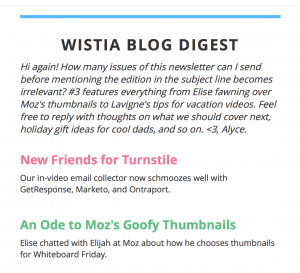](https://www.honeybadger.io/images/2015/06/wistia_blog_digest.png) I want something like this
Setting up a newsletter has been on my todo list for way too long. Today is the day I'm going to make it happen. If you'd like to sign up you can do so [here](https://www.getdrip.com/forms/1964743/submissions/new).
I don't really like long-copy newsletters. The ones I do like are curated digests of interesting content. [RubyWeekly](http://rubyweekly.com/) comes do mind. So does Wistia's blog digest.
Putting these digests together manually takes too much time. But going full-auto is too impersonal. So what I want is a semi-automated process. I need a script that will fetch our most recent blog posts and output an HTML email that I can personalize.
So let's build it! It'll be a fun little project with only one user to make happy - me!
## The Game Plan
Our script needs to do a few things:
1. Fetch and parse the RSS feed for the Honeybadger blog
2. Select the appropriate articles by category
3. Render the collection of articles via an ERB template
It'll be run from the command line and print its results to STDOUT.
## Fetching and Parsing Feeds in Ruby
Did you know that Ruby's standard library ships with [a module](http://ruby-doc.org/stdlib-2.2.2/libdoc/rss/rdoc/RSS.html) for producing and consuming RSS & ATOM feeds? For our use case it couldn't get much simpler. Here's how it works:
```ruby
require 'rss' feed = RSS::Parser.parse('https://www.honeybadger.io/blog/feed/') feed.items.each do |item| puts item.title end
```
The module even fetches the feed for us. Talk about Service!
## Working with Categories
I don't want to send subscribers links they're not interested in, so I'm going to filter articles by category. While Ruby's RSS library has a `categories` method, it returns an array of XML node objects. I need the category names, so I wrap the RSS items in a decorator class called `Article`.
Now I can easily select only the articles in the category "How To".
```ruby
require 'rss' require 'delegate' class Article < SimpleDelegator def category_names categories.map &:content end end feed = RSS::Parser.parse('https://www.honeybadger.io/blog/feed/') articles = feed.items.map { |o| Article.new(o) }.select { |a| a.category_names.include?("How To") }
```
## Rendering the Template
Since this is going to be an email without very much markup, I'm just going to use ERB for templating. As you can see below, I put the template and the rendering code together in a class called DigestView. For such a small, single-purpose template it seemed overkill to split it into a separate file.
The final output is printed to STDOUT. This will let me pipe the output into OSXs `pbcopy` command, copying the output to the clipboard so I can paste it into our mail system.
```ruby
require 'rss' require 'delegate' require 'erb' class Article < SimpleDelegator def category_names categories.map &:content end end class DigestView attr_accessor :articles def initialize(articles) @articles = articles end def render ERB.new(template, 0, '>').result(binding) end def template %{ Headline: Replace me
Intro paragraph: Replace me.
<% for article in @articles %> -
<% end %>
} end end feed = RSS::Parser.parse('https://www.honeybadger.io/blog/feed/') articles = feed.items.map { |o| Article.new(o) }.select { |a| a.category_names.include?("How To") } printf DigestView.new(articles).render
```
This is what the output looks like:
[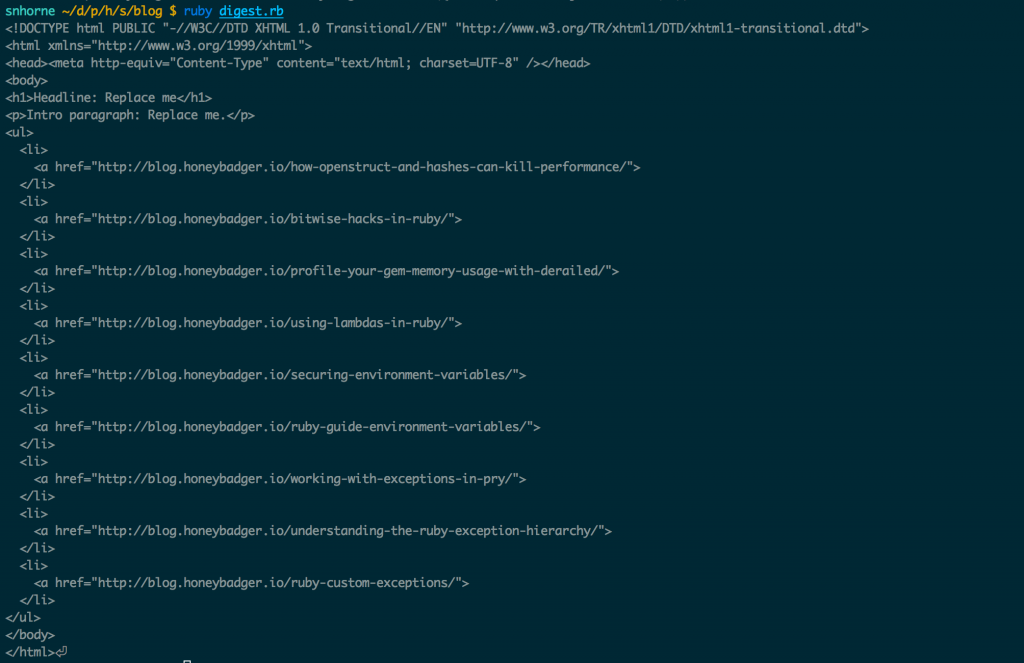](https://www.honeybadger.io/images/2015/06/blog_digest_output.png) Output of our blog digest generator.
## Future Work
I'll need to do a bit more before this is ready for production. But these are mostly customizations specific to Honeybadger, and which wouldn't be very useful otherwise. Here's my strike list for the rest of the day:
1. Make the template pretty & test it with our email provider
2. Add Google Analytics tracking parameters to the links
3. Add post descriptions to the template
---
## Try Honeybadger for FREE
Intelligent logging, error tracking, and Just Enough APM™ in one dev-friendly platform. Find and fix problems before users notice.
[Start free trial](https://app.honeybadger.io/users/sign_up)
[See plans and pricing](https://www.honeybadger.io/plans/)